B01 Terminal S2 sel setting limits:0~26 factory default:0
B02 Terminal S3 sel setting limits:2~26 factory default:2
B03 Terminal S4 sel setting limits:2~26 factory default:4
B04 Terminal S5 sel setting limits:2~26 factory default:9
B05 Terminal S6 sel setting limits:2~26 factory default:10
B06 Terminal S7 sel setting limits:2~26 factory default:11
B07 Terminal S8 sel setting limits:2~28 factory default:12
EC5000
Description of Functional Parameter
EC5000
Description of Functional Parameter
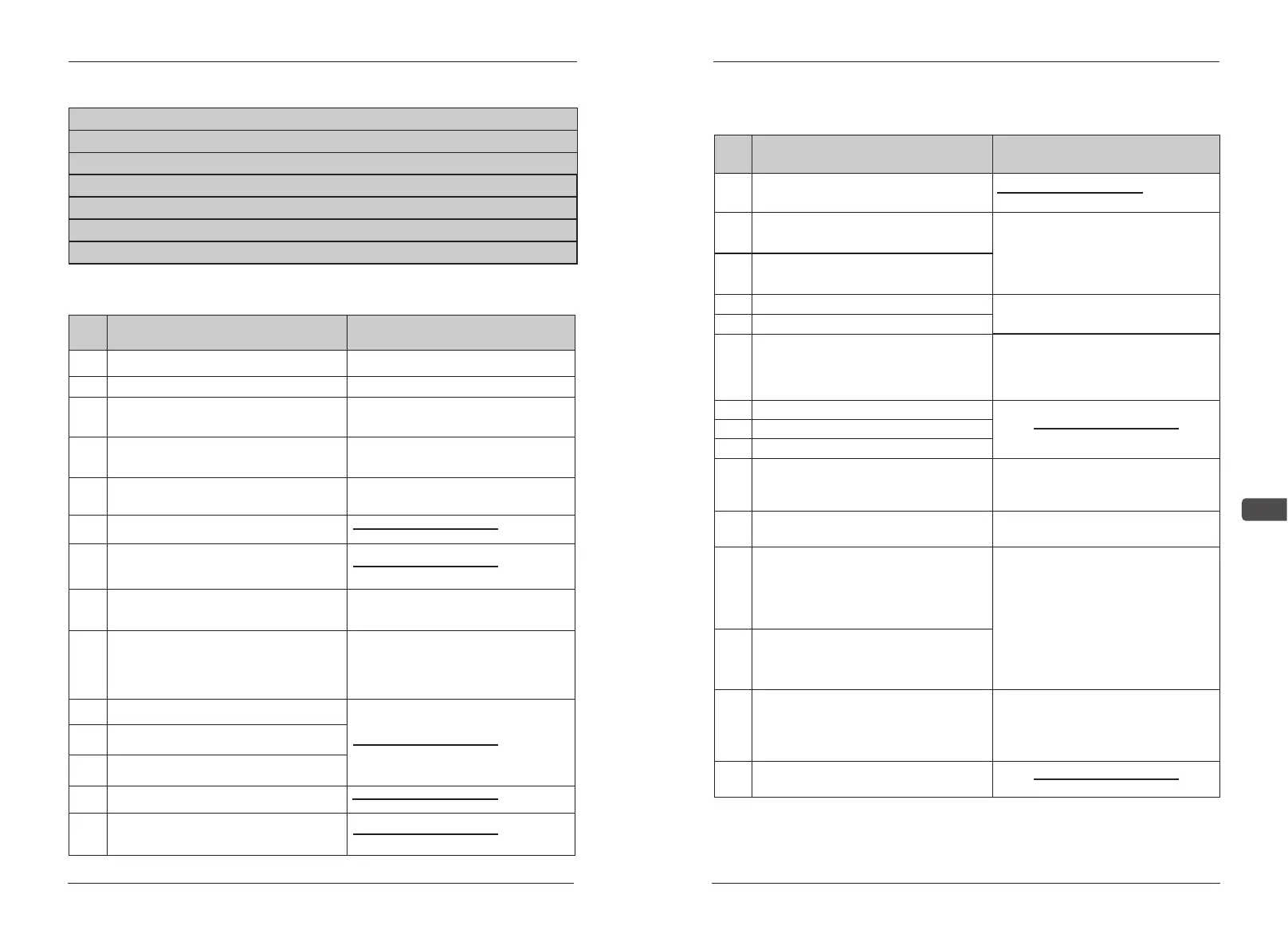
Multi-function joint S2-S8 input:
0
Opposite running order(2 wire)
Set only on data B01
1
Right/opposite running order(3 wire)
Set only on data B01
2
External error(OFF contacts input)
AC motor driver stop by error
when external error signal input
3
External error(ON contacts input)
Stop output, it shows “EF*”on
digital display
4
Error reset
Error resume not allowed when
input running order
5
Local/remote selection
6
Transmit/control circuit terminal
selection
7
Abnormal stop
Retard to stop by retard time 2
when inputing
8
Main Frequency
order input selection
Select main Frequency order to
input(“OFF” for voltage input, “ON”
for
current input)
9
Multi-speed order 1/SS1
Multi-speed order 2/SS2
Multi-speed order 4/SS4
Name
IllustrationSet
10
11
12
13
Jog running
Accelerate/retard time selection
1/RT1
Name
Illustration
Set
27
28
17
18
19
20
21
22
23
24
25
26
Searching order from max.Fre.
Searching order from setting.Fre.
Speed searching order signal
Data setting permitted/frobidden
Select permitted/forbidden set by
digital operator or parallel commu-
nication(“ON”forbidden, “OFF”
permitted)
PID resume
PID control forbidden
Timer function
Input this signal, digital operator
displays “OH3”(flashing),AC drive
continue running
OH3 (converter overheat alarm)
Record given simulate value
sample and keep
“ON”:simulate Fre.sample
“OFF”:keep
KEB order (input on “ON” joint)
(running retard to instant stop)
when AC drive applies in
special need as fibre circles, adjust
running order to OFF. It can be
used as instant stop and emergency
situation, such as power OFF.
Frequency retard when power is
off, AC drive continues running with
this inertia.
KEB order (input on “OFF” joint)
Only data B07 can be set, AC drive
will increase or decrease frequency
by 1 unit. The amended frequency is
not remembered.
UP/DOWN order
JOG inversion
14
15
16
External BB (ON joint input)
Accelerate/retard time selection
2/RT2
External BB (OFF joint input)
Slide signal. When input slide
signal,
motor begin to slide and
digital
operator shows(BB)
- 64 - - 65 -
5


 To Next Page