!
Product Manual Oria Thermostat
EAE KNX Oria Thermostat Oria Thermostat PM R1.0
©EAE!Technology!! ! ! ! www.eaetechnology.com!! ! ! Sayfa!17!/!50!
!
!
This communication object should be linked to an appropriate group address that will be used to detect
whether blind is at “Top Position” (True) or not (False).
This communication object should be linked to an appropriate group address that will be used to detect
whether blind is at “Bottom Position” (True) or not (False).
Table 12
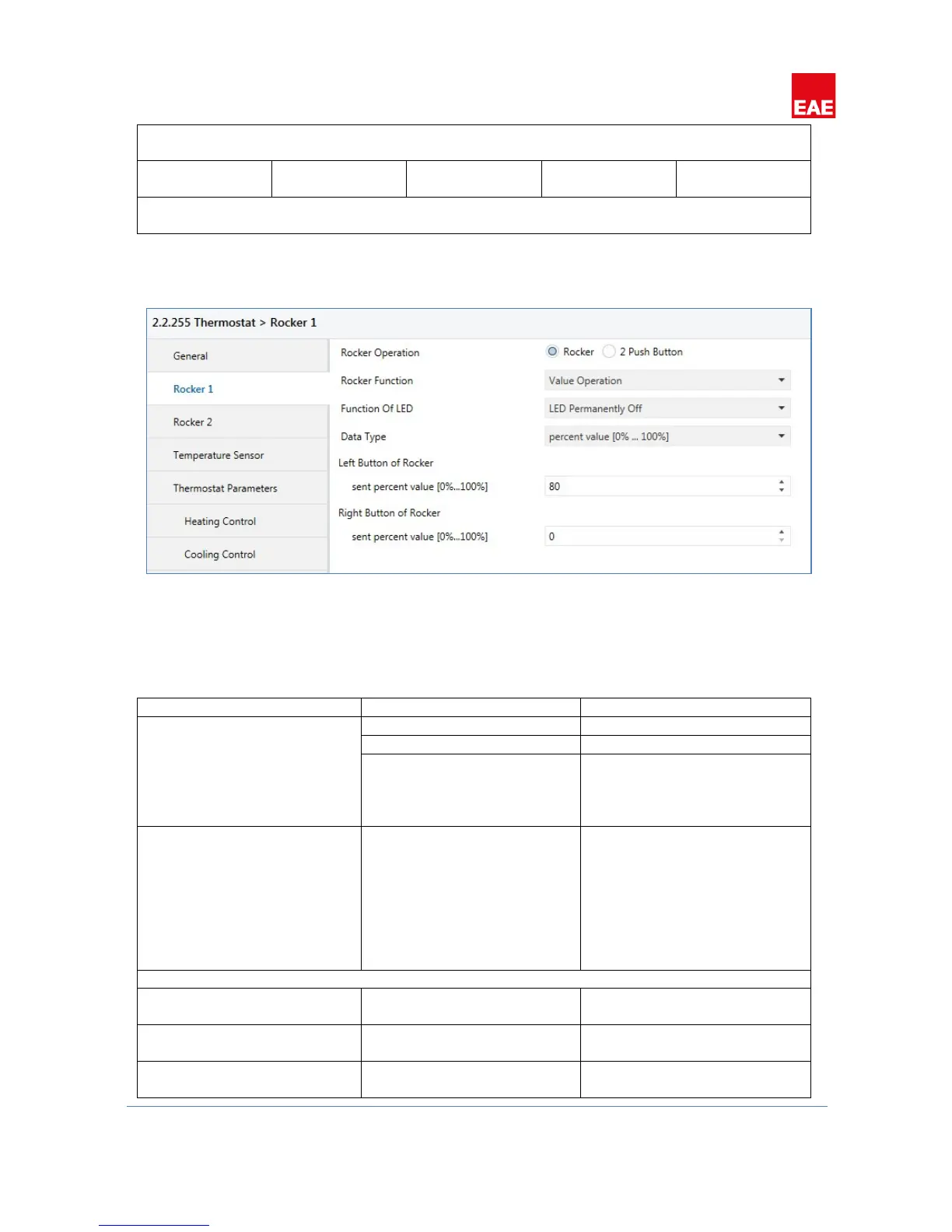
4.2.1.4 Value'Operation'
Figure 7
Rocker buttons can be configured to send predefined values from different data types. Values selected for both
rocker buttons will be transmitted over the same communication object.4.2.1.4.1 Parameters
Status LED of the pressed rocker
button will be on for the time
period selected at “Light Duration
of LED” parameter at “General” tab.
1 bit value
1byte value [0…255]
Percent value [%0…%100]
2 byte value [-32768…32767]
2 byte value [0…65535]
4 byte value [floating point]
4 byte value [0…4294967295]
Visible when “Data Type” selected
Transmitted value [0…255]
Visible when “Data Type” selected
as “1 byte value”.
Send percent value [%0…%100]
Visible when “Data Type” selected
as “percent value”.


 To Next Page