!
Product Manual Oria Thermostat
EAE KNX Oria Thermostat Oria Thermostat PM R1.0
©EAE!Technology!! ! ! ! www.eaetechnology.com!! ! ! Sayfa!21!/!50!
!
!
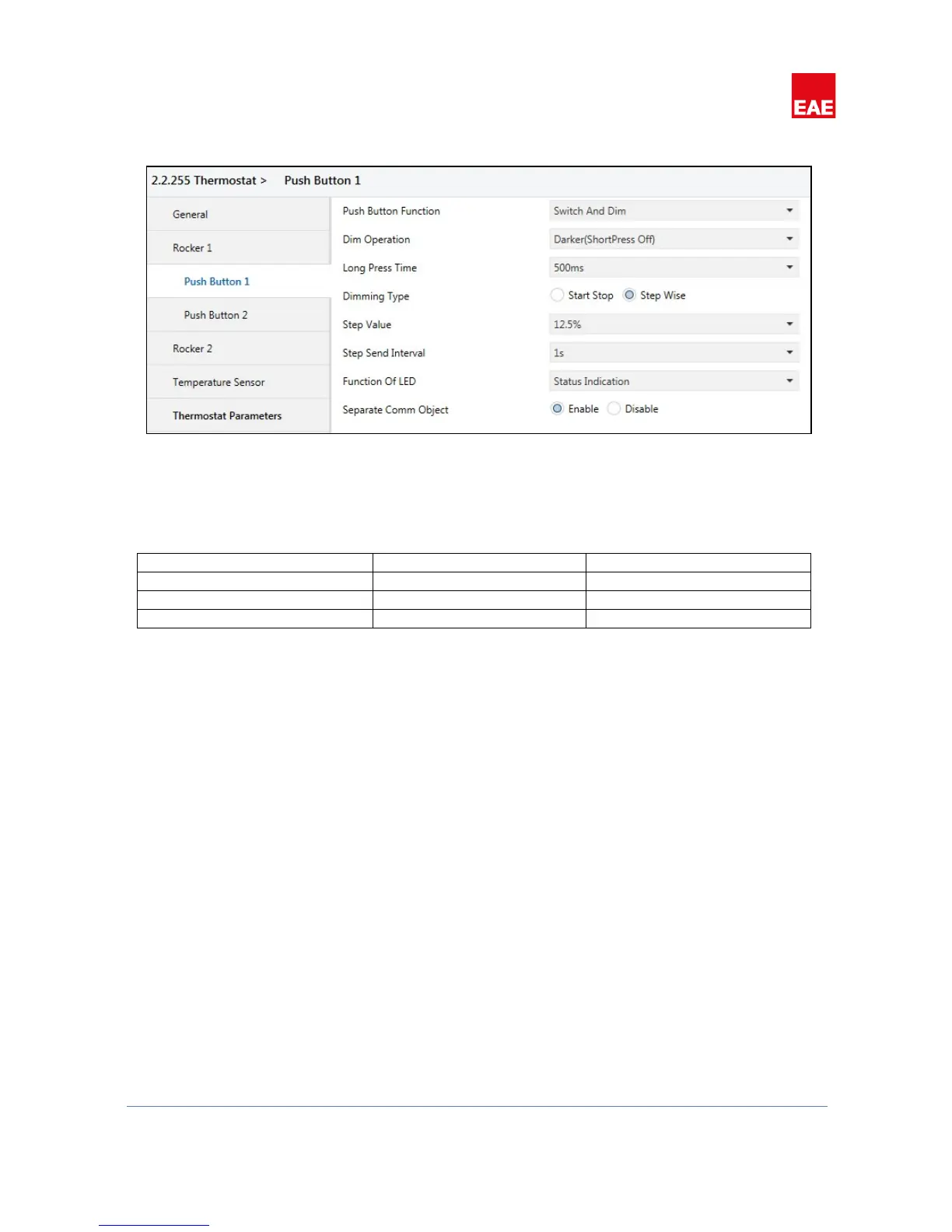
4.2.2.2'' Switch'and'Dim'
Figure 9
When push button function selected as “Switch and Dim” push button can be configured in three different
ways to control brightness value.
Table 18
%XX values can have different values relative to the “Dimming Type” parameter. “Dimming Type” parameter
allows two different types of dimming functionality “Start Stop” and “Step Wise”.
Dimming - Start Stop Type
When push button pressed (and not released) and pressed duration exceeds “Long Press Duration” time
“Increase, %100” (When button in Brighter mode) or “Decrease, %100” (When button in Darker mode)
dimming level will be send using respective communication object. When button released “Increase, Break” or
“Decrease, Break” value will be send.
Dimming - Step Wise Type
When push button pressed (and not released) and pressed duration exceeds “Long Press Duration” time, a step
value level configured in “Step Value” parameter will be send using respective communication object. If button
mode is “Darker”, “Decrease, % [Step Value]”, else button mode is “Brighter”, “Increase, % [Step Value]” values
will be send. Until button is released same step value will be send periodically with a time interval defined in
“Step Send Interval”.


 To Next Page