Home
Eagle Eye
DVR
DV207
Page 23 (Current Time and Date Settings)
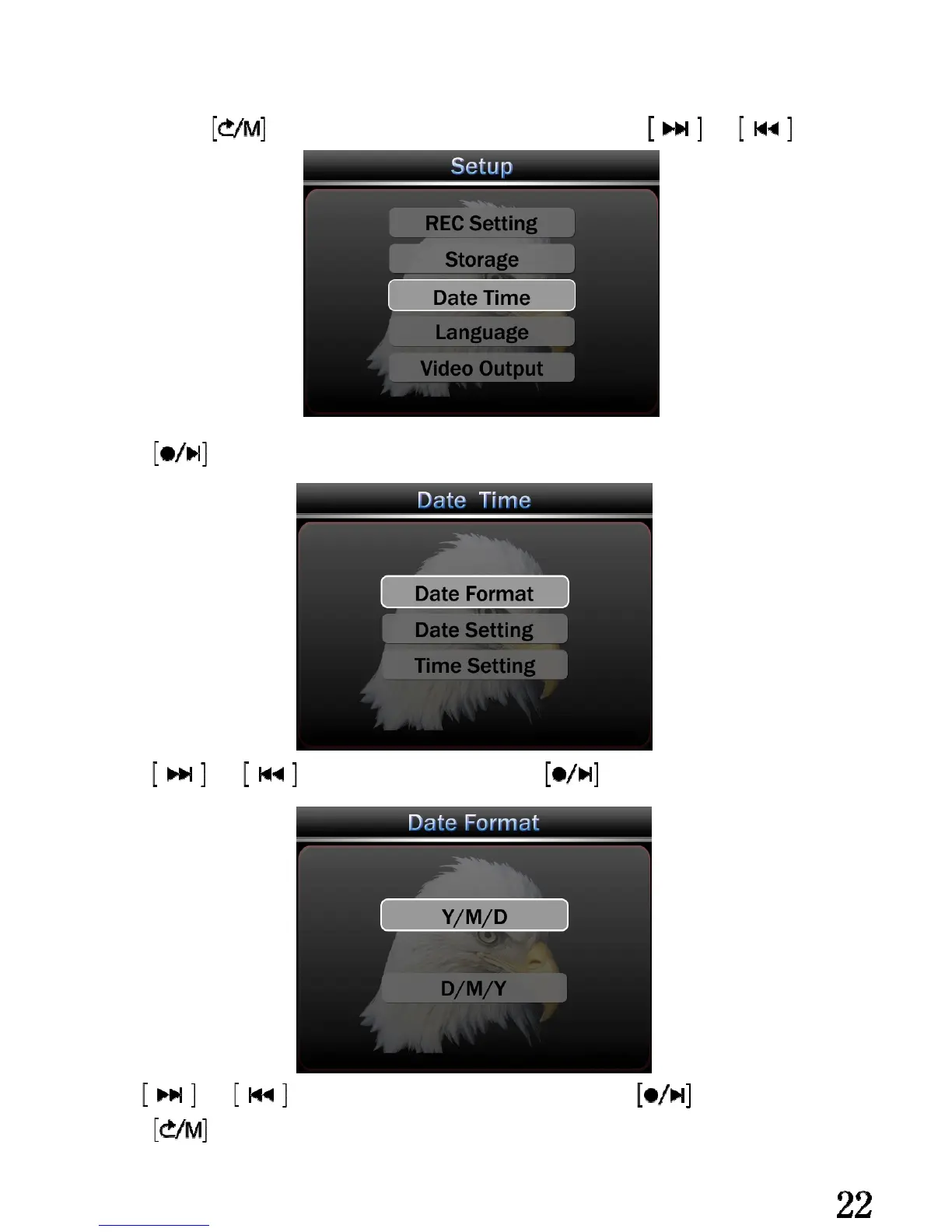
Eagle Eye DV207 - Current Time and Date Settings; Accessing Time;Date Setup Menu; Date Format Selection
36 pages
Manual
Save Page as PDF
To Next Page
To Next Page
To Previous Page
To Previous Page
Loading...
Cur
r
en
t
T
ime and Da
t
e setti
n
g:
Lon
g press
,enter set
tin
g
men
u, ch
o
ose t
im
e
a
nd date by ,
and
press
enter
m
en
u.
press
and
to choose Date Fo
rm
at, press
ente
r
.
Use
and
to choose the s
u
ita
b
l
e dis
p
l
a
y
f
or
m,
p
ress
co
nf
i
r
m.
press
qu
i
t.
22
24
Table of Contents
Main Page
Default Chapter
1
User Manual
1
Table of Contents
2
Introduction
3
Warning
4
Features
5
Application
6
Getting Started
7
Identifying the Parts of the Main Unit
7
Identifying the Parts of the Camera
7
LCD Screen Indicators
8
Recording Mode
8
Playback Mode
8
Installation
9
Battery Installation
9
Parameters for Battery Using
9
Mini SD Card Installation
10
Basic Operation
11
Start Recording
11
Video Content View
12
Delete the Video Files
13
Connect with Other A/V Device
14
Connect with PC
15
System Setting
17
Recording Mode Setting
17
Resolution Setting
18
Record Content Setting
19
Video Time and Date Setting
20
Auto Cover Setting
21
Choose Memory
22
Current Time and Date Setting
23
Language Setting
25
Video Output Setting
26
Automatic Power off
28
Automatic LCD off
29
Format Memory
30
Software Update
31
Revert the Default Setting
32
Memory Information
33
Check System Version
33
Parameters
34
Accessories
35


 To Next Page