4810 Clover Road • Greensboro, NC 27450 • 1-800-336-2776 • www.eagleequip.com • © Eagle Equipment 2017.12 • page 15
7. INPUT METHODS OF RIM DATA AND WHEEL BALANCE OPERATION CONT.
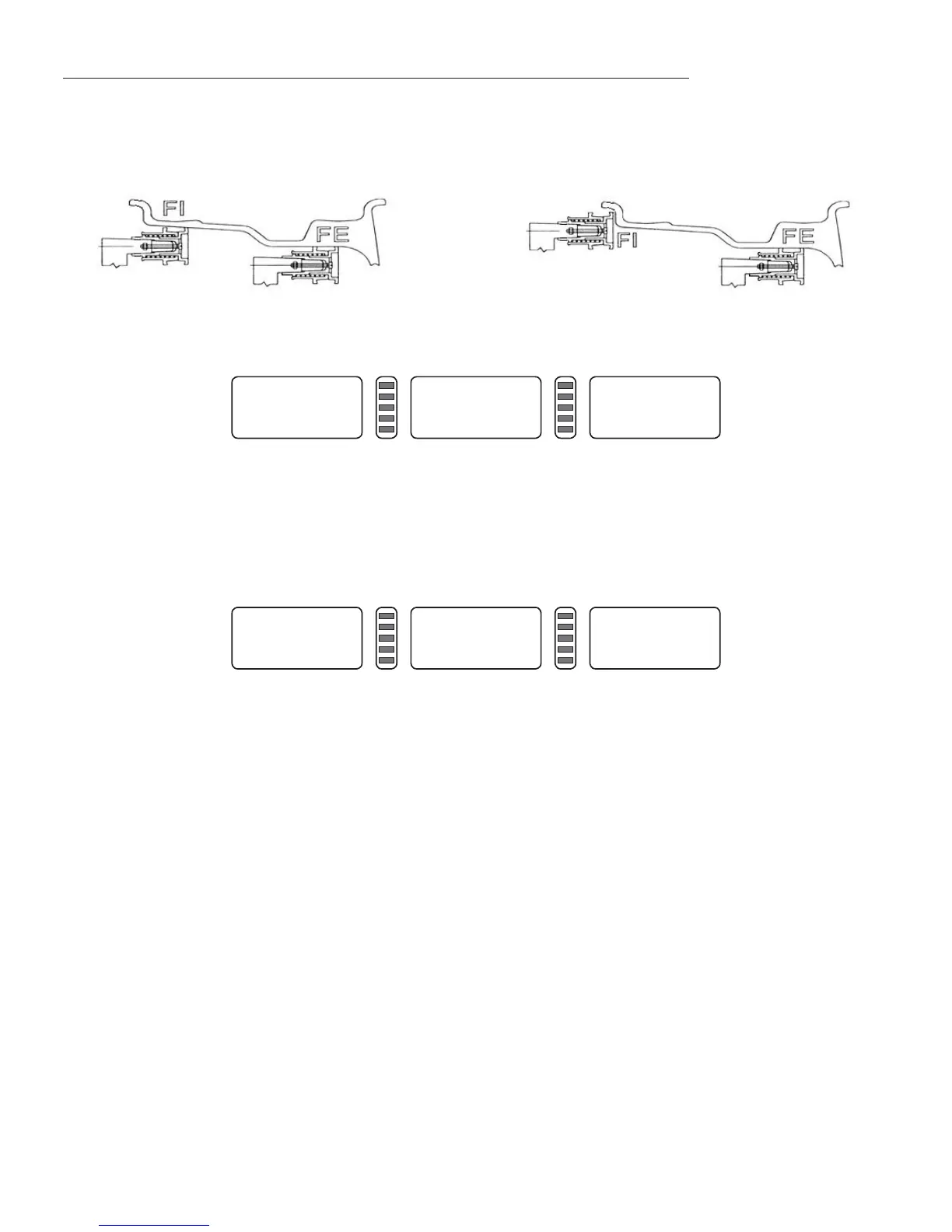
Rotate the measure scale (Figure 7-5, 7-6), pull the scale head to inside of the rim(FI) (this position is to
stick balance weight on the inside), measure distance(a) and diameter (dI) of inside of the rim, (Figure
7-7).
Continue to rotate measure scale, pull the scale head to outside of rim(FE) (this position is to stick
balance weight on the outside), measure distance(aE) and diameter (dE) of outside of the rim, (Figure
12), enter ALU-S mode.
Continue to rotate measure scale, pull the scale head to outside of rim(FE) (this position is to stick
balance weight on the outside), measure distance(aE) and diameter (dE) of outside of the rim, (Figure
7-8), enter ALU-S mode.
When the scale is back to the zero position, the LED will display aE and dI value. Press a+, a- to adjust a
value. Press b+, b- to adjust aE value; press d+, d- to adjust dI value; press FINE key, LED will display dE
value. Hold FINE key and press d+, d- to adjust dE value.
ALU -5-
Figure 7-8
Figure 7-6Figure 7-5
---
5.7
---
Figure 7-7


 To Next Page