4810 Clover Road • Greensboro, NC 27450 • 1-800-336-2776 • www.eagleequip.com • © Eagle Equipment 2017.12 • page 20
10. THE BALANCING OPERATION OF THE WHEEL CONT.
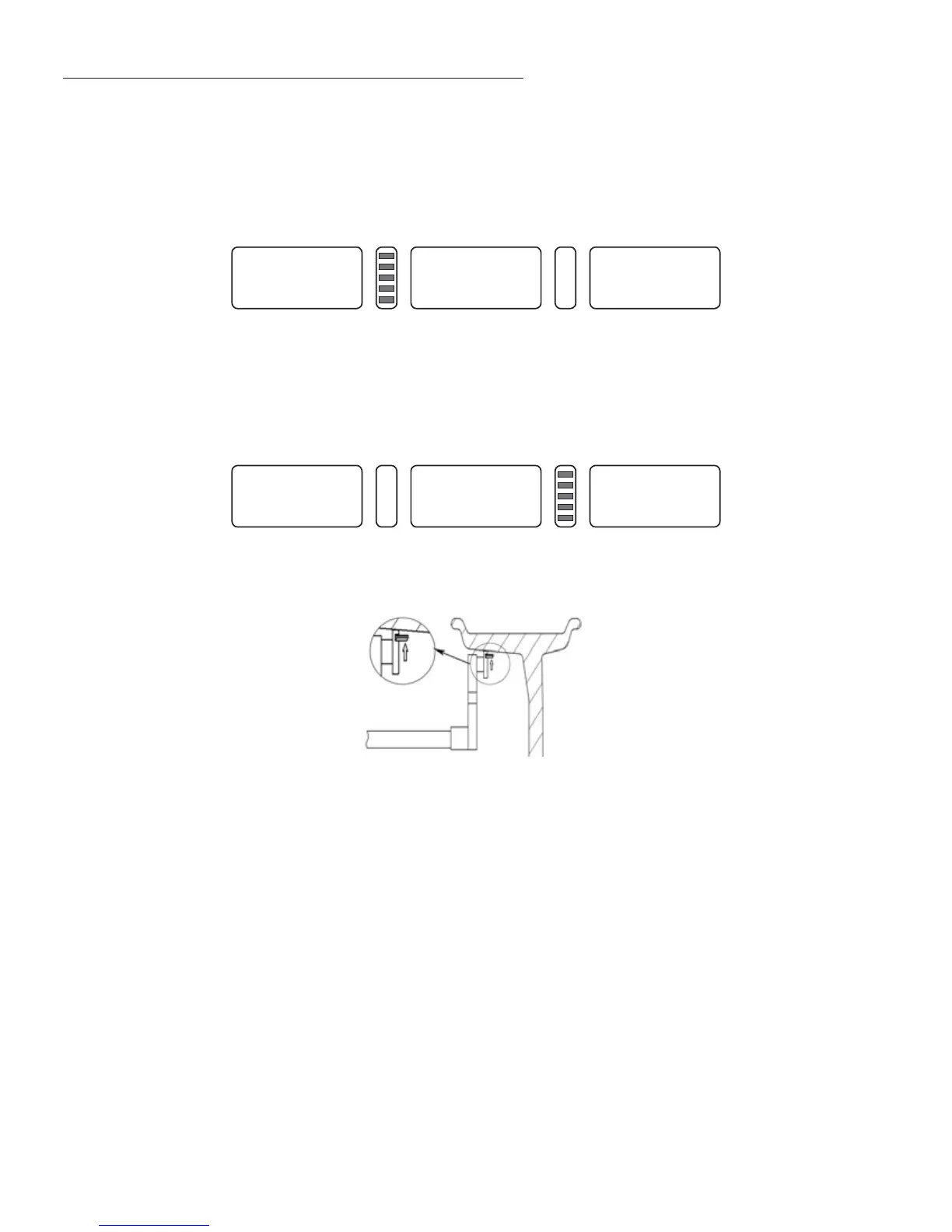
will display “- - -”. Insert corresponding counterweight into the scale head slot, slowly spin the
wheel. When the inside counterweight position indicator lights (Figure 5-1(9)) are all on, draught
scale. When the inside counterweight position indicator lights (Figure 5-1(3)) are all on, slowly pull
out measure scale. The middle of LED display will show (Figure 10-10), then turn the scale and stick
counterweight on the rim (Figure 10-12).
9. Insert corresponding counterweight into the scale head slot, slowly spin wheel, when outside
counterweight position indicator lights (Figure 5-1(4)) are all on, draught scale, when inside
counterweight position indicator lights (Figure 10-11) all on, turn scale, stick counterweight on the
rim (Figure 10-12).
NOTE: When using the scale to stick the counterweight automatically, make sure the LED displays
“- - -”, if not, do not move the scale. Press the STOP and ALU key, then the middle LED display will
show “- - -”. You can now move the scale for automatically sticking counterweight.
0--
Figure 10-10
--0
Figure 10-11
Figure 10-12


 To Next Page