70
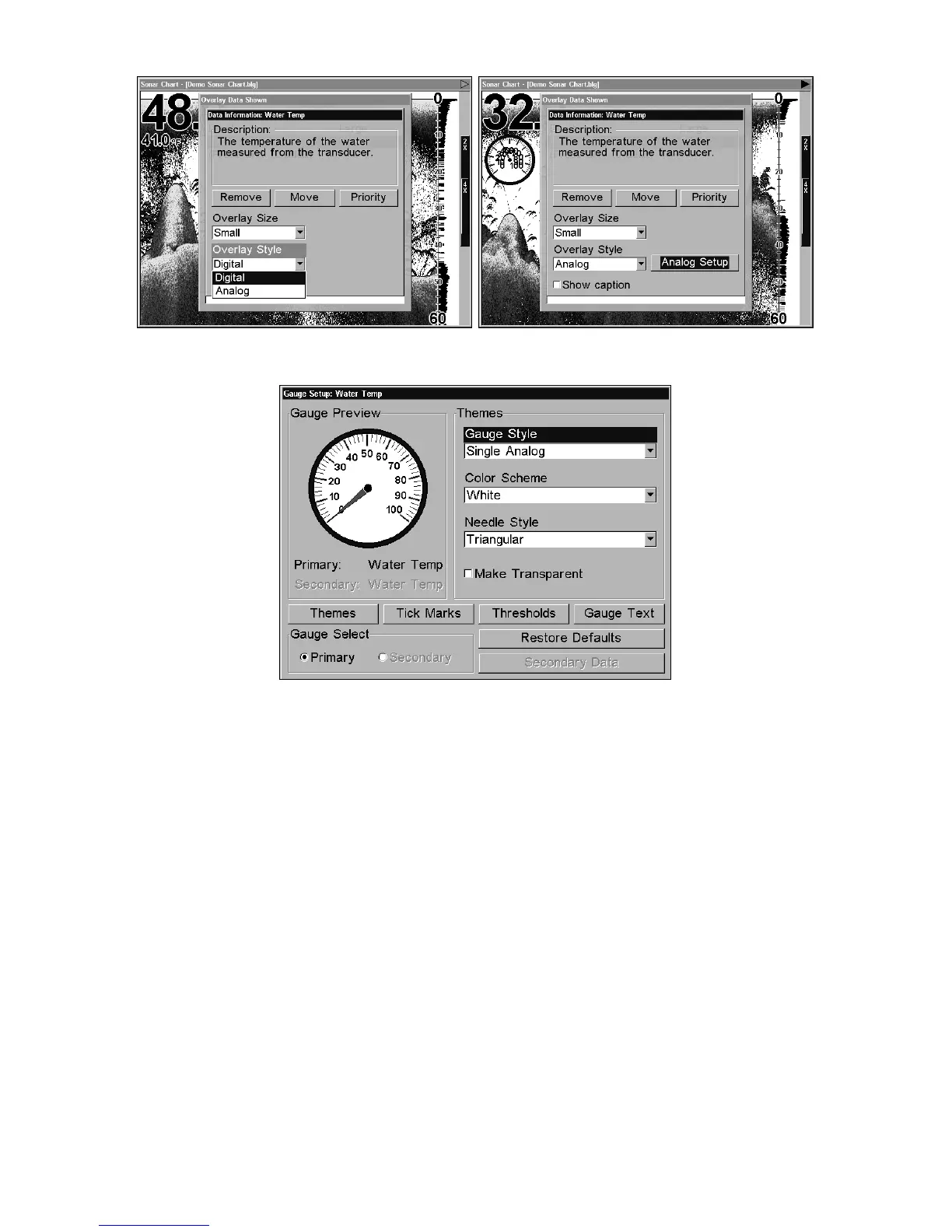
The Data Information menu (left) with Overlay style window
activated. Choose analog and the Analog Setup button appears (right).
Gauge Setup Menu.
There are four primary setup options in the analog menu: Themes, Tick
Marks, Thresholds and Text. You can make gauges transparent from
all setup menus except Text Setup.
To change the setup menu, scroll down, highlight one of the four setup
options and press
ENT. Use ↑ ↓ to select the desired category on the
setup menu, then press
ENT. To return to the main sonar display, press
ENT repeatedly. For advanced information on Overlay Data Style skip
ahead to page 151.
Ping Speed & HyperScroll
Ping Speed controls the rate at which the transmitter and transducer
broadcast sonar sound waves — pings — into the water. The unit has a
default ping speed of 50 percent. At normal boating speeds, this
automatically provides enough return echoes to refresh the screen and
scroll the chart at maximum chart speed.
However, when you are running at high speeds or just want the fastest
possible screen update, you may want to use the HyperScroll feature.











 To Next Page