EasyManua.ls Logo

Eaton Matrix 2000 - System Parameter Settings

Eaton Matrix 2000
37 pages
Print Icon
To Next Page IconTo Next Page
To Previous Page IconTo Previous Page
Loading...
Operation
Copyright © 2017 Eaton Corporation. All Rights Reserved.
IPN 997-00012-72C July 2017
13
System Parameter Settings
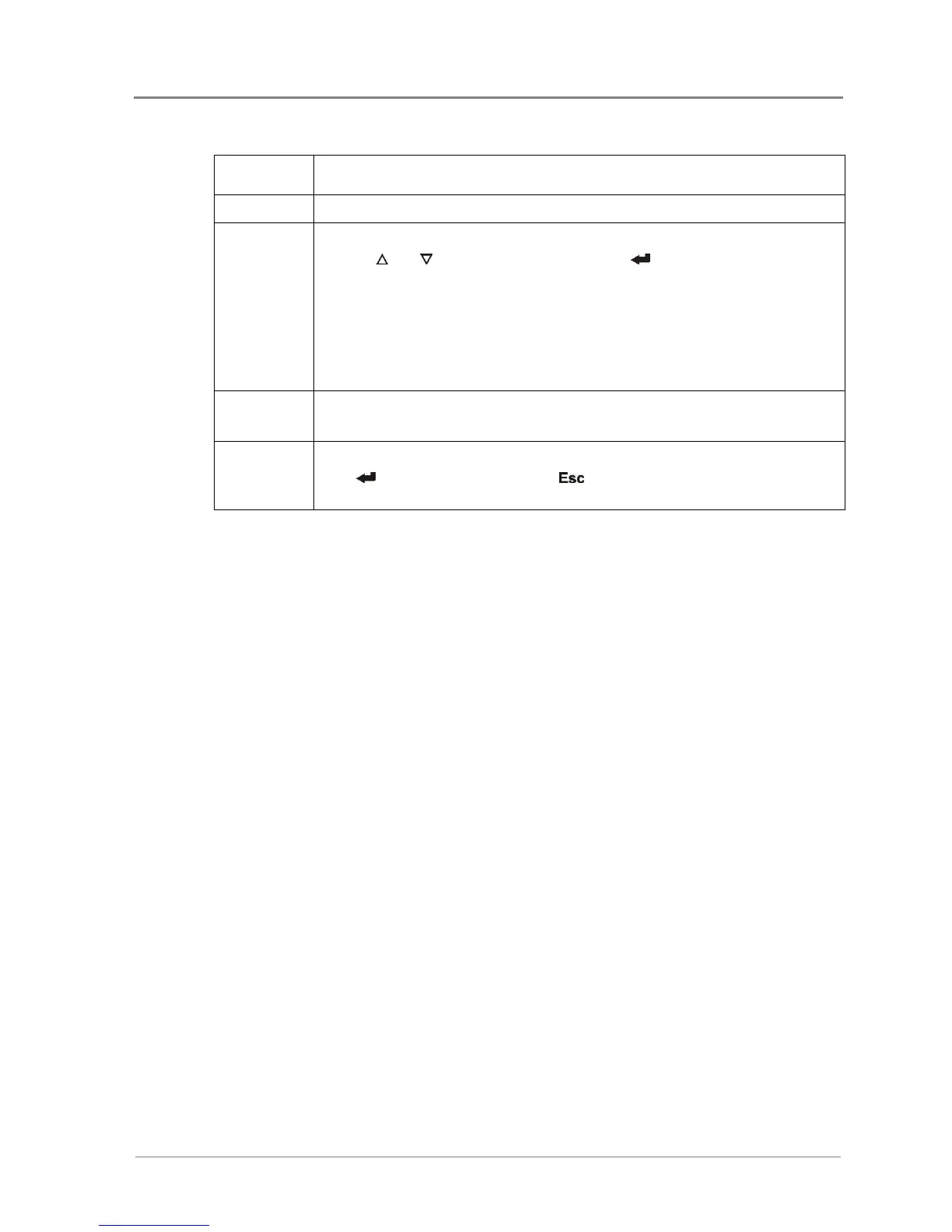
Parameter
Specification
Language
English/ Simplified Chinese/ Traditional Chinese
Password
Set a new Settings menu password.
1 Use and to select new password. Press to validate each digit of
password once the desired number is selected.
2 After 4-digit new password is input, the system would ask to re-key in the
new password as confirmation. Repeat Step 1 to key in the new password
again.
3 Once the password is successfully changed, DONE will appear on the
screen.

Brightness
LCD brightness.
From 00~63 for adjusting LCD contrast
Default
Restore factory settings.
Press to reset the default value or to cancel. Please refer to Default
Values on page 23.

Related product manuals