www.eaton.com
Network Shutdown Module V3 – User Manual - 34 003 934 XU / AE Page 33/65
6.3 Create a multi-UPS configuration
For the multi-UPS configurations, you have to enter the IP address of each UPS that electrically powers the
machine hosting the Network Shutdown Module.
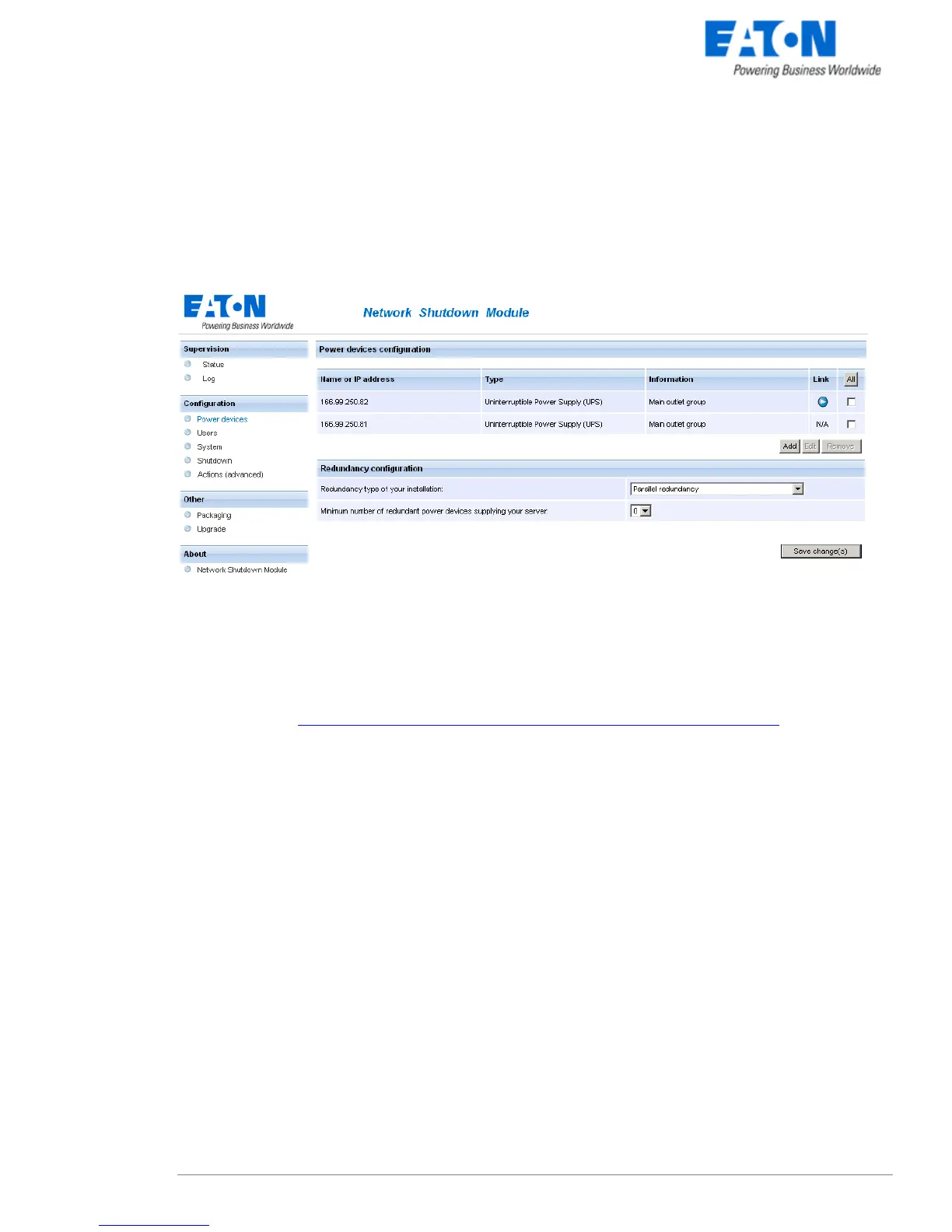
From the, Configuration->Communication page, please proceed as follows:
Multi-UPS configuration
z Click on the Add button
z Key in the first IP address
z Key in the next IP addresses (Click on the Add button).
z Select the Redundancy type of your installation (Parallel, STS, Sequential, Serial, Server with multiple
power supplies) according to your electrical configuration.
Note: For the Hot Standby/Sequential UPS Model refer to the specific UPS configuration
z (optional) key in the Minimal number of redundant UPSs powering your system:
The default value is 0.
If you set this parameter to a higher level you will receive the Redundancy Lost alarm when you don’t
have enough redundant UPSs.
Note: We warn you against the consequences of this settings, but you also have the possibility to trigger
the shutdown action on “Redundancy Lost“ alarm in the actions settings.
z Click on the Save button



 To Next Page