EN
33
EN
5.41
5.42
5.44
5.47
5.45
5.48
5.43
X
X
X
X
X
X
X
X
X
X
X
X
X
X
X
X
X
X
X
X
X
X
X
X
X
X
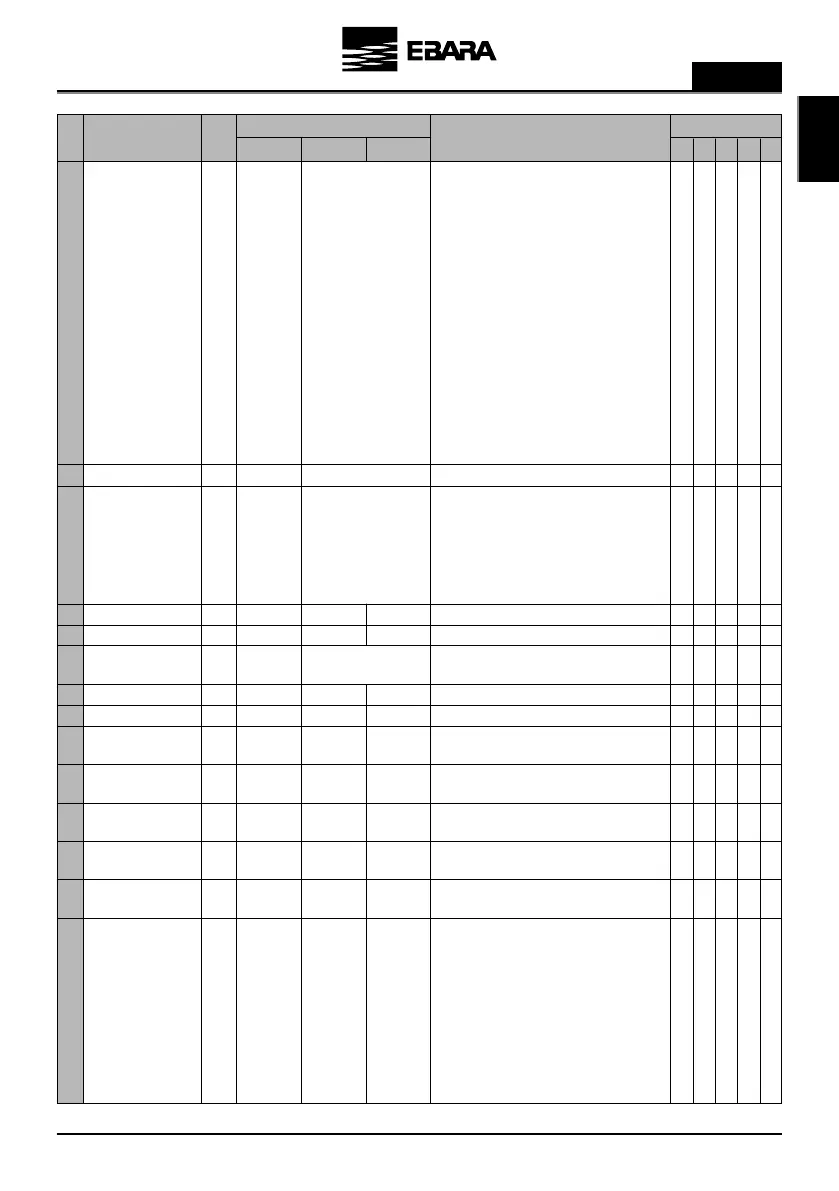
See parameter 5.41
00:00
00:00
00:00
00:00
23:59
23:59
23:59
23:59
OFF
M-Su
M-F
Sa-Su
M ….. Su
OFF
OFF
00:00
00:00
00:00
00:00
OFF
OFF
Alarm (NO)
Alarm (NC)
Start
Clock (NO)
Clock (NC)
Dry running
External stop
Overpressure (NO)
Overpressure (NC)
X
X
X
X
X
X
X
XX
The aim of this parameter is to enable signals remotely.
OFF: The relay is never activated.
Alarm (NO): The relay closes before an alarm.
Alarm (NC): The relay opens before an alarm.
Start: The relay is energised when the unit is running.
Clock (NO): The relay closes depending on the time data
programmed in parameters 5.44 to 5.48.
Clock (NC): The relay opens depending on the time data
programmed in parameters 5.44 to 5.48.
Dry running: The relay is energised if the inverter
detects dry running.
External stop: The relay is energised when there
is an external stop. (For this condition we must have
programmed a digital input as “Local Stop”).
Overpressure (NO): The relay closes if there is
overpressure alert (parameter 5.49).
Overpressure (NC): The relay opens if there is
overpressure alert (parameter 5.49).
See parameter 5.41
Start time of schedule program 1.
Start time of schedule program 2.
Stop time of schedule program 1.
Stop time of schedule program 2.
In this parameter you can choose not to have a schedule
program (OFF) or the days of the week that you want
this program to run. You can choose between whole
weeks (M-Su), weekdays (M-F), weekends (Sa- Su) or
individual days.
The schedule program will act on the output relay
programmed for this purpose.
RELAY OUTPUT 1
RELAY OUTPUT 2
PROGRAM START TIME 1
PROGRAM START TIME 2
PROGRAM STOP TIME 1
PROGRAM STOP TIME 2
SCHEDULE OPERATION 1
EDCBAMax.Min.Default
UnitsDescriptionPar.
Programming Application
Notes
5.46
5.49
5.50
5.51
5.52
5.53
5.54
X
X
(2)
X
(2)
X
X
See parameter 5.43
Par 1,1
Par 1,1
0
0
0
YES
FS
FS
100
100
100
NO
OFF
FS
FS
0
100
100
YES
ºC
ºC
ºC
X
X
X
X
X
X
X
X
(1)
X
X
X
X
X
Same as parameter 5.43 but for a second schedule
program.
Parameter to set the maximum pressure value of the
Hydraulic system.
Parameter to set the maximum differential pressure value
of the hydraulic system.
Parameter to set the minimum temperature of the
hydraulic system.
Parameter to set the maximum temperature of the
hydraulic system.
Parameter to set the maximum differential temperature
of the hydraulic system.
Parameter for enabling or disabling the low water level
alarm.
In the case of being active and cause notice, the drive will
start attempts by the following sequence:
5 minutes, 15 minutes, 1 hour, 6 hours or 24 hours. The
display shows the remaining time start attempt. Pressing
F2 we force the reset of the notice, still unfinished
countdown.
If after the 24-hour notice is detected again dry running,
the drive will lock indefinitely until you press F2.
SCHEDULE OPERATION 2
OVERPRESSURE ALERT
LEVEL
PRESSURE DIFFERENTIAL
ALARM LEVEL
MINIMUM TEMPERATURE
ALERT LEVEL
MAXIMUM TEMPERATURE
ALERT LEVEL
TEMP. DIFFERENTIAL
ALARM LEVE
DRY RUNNING ALARM
ACTIVE


 To Next Page