March 2013 53 IPV58
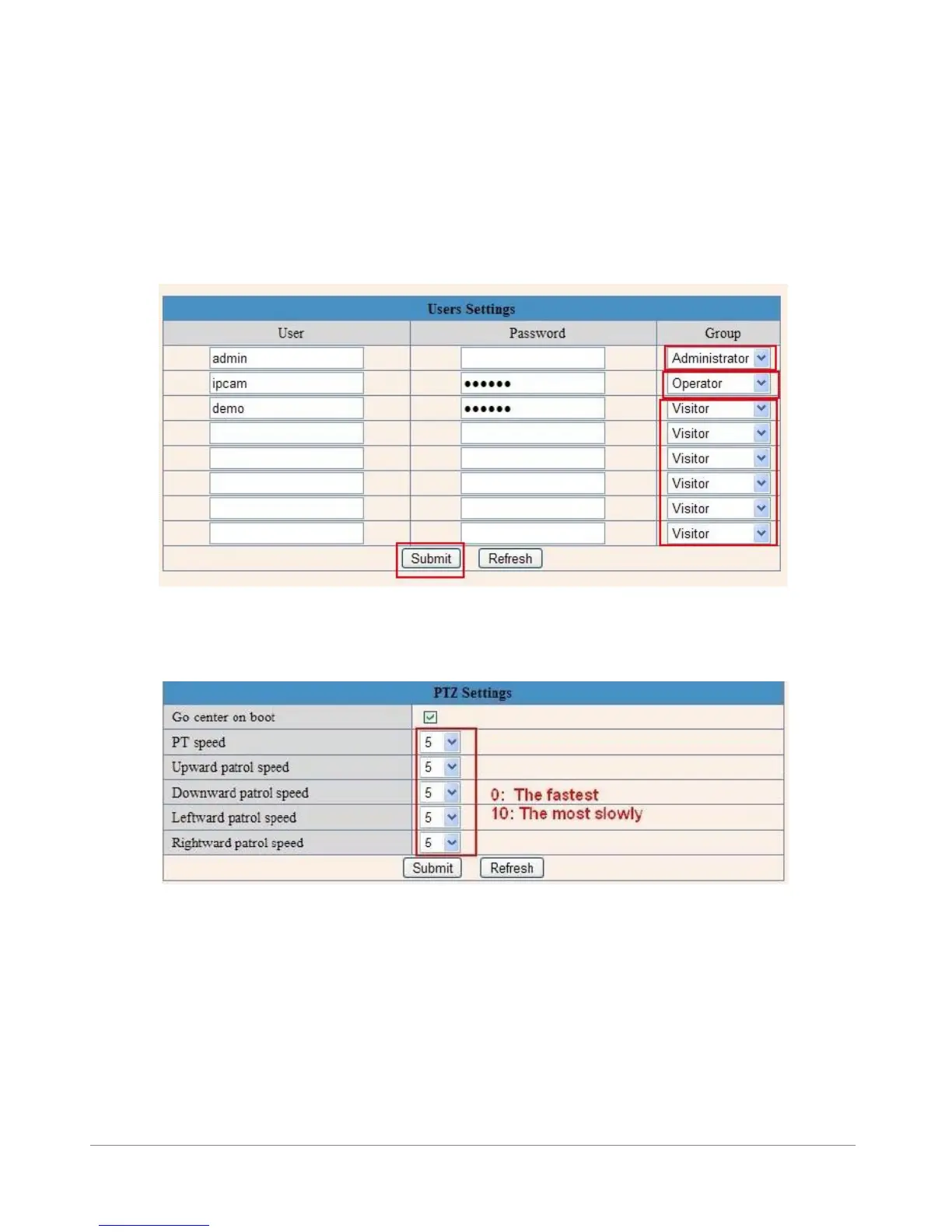
3.5 Users Settings
Eight accounts are acceptable for this system. Here you can set the user names and password as
Administrator, Operator or Visitor, the permission for them as below:
Visitor: In this mode, you can only view. (Details 2.7)
Operator: You can control the direction of IP Camera and set some parameter. (Details 2.8)
Administrator: You can setup the advanced configurations of the IP Camera.
(Details3.1-3.20)
Figure 8.5
3.6 Pan, Tilt, (PTZ) Settings (note, there is no Zoom feature on this model)
Figure 8.6
1. Go center on boot: The camera rotates to the center automatically when it starts.
2. PT speed: Set Pan/Tilt speed.
3. Upward patrol speed: Set the speed of cruising upward.
4. Downward patrol speed: Set the speed of cruising downward.
5. Leftward patrol speed: Set the speed of cruising leftward.
6. Rightward patrol speed: Set the speed of cruising rightward.
NOTE: Value 0 means the fastest, value 10 means the slowest. In order to protect the camera’s motor, we
recommend that setting the speed to value 5.



 To Next Page