E E P R O M S E T T I N G S
1.2.16
Introduction
he 100-181 controller enables independent control of the front and rear doors at each
floor.
The 100-181 controller can operate up to 8 floors.
The controllers can be grouped up to a 6 car group and may be inter-connected using 3 wire serial communication. A
separate group controller is therefore, not required.
Processor
Under normal operation;
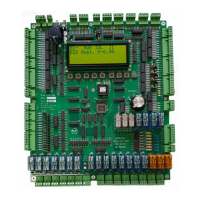
• The red Red3 LED blinks to confirm that the microprocessor is running.
• The yellow Yel3 LED comes on to confirm outputs are enabled.
• The green Grn3 LED comes on during power up and turns off during normal operation. It will
also flash once when a new value has been written in to EEPROM.
When re-powering; ensure the lift is off for 10 seconds before turning back on.
On power up, a delay of approximately 2 seconds is given on start up to ensure voltages are stable prior to reading
and writing outputs.


 To Next Page