L I Q U I D C R Y S T A L D I S P L A Y
Section 5. Liquid Crystal Display
Understanding the LCD
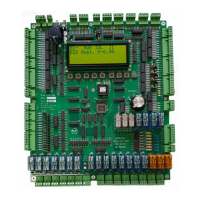
Reading the liquid crystal display Modes, Position, Address’ and status
Note: LCD contrast is set via POT located to the upper left of LCD. (POT 2.)
LCD Status Line
LCD Position & Direction
The lift position is shown in the top left of the LCD display, followed by the
current demand direction.
The left side example shows the lift on the 2
nd
floor with an up direction
LCD Modes
The lift modes are shown in the top left centre of the LCD display.
The left side example shows the lift on Normal
• CFS Lift on Car Fire Service
• DDO Door Open Disable (Toggle switch provided on board)
• EP Lift on Emergency Power
• EQK Earthquake input activated
• HCB Hall Call Bypass
• HFA Lift on Hall Fire Alternate Service (USA-Fire Service Code 17.1 only)
• HFS Lift on Hall Fire Service
• IND Lift on Independent Service
• INS Lift on Inspection Service (Toggle switch provided on board)
• NOR Lift on Normal
• NPT No Pulse Time out (Fatal error. See Section 6,Counting method 01, NPT )
• PRK Lift on Parking
• ZON Lift zoned/zoning to floor
02u NOR IDL ][][
ECD Aust. V-4.02
02d NOR RDN ][][
ECD Aust. V-4.02


 To Next Page