96
96
Necessary Information
Reference
* Depending on your mobile phone, the mute function may not work correctly. If it does not, press
the [MUTE] button on the main unit. Refer to the ECLIPSE Web site (http://www.eclipse-web.com)
for details on applicable phone models.
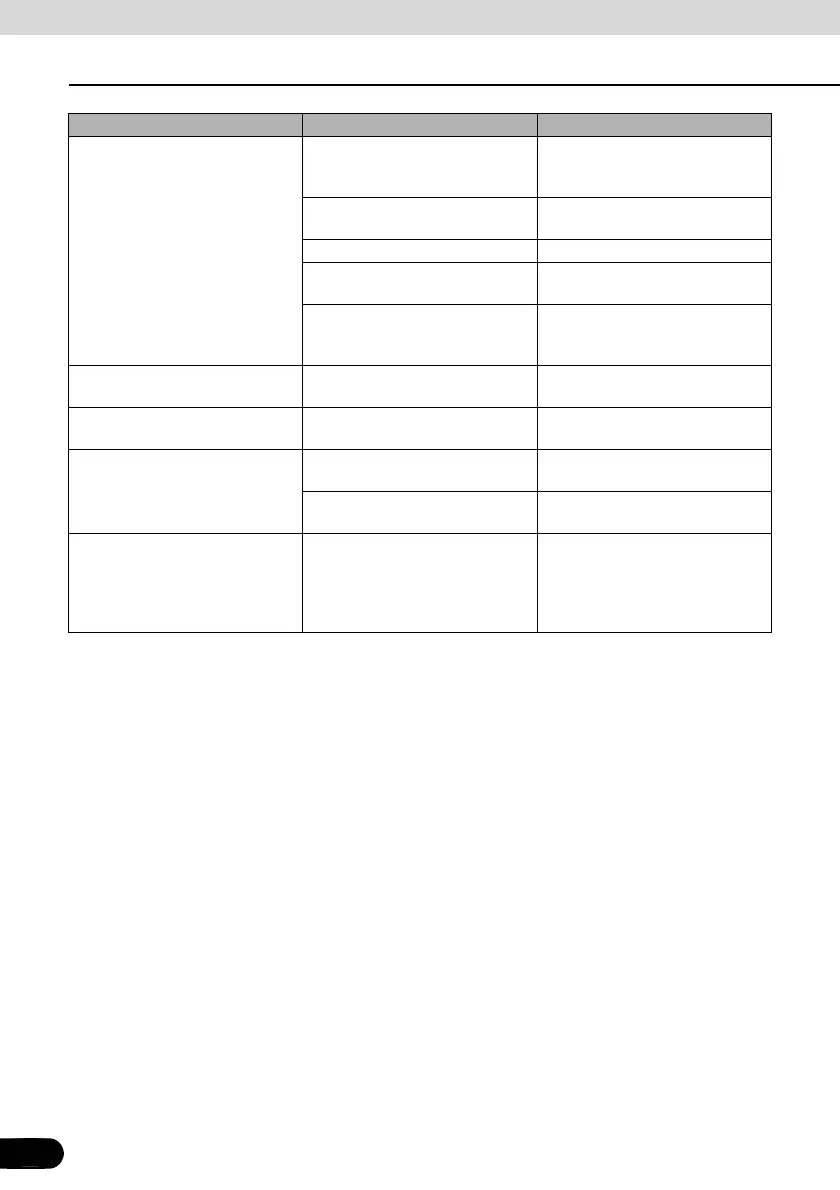
A CD/DVD cannot be played.
There is water condensation
inside the equipment.
Stop using the equipment for a
short time and then try using it
again.(See page 14)
There is a large scratch or warp in
the CD/DVD.
Insert a different CD/DVD.
The CD/DVD is very dirty. Clean the CD/DVD.(See page 14)
The CD/DVD is upside down.
Insert the CD/DVD with the
proper orientation.
A non-supported type of CD/DVD
has been inserted.
Insert a CD/DVD that is
supported in the deck(See page
14)
Audio is output, but not video.
The screen has been turned off
with the screen OFF button.
Press the [SCREEN AV/NAV]
button.(See page 19)
Audio is output, but not DVD
video. (With vehicle stopped.)
The emergency / parking brake
has not be set.
Set the emergency / parking
brake.
Neither video nor audio is output.
The vehicle ignition switch has
not been turned on.
Turn the vehicle ignition switch to
[ACC] or [ON].
The connection wires and cables
are not completely connected.
Check the connections to each
connection wire and cable.
There is a point of light on the
display.
At least 99.99% of the pixels on
the LCD panel are effective, but it
is possible that 0.01% of the
pixels may not light or may stay
lighted.
This is not a defect, so please use
the equipment in this condition.
Phenomenon Possible cause Action



 To Next Page