50
Basic operation
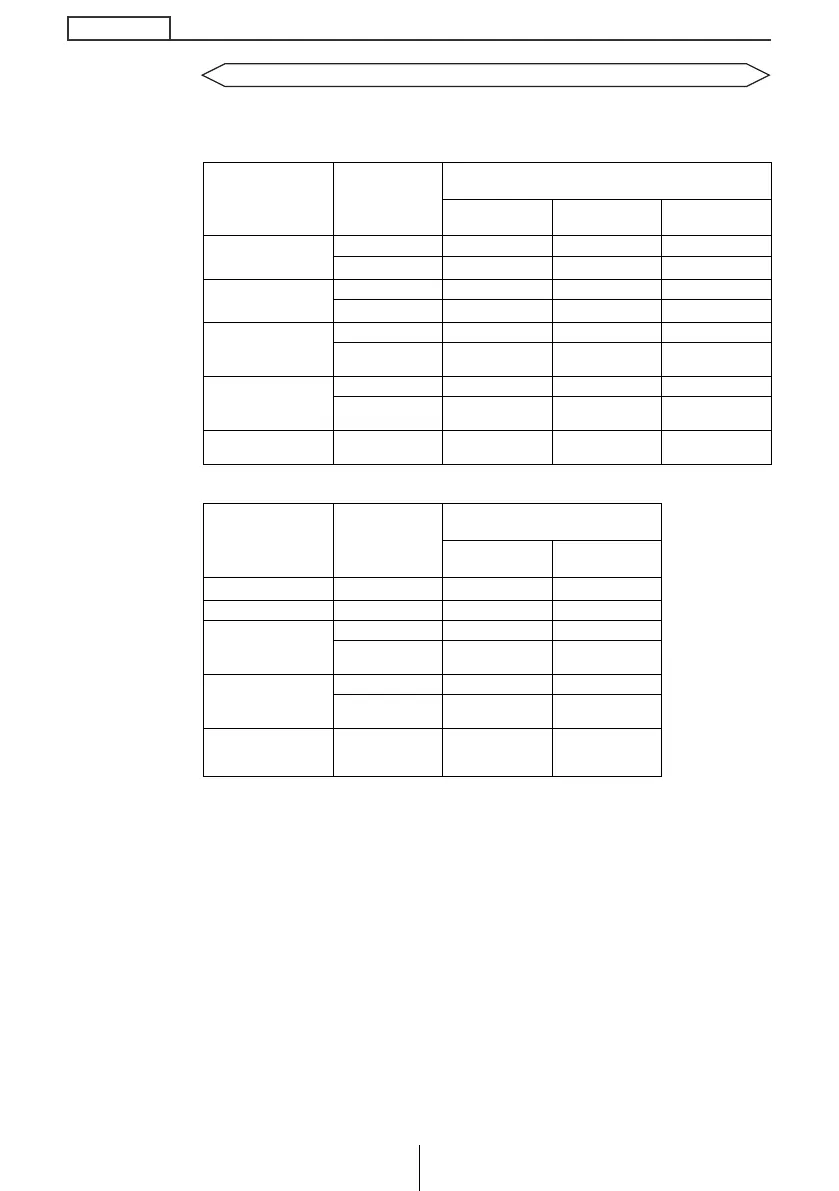
Compatibility with various switches
Displays the compatibility of the system’s modes and the steering
switch.
*1
: Switch names change depending on vehicle make and model.
*2
: If an optional SIRIUS satellite radio tuner is connected, categories can be switched when in the satellite
mode.
Switch Name
*1
Button operation
Mode
Tuner Disc mode AUX
SEEK+
Short tap TUNE UP TRACK UP –
Hold
SEEK UP
*2
FAST UP –
SEEK-
Short tap TUNE DOWN TRACK DOWN –
Hold
SEEK DOWN
*2
FAST DOWN –
VOL+
Short tap Volume UP Volume UP Volume UP
Hold
Gradually
increases volume
Gradually
increases volume
Gradually
increases volume
VOL-
Short tap Volume DOWN Volume DOWN Volume DOWN
Hold
Gradually
decreases volume
Gradually
decreases volume
Gradually
decreases volume
MODE –
Change to the
disc mode
Change to the
AUX mode
Change to the
tuner mode
Switch Name
*1
Button operation
Mode
Others Power OFF
SEEK+ –
–
–
SEEK- – – –
VOL+
Short tap Volume UP –
Hold
Gradually
increases volume
–
VOL-
Short tap Volume DOWN –
Hold
Gradually
decreases volume
–
MODE –
Change to the
various audio
modes
Power ON in the
tuner mode
CD5435_04_E.fm 50 ページ 2004年12月15日 水曜日 午後6時16分



 To Next Page