Part 10 - Lighting the appliance / First start-up
Weather dependent control
In weather dependent control operation with an outside sensor, the boiler CH set point depends on the
outside temperature and a pre-set weather compensation setting.
In case an outside sensor and an on/off thermostat have been installed, the next steps need to be
performed to pre-set weather dependent control:
a) Select 1 for parameter no. 7 in the installers menu for presence of the outside sensor;
b) Connect the ‘RT’ contact on the burner control PCB for weather dependent control in day
mode;
c) Connect the ‘RT’ and the ‘HRU’ contact on the burner control PCB for weather dependent
control in night mode;
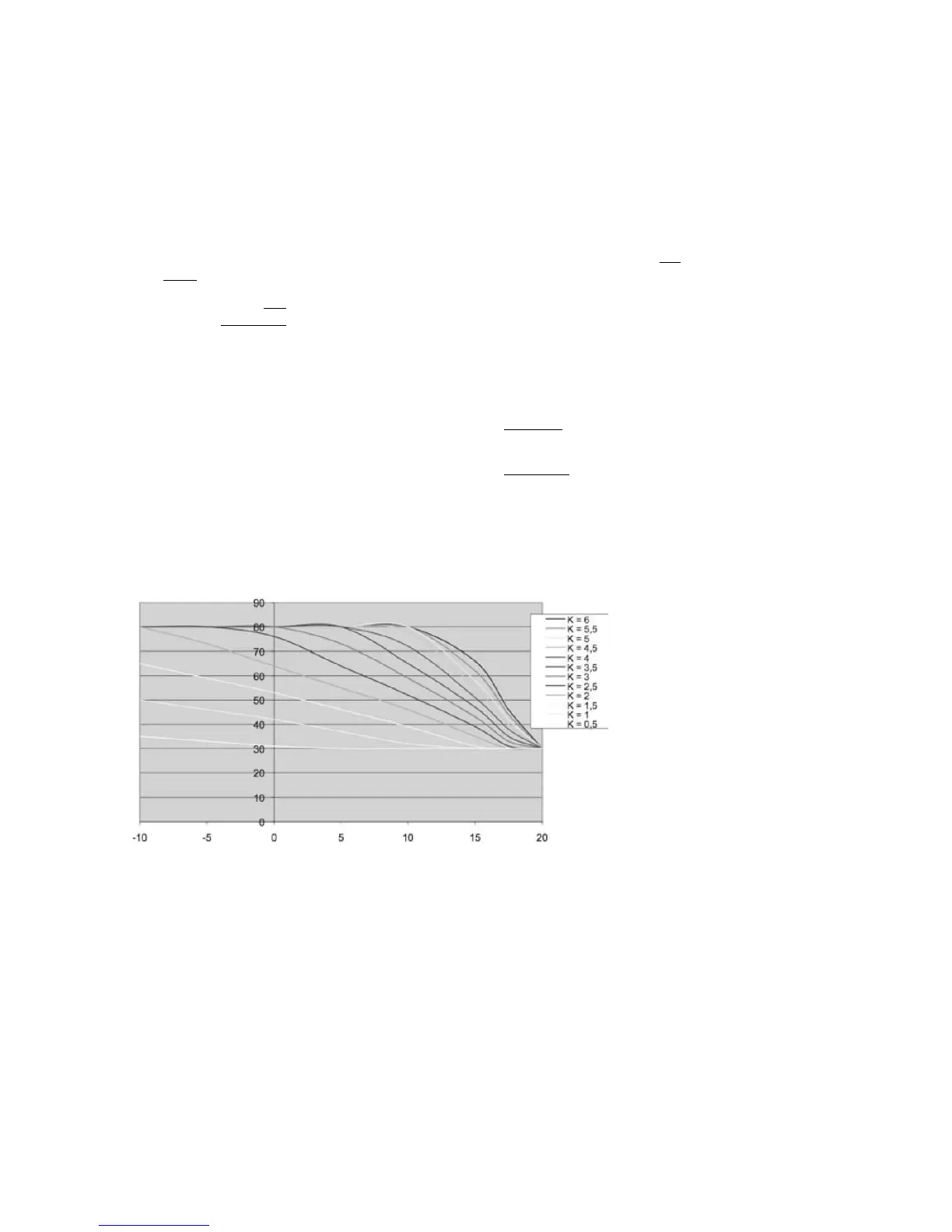
The lower the outside temperature, the higher the CH temperature must be. When it becomes warmer
outside, the CH temperature must decrease. The relationship between the outside temperature and
the CH temperature can be visualized with a weather compensation setting graph. The graph shows
the relationship between the desired CH supply temperature at a certain outside temperature.
d) When needed adapt the weather compensation setting for day mode via parameter 8 in the
installers menu.
e) When needed adapt the weather compensation setting for night mode via parameter 9 in the
installers menu.
f) When needed shift the weather compensation setting via parameter 10 in the installers menu.
Weather compensation setting graph



 To Next Page