EN
8
3. Operating and Programming
3.2 Quick Start
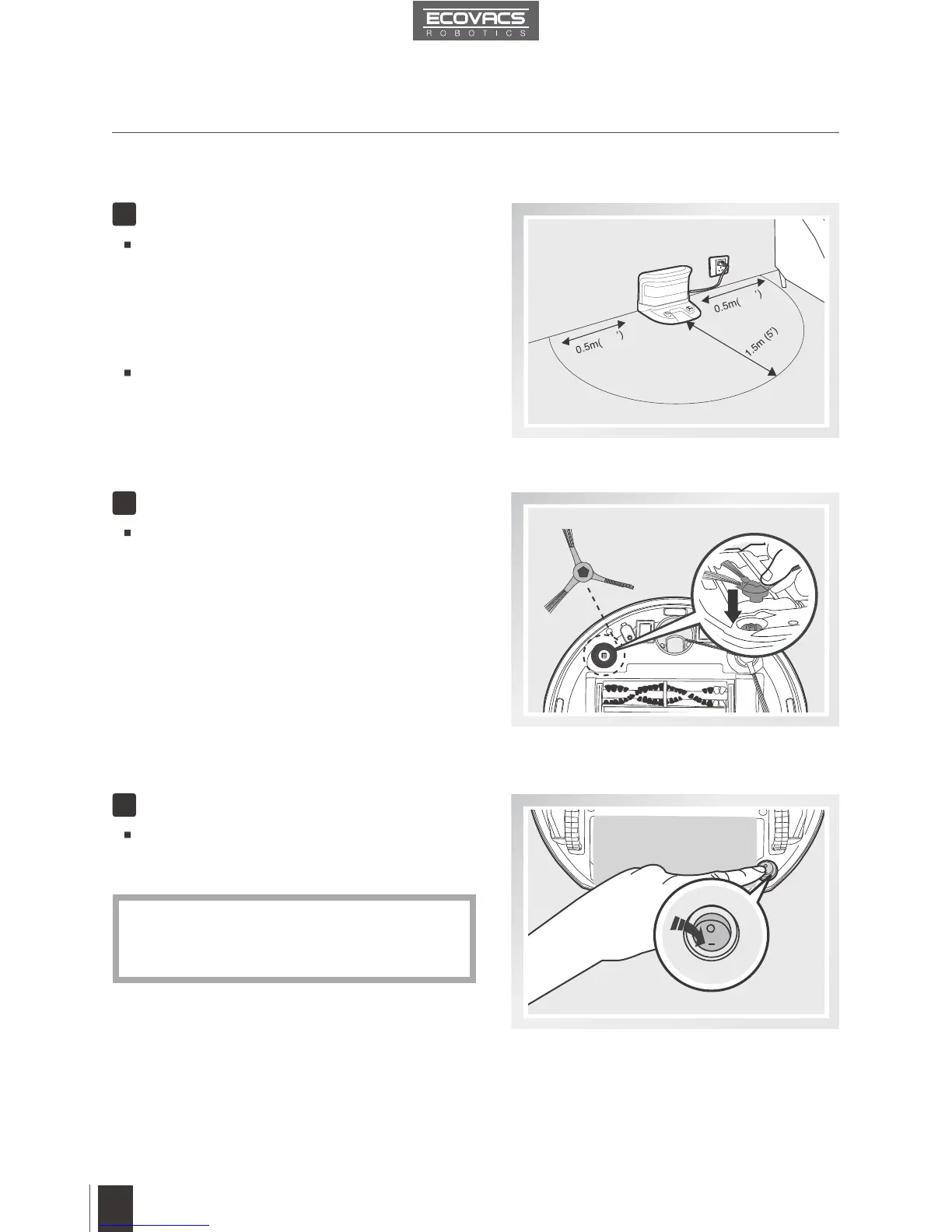
Charging Dock Placement
Install Side Brushes
Power ON
Place the Charging Dock on a level floor
surface against the wall with the base
perpendicular to the ground. Keep the
immediate area 1.5m (5’) in front of the charger
and 0.5m (1.6’) on both sides of the charger
clear of objects and reective surfaces.
Plug the Charging Dock in.
Attach Side Brushes to the bottom of
DEEBOT 8 by pressing a brush into each slot
with the matching color until it clicks.
Turn the robot’s Bottom Power Switch to
the ON position. “l” indicates ON and “O”
indicates OFF.
1
2
3
When DEEBOT 8 is not working, it is
suggested to keep it powered ON and
charging, instead of powered OFF.
*
1
.6
1
.6
ON













 To Next Page