EN
12
*
3. Operating and Programming
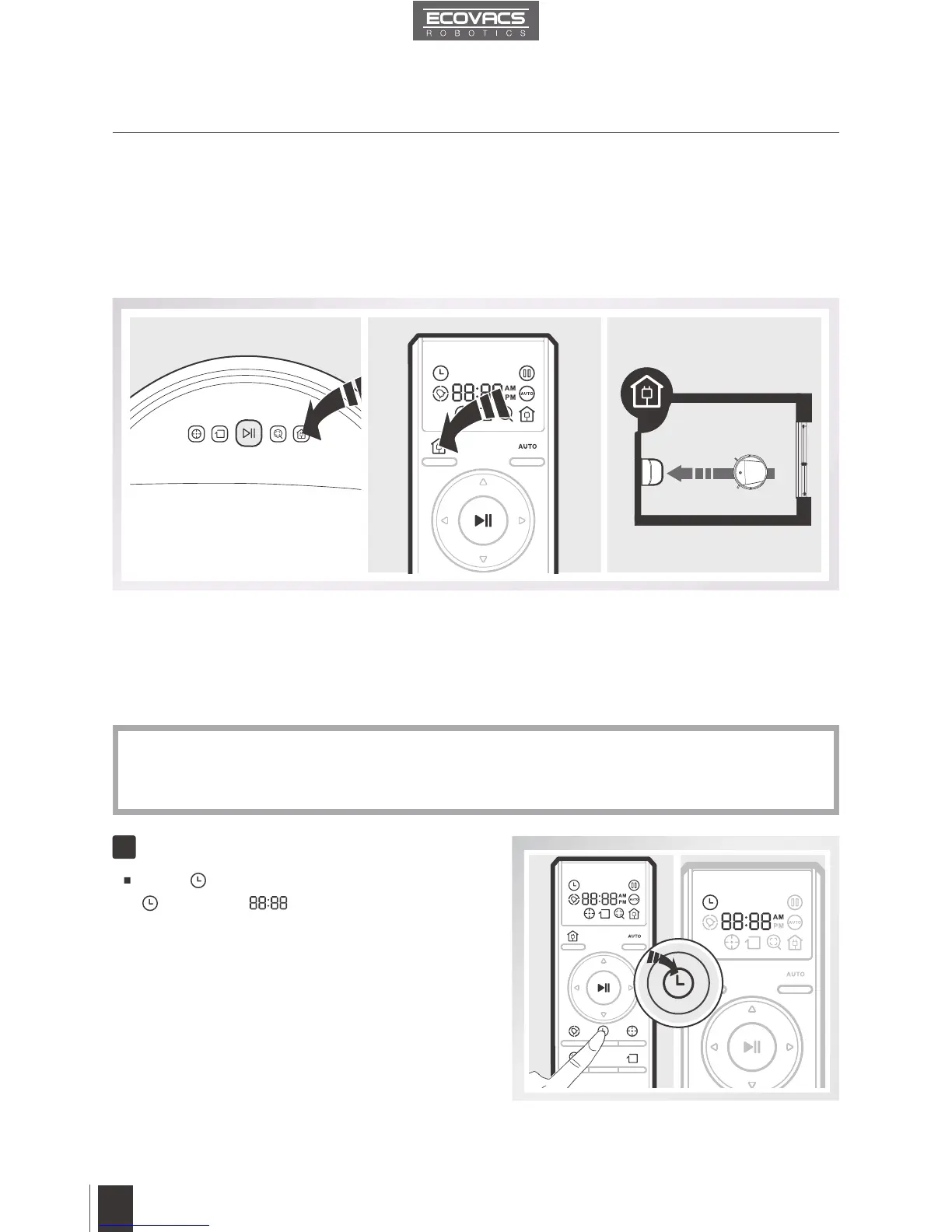
Press button on the Remote Control until
ashes, and illuminates on the Remote
Control LED Screen.
3.4 Programming the Robot
DEEBOT 8 has a Time Scheduling function. DEEBOT 8 can be programmed to automatically
clean once per day, at a specic time, even if nobody is at home. The current time of day
and the cleaning time are scheduled using the Remote Control.
Return to Charger Mode
When battery power gets low, DEEBOT 8 automatically switches to Return to Charger Mode and
returns to the Charging Dock to recharge itself.
DEEBOT 8 can also be sent back to the Charging Dock at any time by Pausing DEEBOT 8, then
pressing the Return to Charger Mode Button on the robot’s Control Panel (D83 model ONLY), or
pressing the Return to Charger Mode Button on the Remote Control twice.
S
T
A
R
TT
All scheduled cleanings are performed in AUTO Cleaning Mode.
Before programming the robot, press any button on the Remote Control to wake up the Remote
Control LED Screen. The Remote Control uses a 12-hour clock with “AM” and “PM” indicators.
*
*
Set the Current Time of Day
1













 To Next Page