19
ECOWATER
SYSTEMS
Faceplate Controller, Features/Options
INITIATING EXTRA RECHARGES
RECHARGE NOW: Press the Recharge keypad to go to the recharge menu. Move square cursor down to Start
Recharge Now. Press SELECT/EXIT keypad and a recharge begins immediately.
To assure an adequate supply of conditioned water, at times of unusual or unexpected high water use demand,
use the RECHARGE NOW feature. For example, if you have guests and the Soft Water Available screen is at
or below 50%, you could deplete conditioned water capacity before the next recharge is automatically initiated.
To be sure this will not happen, use RECHARGE NOW to restore 100% conditioned water capacity.
RECHARGE TONIGHT: Press the Recharge keypad to go to the recharge menu. Move cursor down to Set/Can-
cel Recharge Tonight. Press SELECT/EXIT keypad to return to Normal Screen Views. When this feature is set,
the EcoWater conditioner will regenerate at the next programmed start time. This feature is beneficial to assure
a sufficient supply of conditioned water for an expected heavy water usage the next day.
To cancel a recharge when RECHARGE TONIGHT is
shown, press the Recharge keypad to go to the recharge
menu. Move cursor down to Set/Cancel Recharge Tonight. Press SELECT/EXIT keypad to return to Normal
Screen Views.
The following is a description of the options in the Primary Menu. To enter this menu press SELECT/EXIT (↵ )
keypad and move square cursor (J) to menu choice. To exit to Normal Screen Views move square cursor (J)
to EXIT, which appears at e ither the top or the bottom of this menu. If no keypad has been pressed display will
show for 4 minutes before defaulting back to the Normal Screen Views.
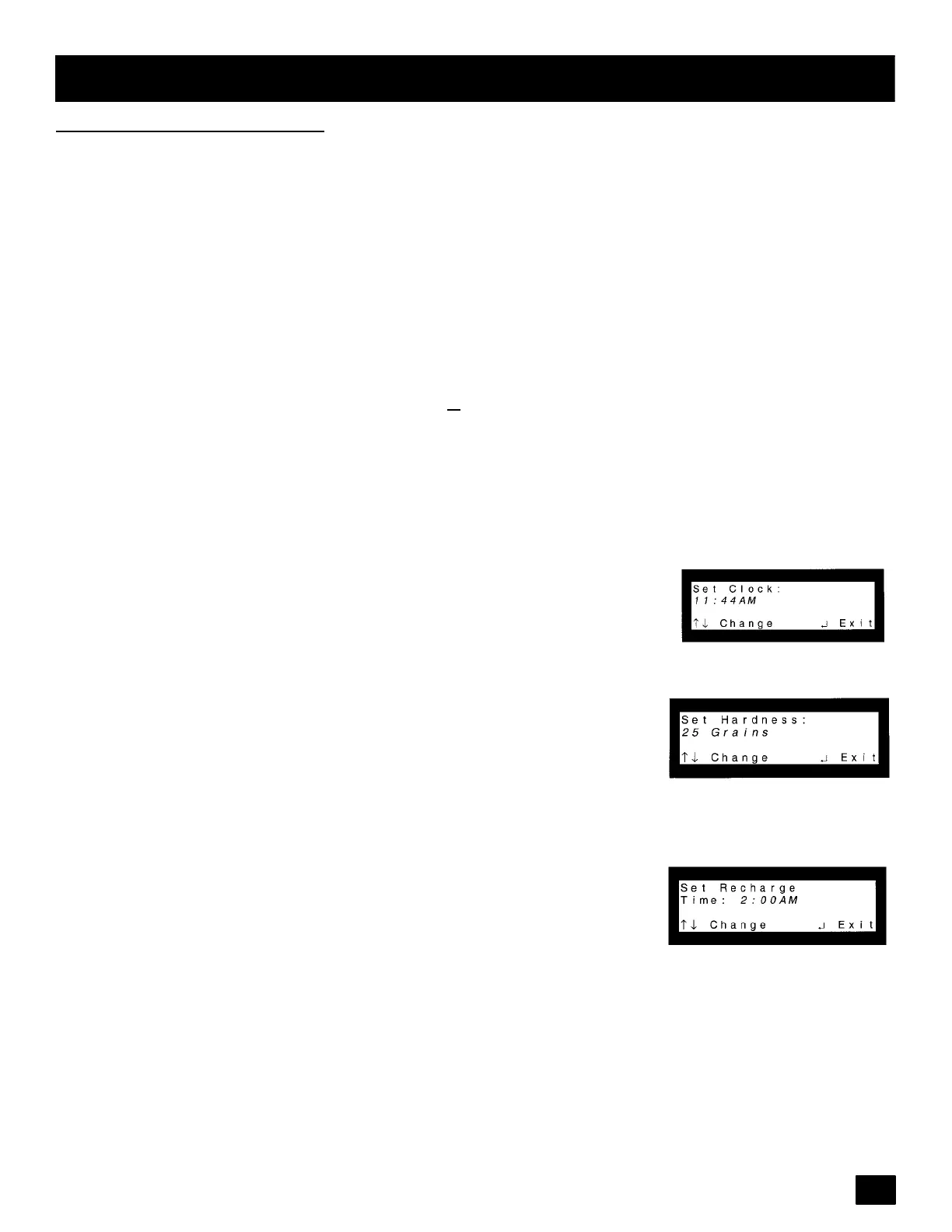
SetClock
: EnterPrimaryMenu. Pressthe (↑)or(↓)keypads untilcursor isnext
to Set Clock. Again, use the (↑)or(↓) keypads to set the present time of day,
being sure AM or PM shows, as applicable. Press (↑) to move the display
ahead; press (↓) to move the time backward. NOTE: Each press of a keypad
changesthe time by1 minute.Holding a keypadin changes the timeby 32 min-
utes each second. Press the SELECT/EXIT ( ↵ ) keypad to set.
Set Water Hardness
: Enter Primary Menu. Press the (↑)or(↓) keypads until
cursor is next to Set Hardness. Press the SELECT/EXIT ( ↵ ) keypad once to
display a flashing number and ppm (or GRAINS). Set the ppm! hardness of
your water supply. Use the (↑) keypad to advance the number; use the (↓)key-
pad to reduce the number. Pressing the SELECT/EXIT ( ↵ ) keypad will set the
hardness level. NOTE: If using potassium chloride (KCl) instead of standard
sodiumchloride(NaCl)watersoftenersalt, hardnesssettingmustbeincreased
by 25%. !1gpg = 0.959 _d = 1.71 _F = 17.1 ppm
Set Recharge (Regeneration) Time: Enter Primary Menu. Press the (↑)or(↓)
keypads until cursoris next to Set Recharge Time. Pressthe SELECT/EXIT(↵)
keypad once to display a flashing 2:00 AM. At this setting,the EcoWatercondi-
tioner begins recharge, or regeneration, at 2:00 AM., ending no later than 5:30
AM. This is a good time in most households because water is not being used.
If hot water is used while the unit is regenerating, the water heater will refill with
hard water. To select a different recharge start time, use the (↑)or(↓) keypad.
Pressing the SELECT/EXIT ( ↵ ) keypad will set the recharge time.
continued



 To Next Page