20
ECOWATER
SYSTEMS
Faceplate Controller, Features/Options
Primary Menu, continued
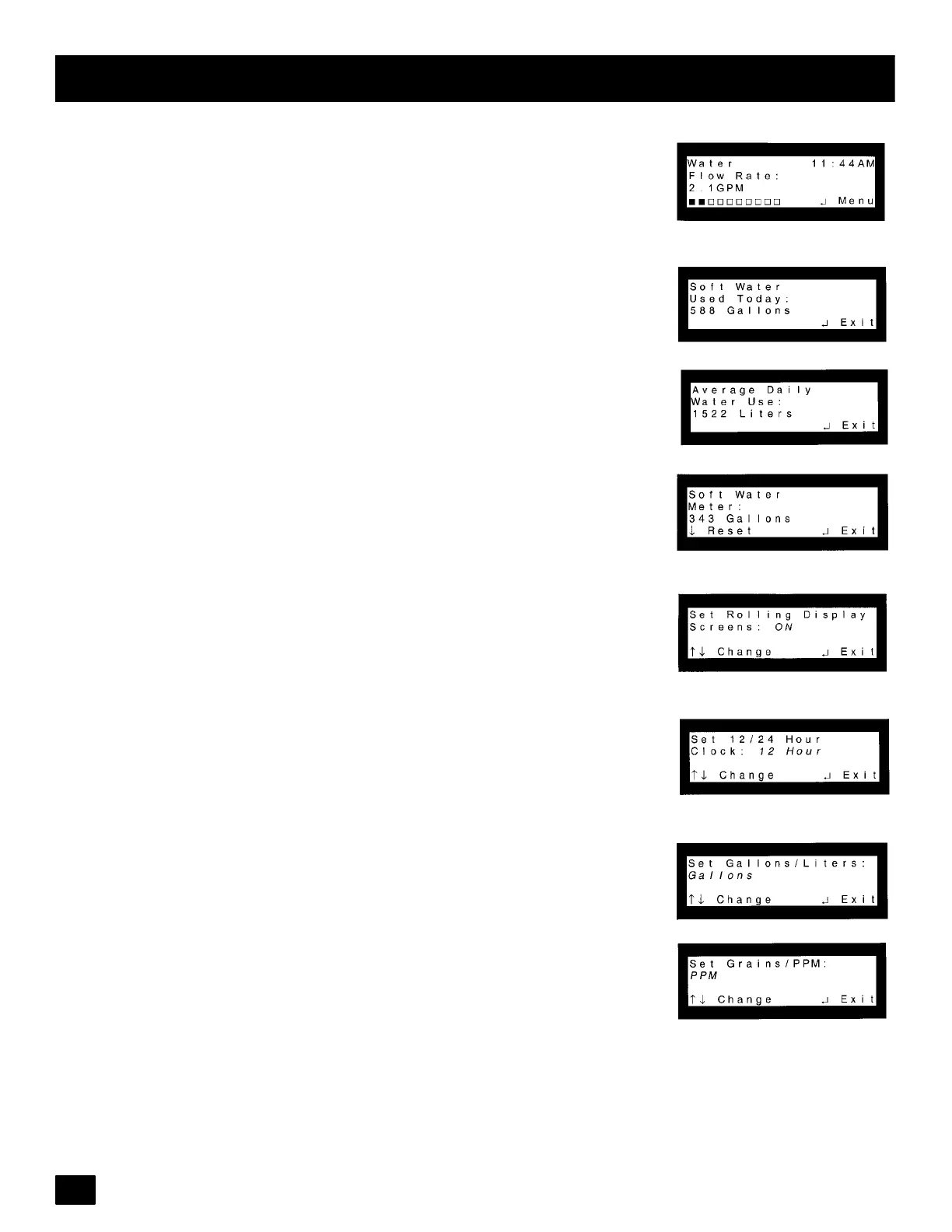
Water Flow Rate: Enter PrimaryMenu. Pressthe (↑)or(↓) keypads until cursor
is next to Water Flow Rate. Press the SELECT/EXIT (↵ ) keypad. When se-
lected, this screen will show the water flow rate in liters per minute (LPM) or gal-
lons per minute (GPM) with the moving bar graph at the bottom of the display.
Water Used Today: Enter Primary Menu. Press the (↑)or(↓) keypads untilcur-
sor is next to Water Used Today. Press the SELECT/EXIT (↵ ) keypad and the
liters/gallons used since midnight will be shown in the display.
AverageWaterUse:Enter PrimaryMenu. Pressthe (↑)or(↓)keypads untilcur-
sor is next to Average Water Use. Press the SELECT/EX I T (↵ ) keypad and the
average liters/gallons use each day will be shown in the display.
Soft W ater Meter: Enter PrimaryMenu. Pressthe (↑)or(↓)keypads untilcursor
is next to Soft Water Meter. Press the SELECT/EXIT (↵) keypad. This screen
issimilartoatripodometerinthat itwill countthe numberof liters/gallonsthrough
the system until it is reset. To reset back to zero press the (↓) keypad.
Set RollingScreen: Enter Primary Menu. Pressthe (↑)or(↓) keypads until cur-
sor is next to Set Rolling Screen. Press the SELECT/EXIT (↵) keypad. This
menu will disable the Normal Screen Views from scrolling and will show only the
screen that is most current.
Set 12/24 Hour Clock: Enter Primary Menu. Press the (↑)or(↓) keypads until
cursor is next to Set 12/24 Hour Clock. Press the SELECT/EXIT ( ↵ ) keypad.
Moving the (↑)or(↓) keypads will change clock display from12 hour (AM & PM)
or 24 hour format.
Set Gallons/Liters: Enter Primary Menu. Press the (↑)or(↓) keypads until cur-
sor is next to Set Gallons/Liters. Press the SELECT/EXIT (↵) keypad. Moving
the (↑)or(↓) keypads will change displays to indicate water in gallons or liters.
Set Grains/PPM: Enter Primary Menu. Press the (↑)or(↓) keypads until cursor
is next to Set Grains/PPM. Press the SELECT/EXIT (↵) keypad. Change be-
tween diplaying hardness units in grains or parts per million (PPM). Note: 1 gpg
= 0.959 _d = 1.71 _F = 17.1 ppm
continued



 To Next Page