22
ECOWATER
SYSTEMS
Faceplate Controller, Features/Options
The following is a description of the options in the Advanced/Service Menu. To enter any of the following menus,
pressSELECT/EXIT(↵)to enterPrimary Menu. Pressthe (↑)or(↓)keypads untilcursorisnext to Advanced/Ser-
vice. Press the SELECT/EXIT ( ↵ ) keypad to enter this menu. Warning screen will show, press the (↑) keypad
to continue. To exit to Normal Screen Views move square cursor (J) to EXIT, which appears at either the top or
the bottom of this menu. If no keypad has been pressed display will show for 4 minutes before defaulting back
to the Normal Screen Views.
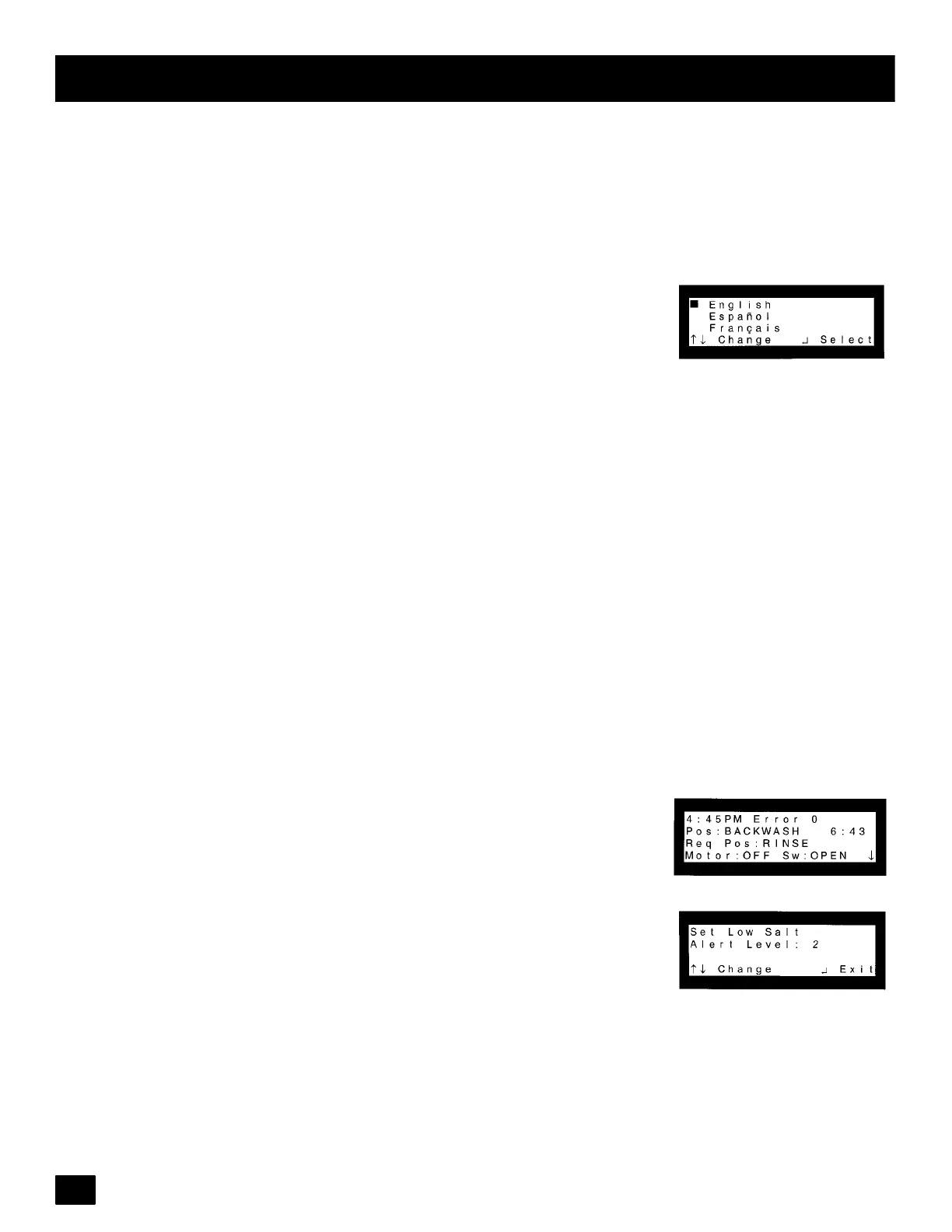
Set Language: Press the (↑)or(↓) keypadsuntil cursoris next to Set Language.
Language can be changed from English to Spanish or French. Warning: If the
language has been mistakenly changed, the following steps can be followed to
reset.
1) Unplug transformer, then reapply power to the unit. After 4 seconds, the time
ofday shouldshowin the upperrightcorner. If the timeof dayisnot shown,press
the SELECT/EXIT ( ↵ ) keypad until it is.
2) Press the SELECT/EXIT ( ↵ ) keypad.
3) Pressthe (↓) keypad until the square cursor (J)is next to one of the following:
Advanced/Service (English)
Servicio/Avanzando (Spanish)
Fonct avanc (French)
4) Press the SELECT/EXIT ( ↵ ) keypad.
5) Press the (↑) keypad.
6) Pressthe (↓) keypad until the square cursor (J)is next to one of the following:
Set Language (English)
Seleccionar idioma (Spanish)
Réglage langue (French)
7) Press the SELECT/EXIT ( ↵ ) keypad.
8)Language can nowbe selected bypressing the (↑)or(↓) keypadsuntilthe cur-
sor is next to correct language.
9) Press the SELECT/EXIT ( ↵ ) keypad to select language.
10) Press the (↑)or(↓) keypads until cursor is next to EXIT.
11) Press the SELECT/EXIT ( ↵ ) keypad.
Diagnostics: Press the (↑)or(↓) keypads until cursoris next to Diagnostics and
pressSELECT/EXIT ( ↵ ). This screen is for viewing only and will show any error
codes plus information about the unit. Use the (↑)or(↓) keypads to view alllines
of the screen. See page 28.
Set Low Salt Alert: Press the (↑)or(↓) keypads until cursor is next to Set Low
Salt Alert and press SELECT/EXIT ( ↵ ). Use the (↑)or(↓) keypads to change
Alert Level. At this level the controller will signal that salt needs to be added to
the conditioner brine tank. Press SELECT/EXIT (↵)toexit.
continued



 To Next Page