15
Installing the Motherboard
Expansion Slots
Installing Add-on Cards
The slots on this motherboard are designed to hold expansion cards and connect
them to the system bus. Expansion slots are a means of adding or enhancing the
motherboard’s features and capabilities. With these efficient facilities, you can in-
crease the motherboard’s capabilities by adding hardware that performs tasks that are
not part of the basic system.
1. Before installing an add-on card, check the documentation for the card
carefully. If the card is not Plug and Play, you may have to manually
configure the card before installation.
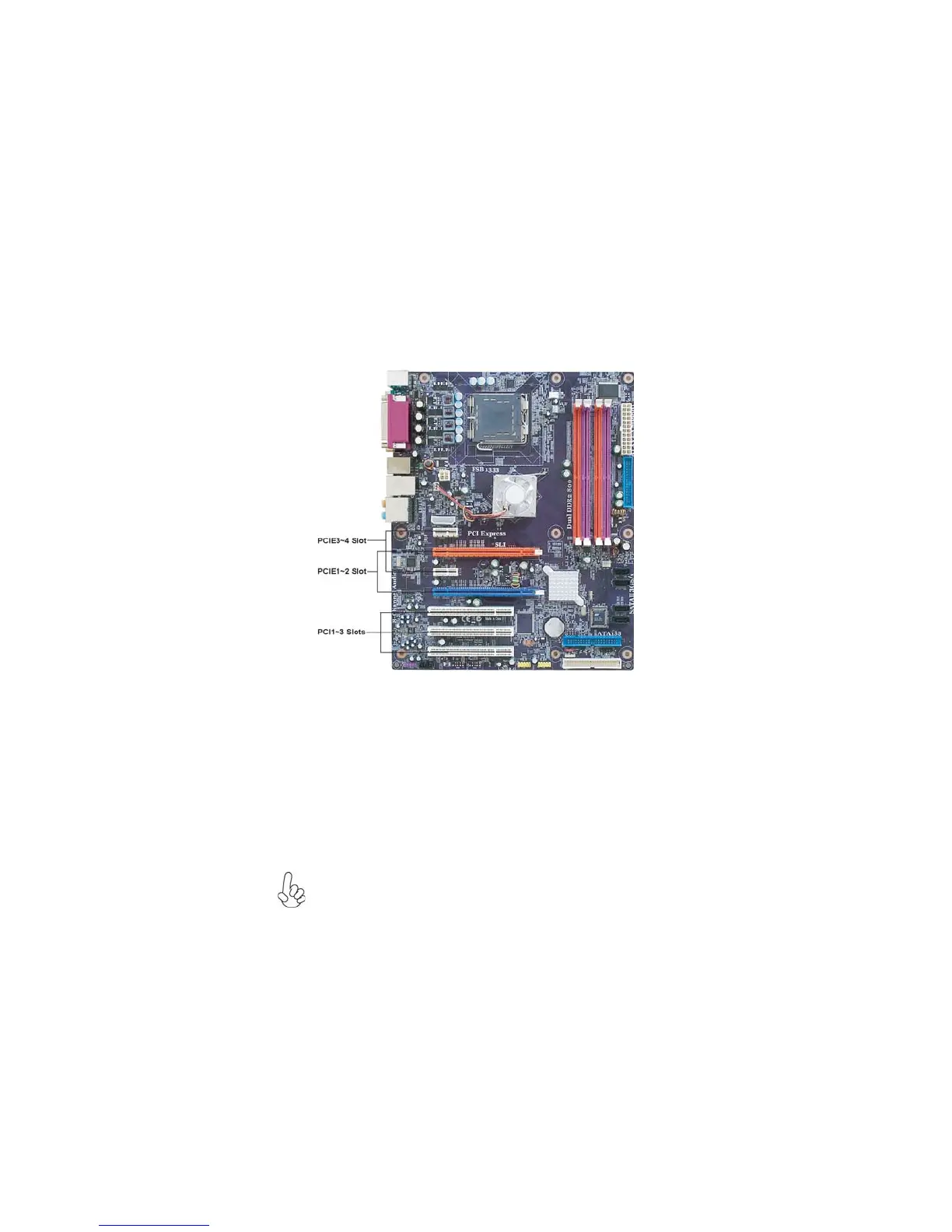
2. PCIE3/PCIE4 slot will be disabled when PCIE2 slot is installed.
This motherboard is equipped with three standard PCI slots. PCI stands for
Peripheral Component Interconnect and is a bus standard for expansion
cards, which for the most part, is a supplement of the older ISA bus stan-
dard. The PCI slots on this board are PCI v2.3 compliant.
PCI1~3
Slots
PCIE3~4
Slots
The PCI Express x16 slot is used to install an external PCI Express graph-
ics card that is fully compliant to the PCI Express Base Specification
revision 1.0a. (SLI Mode: x8+x8, single PCI-E is x8 mode)
PCIE1~2
Slots
The PCI Express x1 slots are fully compliant to the PCI Express Base
Specification revision 1.0a.



 To Next Page