Chapter 6
| Switch Management
How to Connect to the Console Port
– 41 –
How to Connect to the Console Port
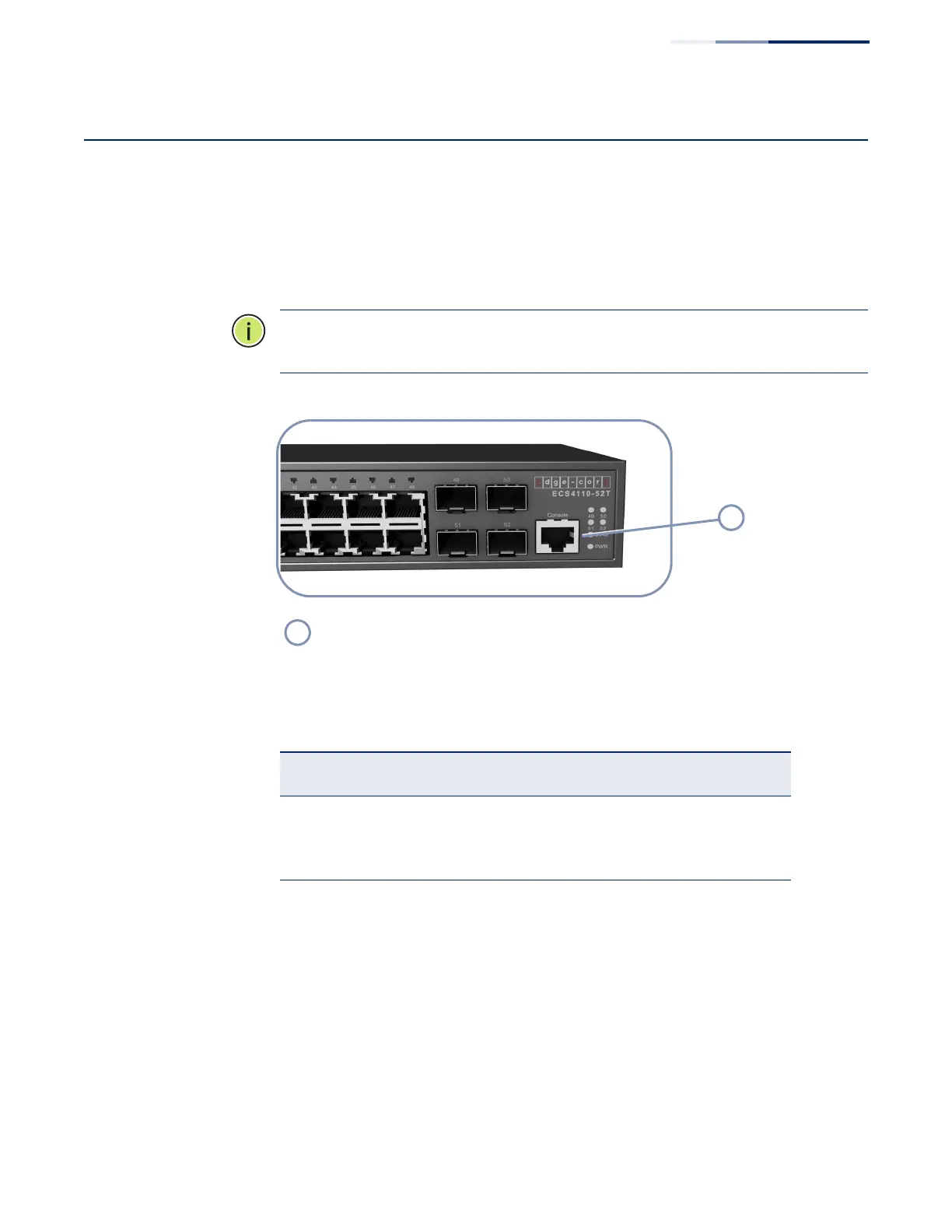
The RJ-45 Console port on the front panel of the switch is used to connect a
console device to the switch for out-of-band console configuration. The console
device can be a PC or workstation running a VT-100 terminal emulator, or a VT-100
terminal. A console cable is supplied with the switch for connecting to a PC’s RS-
232 serial DB-9 DTE (COM) port.
Note:
To connect to notebooks or other PCs that do not have a DB-9 COM port, use
a USB-to-male DB-9 adapter cable (not included with the switch).
Figure 21: Console Port
The following table describes the pin assignments used in the console cable.
The serial port’s default settings are as follows:
◆ Default Baud rate—115200 bps
◆ Character Size—8 Characters
◆ Parity—None
◆ Stop bit—One
Console Port
Table 10: Console Cable Wiring
Switch’s RJ-45
Console Port
Null Modem PC’s 9-Pin
DTE Port
6 RXD (receive data) <--------------------- 3 TXD (transmit data)
3 TXD (transmit data) ---------------------> 2 RXD (receive data)
4,5 SGND (signal ground) ----------------------- 5 SGND (signal ground)
No other pins are used.



 To Next Page
 Loading...