INTRODUCTION PARTS DESCRIPTION INSTALLATION OPERATING INSTRUCTIONS INTERNET UPDATES APPENDIX
I N S T A L L A T I O N
18
U S E R G U I D E
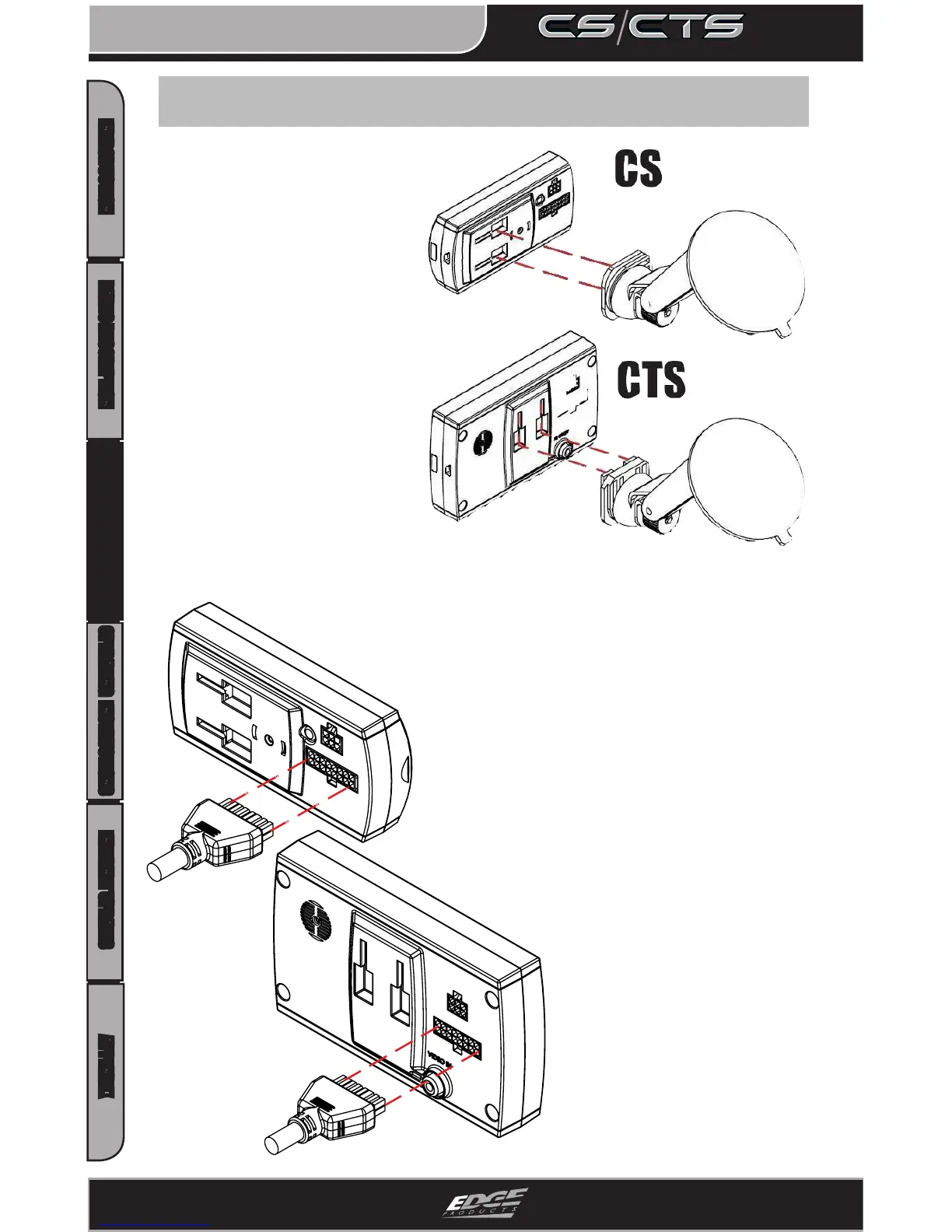
Step 4: Connect the Mount and OBDII Cable
Before you attach the suc-
tion cup portion of the
mount to the window
attach it to the device.
Insert the tabs on the
mount into the slots on
the back of the device and
slide up (CTS) or to the
side (CS) until it stops.
Next, insert the connector on
the end of the OBDII cable
into the 16-pin connector on
the back of the device (this is
easier if done prior to
mounting the device on the
window). The connector only
ts one way so be sure that the
locking tab is on the bottom.
*The mounting tabs are a tight
fit by design in order to main-
tain a solid connection. You
may add a small amount of lithium
lube to aid in insertion.


 To Next Page