7
CHAPTER 3: PANELS
3.1 Front Panel Description
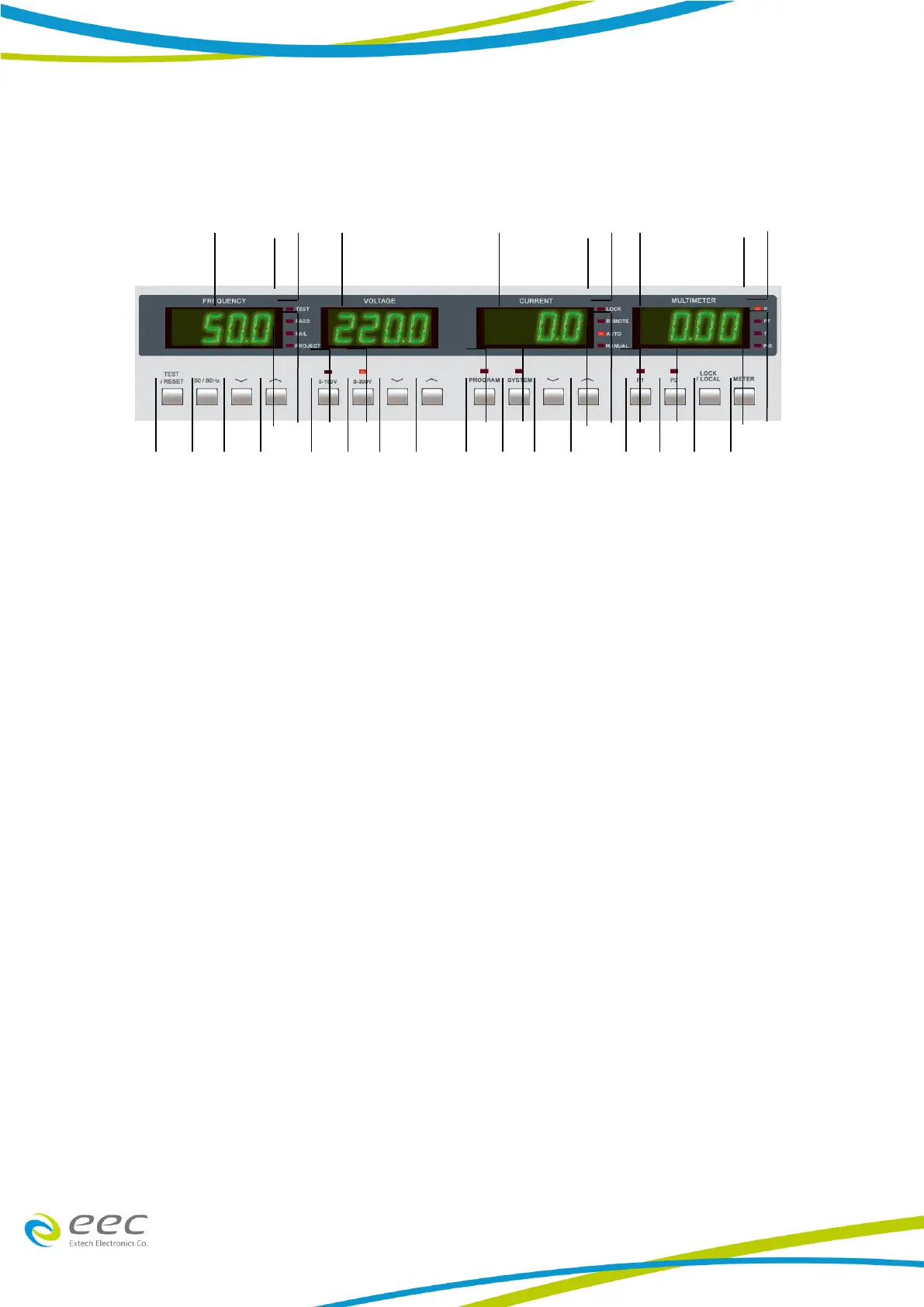
1. Frequency Display. When the output is OFF, it shows the frequency setting. Otherwise, it
shows the frequency of the output.
2. Voltage Display. When the output is OFF it shows the output voltage setting. Otherwise it
shows the voltage of the output.
3. Current Display. . When the output is OFF it shows the output current setting. Otherwise it
shows the current of the output.
4. Multimeter Display. Display the value of output wattage 、 power factor test time or the
state of Program-Step.
5. Meter Key. Select the display of output wattage (P)、 power factor (PF) 、 test time or Program-Step.
6. LOCK/LOCAL Key. To disable all the keys on the front panel (ON/OFF) and to escape from
programmable operation mode.
7. P1 Button. Store setting memory [Press and hold for a second or above]
8. P2 Button. Store setting memory [Press and hold for a second or above]
9. ︿ Key. To increase high limit of current, as well as SYSTEM and PROGRAM parameters.



 To Next Page