Cummins 2010-2018 Quick Start
support@efilive.com - 15 - www.efilive.com
4. Select the [F3: Tune] option in the left-hand pane.
5. Click on the Open button at the bottom left of the screen.
6. Select the calibration file for the controller you wish to flash or license.
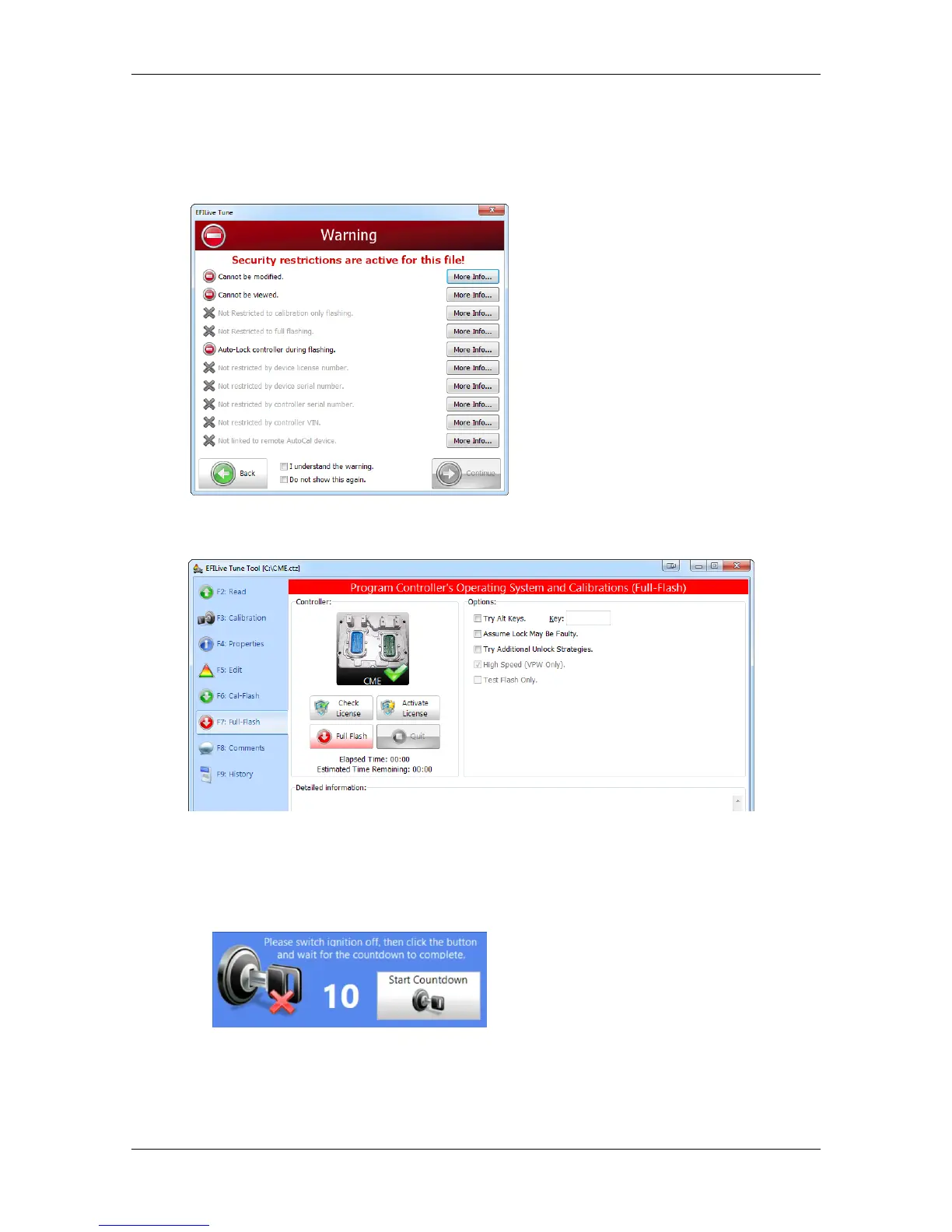
7. If tune file security has been applied to the tune file, review and accept the
Security Warning.
7. Click on the [F7: Full Flash] options in the left-hand pane.
8. Click on the Check License button. This will indicate if the controller is already
licensed or not.
9. When the Check License process is complete a countdown timer will be
shown. When prompted perform the following actions:
a. Turn the vehicle ignition Off.
b. Click on the Start button to begin the countdown timer.
c. DO NOT turn the vehicle ignition on until the countdown timer
expires. This time is critical to allow the ECM to perform internal functions
after a read/flash operation.


 To Next Page