Cummins 2010-2018 Quick Start
support@efilive.com - 19 - www.efilive.com
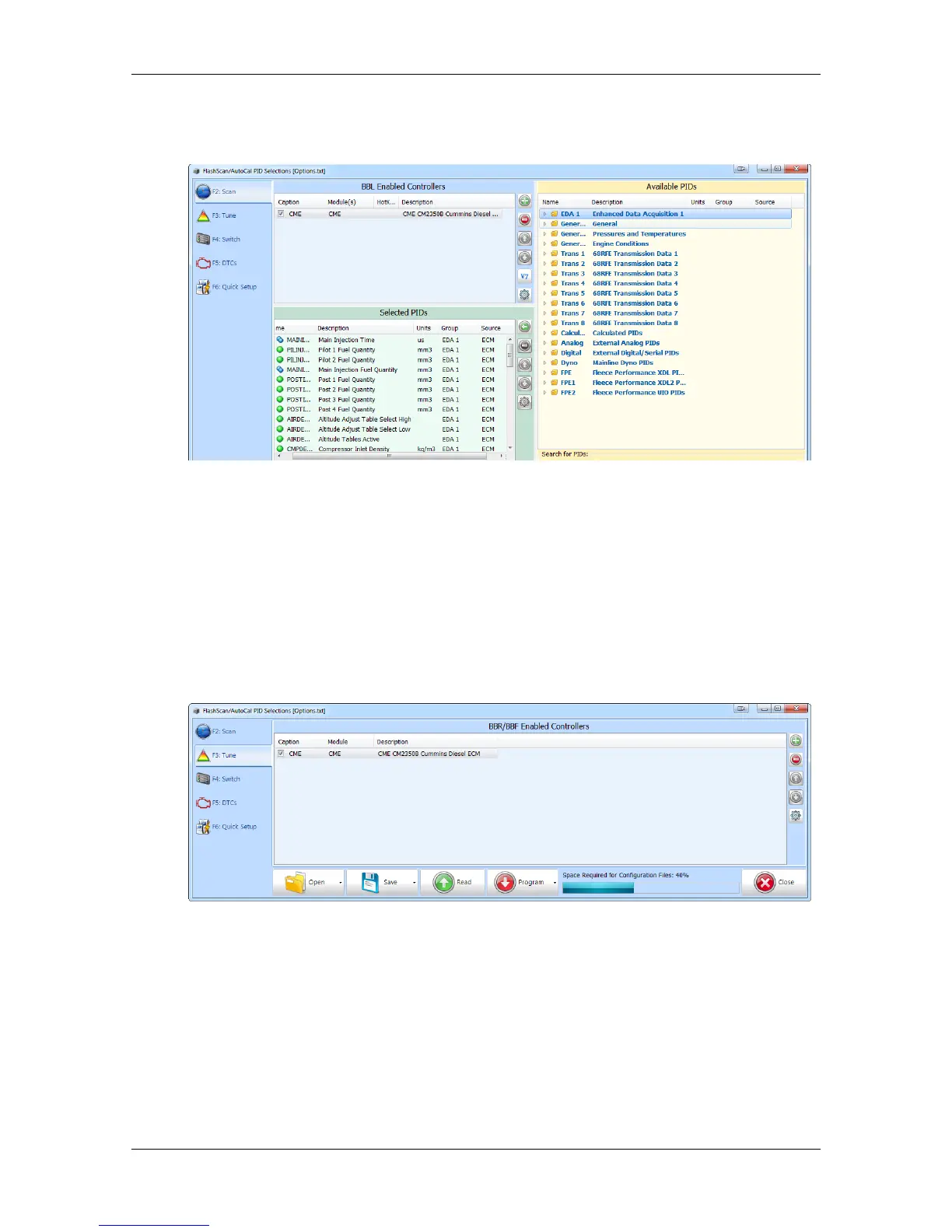
4. Navigate and select Available PIDs to facilitate logging.
5. Drag PID selections from the Available PIDs window into the Selected PIDs
window.
BBR & BBF (Black Box Reading and Flashing) Configuration
1. Select the [F3: Tune] option in the left-hand pane.
2. Remove any unnecessary controller configurations to ensure capacity restrictions
are not exceeded.
3. Add your chosen controller(s) to your list;
a. Press the green '+' icon.
b. Right click on the Engine Controller or Transmission Controller box.
c. Click on a selected controller.
d. Select OK
Switchable Tune Configuration
Switchable tune configuration is only required when CSP
5
tune files are to be
flashed into the ECM.
1. Select the [F4: Switch] option in the left-hand pane.
2. Enter switchable tune names you wish to display on FlashScan V2/AutoCal as
appropriate.


 To Next Page