Cummins 2010-2018 Quick Start
support@efilive.com - 21 - www.efilive.com
4. To place tune files on FlashScan V2/AutoCal, add tune files to the Quick Setup
using the green '+' icon.
Write this configuration to FlashScan V2 or AutoCal using the [Program Quick
Setup] function. The [Program Quick Setup] programs all selected Scan, Tune,
Switch options, as well as selected device settings, BBX Quick Setup selections
and tune files. Once the device is programmed, FlashScan V2 or AutoCal is
configured for BBX functions and tune switching via FlashScan V2 or AutoCal.
Each option can be programmed individually using the [Program] button on each
tab, or collectively using the [Program Quick Setup] option.
Move Tune and Log files from FlashScan V2/AutoCal to your PC
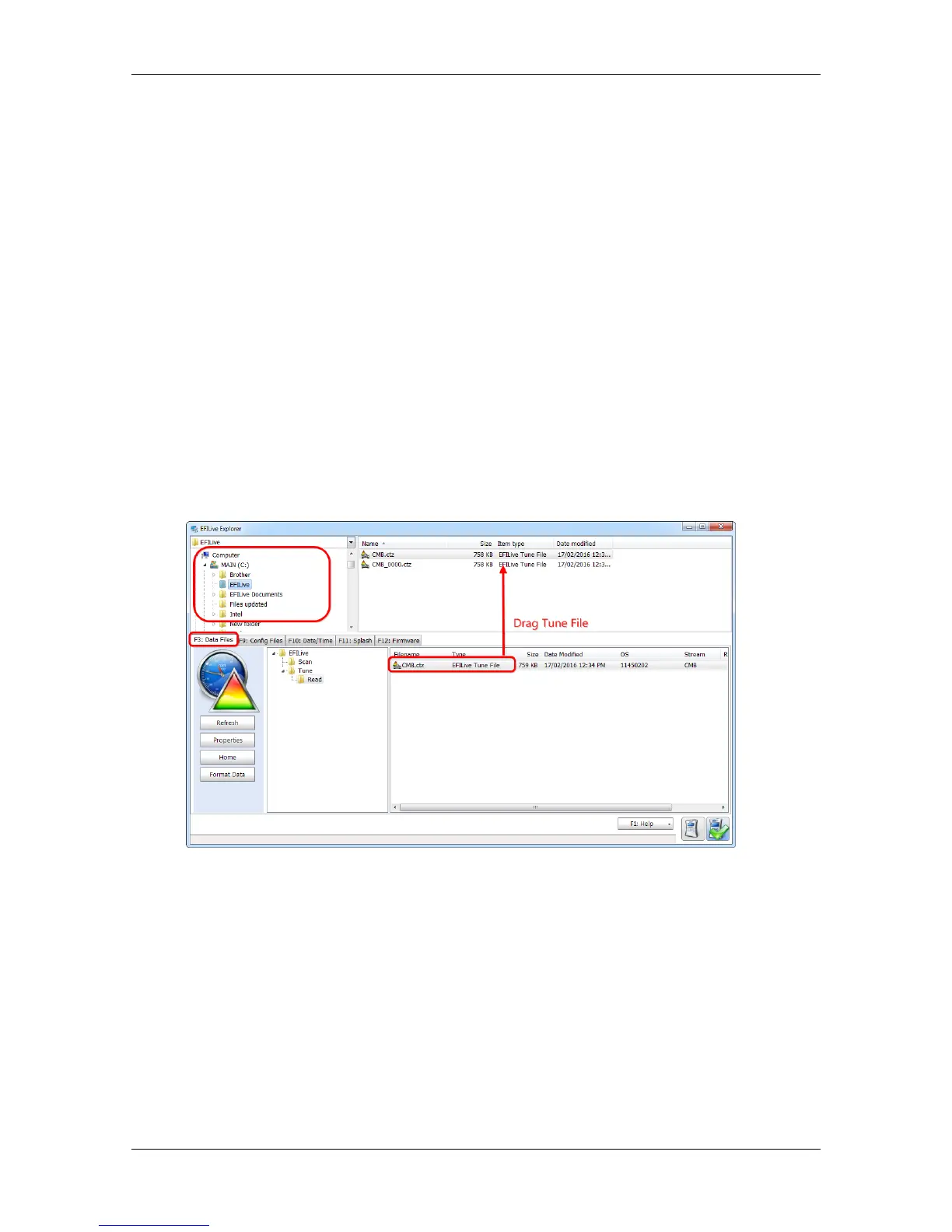
To move tune files and log files from FlashScan V2/AutoCal to your PC;
1. Connect your FlashScan V2/AutoCal device to your PC.
2. Open EFILive Explorer.
3. Navigate to the directory on your PC where you wish to save the file.
4. Navigate to: [F3: Data Files].
5. Select appropriate folder on your FlashScan V2/AutoCal device and drag the
selected file to your PC.
Once tune and log files are copied from your FlashScan/AutoCal to your PC, they
can be opened/viewed using EFILive Scan and Tune, V7 Tune Tool, or V7 Scan
Tool.


 To Previous Page