Cummins 2010-2018 Quick Start
support@efilive.com - 16 - www.efilive.com
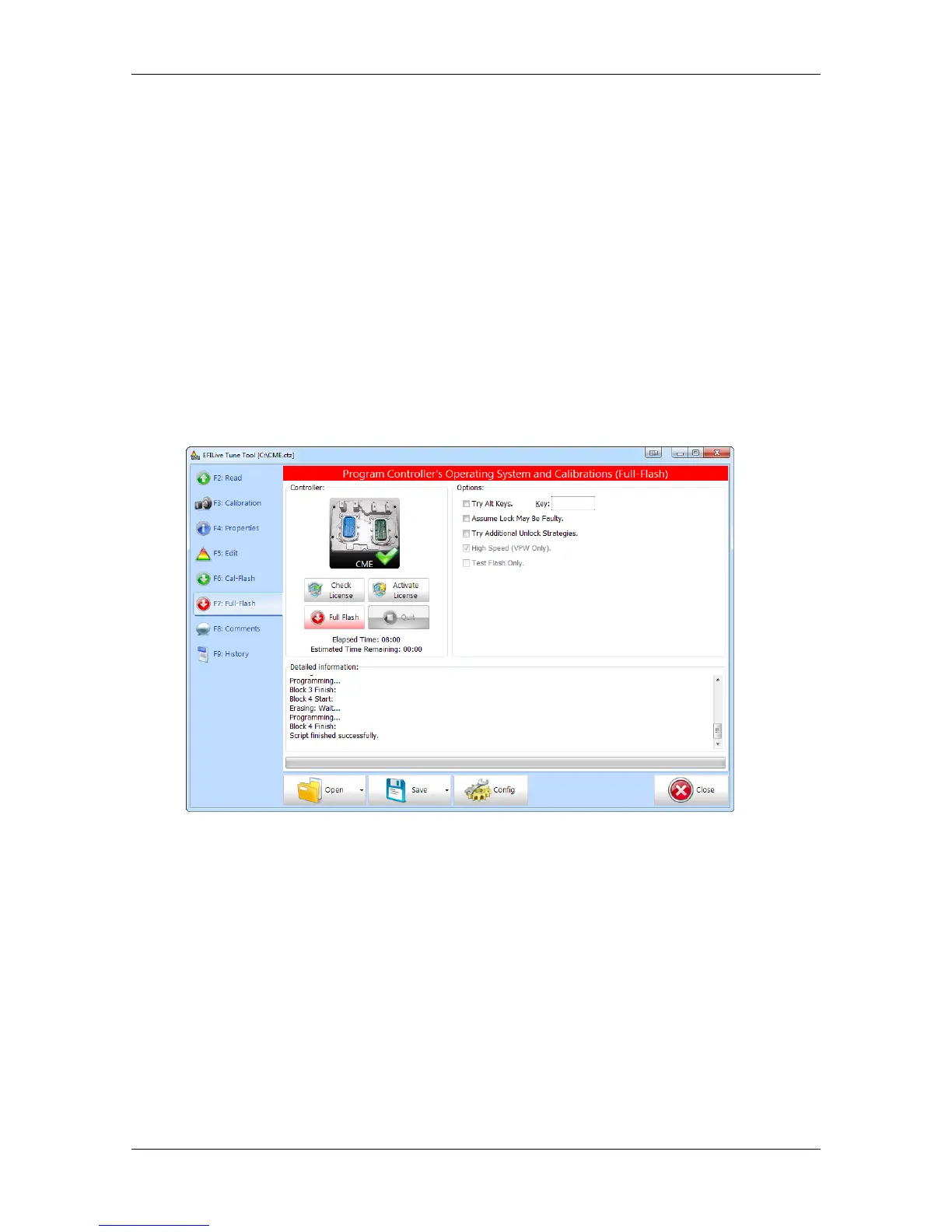
10. If the controller is not licensed, select the Activate License button, and If the
controller is not licensed, select the Activate License button, and follow the
prompts to license the controller.
11. Select Full Flash button to commence the flash. Three notification screens will
display. Please ensure that you read and understand the contents of these
screens before proceeding with the flash operation.
12. While the ECM is flashing an Elapsed time indicator, an Estimated Time
Remaining indicator, and a Progress bar will display detailing the Flash progress.
13. When the flash process is complete a countdown timer will be shown. When
prompted perform the following actions:
a. Turn the vehicle ignition Off.
b. Click on the Start button to begin the countdown timer.
c. DO NOT turn the vehicle ignition on until the countdown timer
expires. This time is critical to allow the ECM to perform internal functions
after a read/flash operation.
14. Once the countdown timer is completed the flash summary will be shown.
FlashScan V2
Follow these steps to license and flash the selected controller.
1. Setup FlashScan V2 for BBX features if not already setup.
2. Copy selected tune file(s) from your PC to FlashScan V2 if not already copied.
3. Connect your FlashScan V2 device to your vehicle.
4. Turn the vehicle ignition to the On positon (not the Accessory position. Vehicle
must not be cranked/running when flashing).
5. Navigate to the F2 Tune Tool -> F1 Tuning and select F3 Program Full menu
option.
6. Using the arrow keys, navigate to the correct tune file and select OK.
7. If the controller has not been licensed by the selected FlashScan V2 previously,
you will be presented with the message License this controller now? Select
Yes to license the controller.


 To Next Page