Home
ehang
Drones
GHOSTDRONE 2.0
Page 11
ehang GHOSTDRONE 2.0 - Page 11
31 pages
Manual
Save Page as PDF
To Next Page
To Next Page
To Previous Page
To Previous Page
Loading...
08
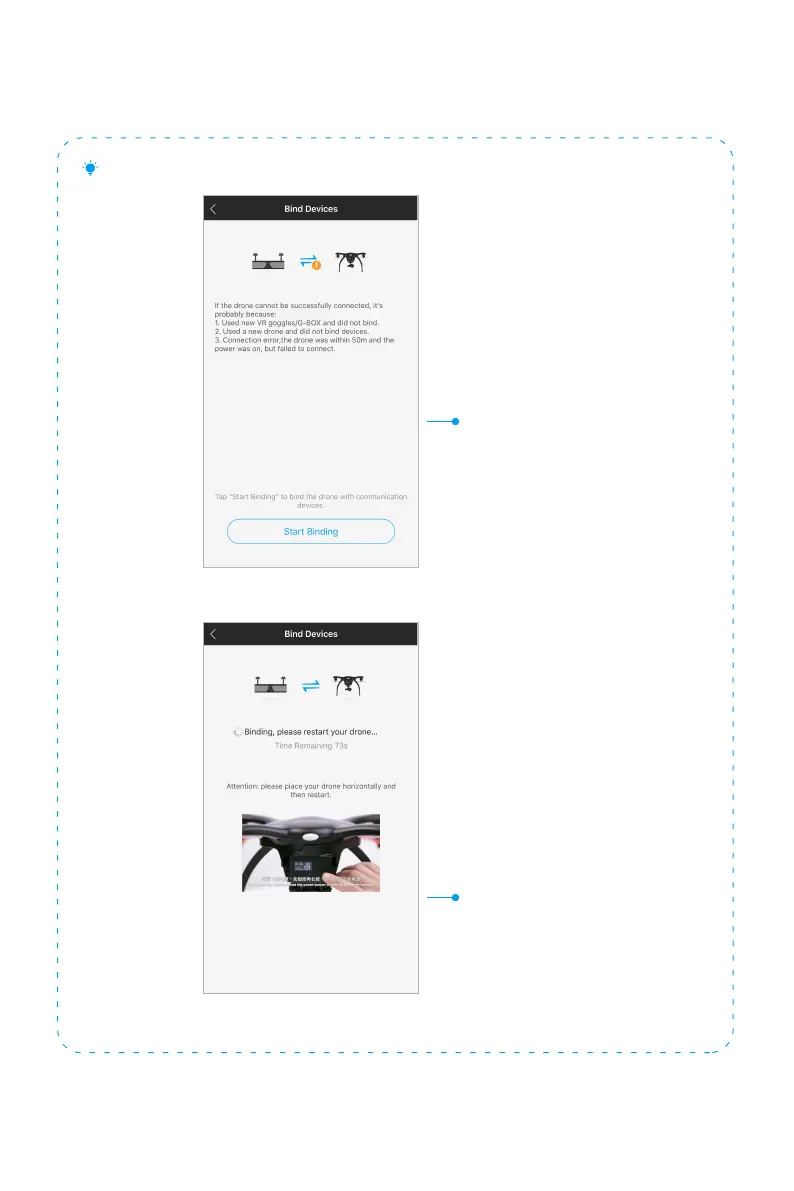
Turn on the drone back on
If you are using a new device (drone or
VR Goggles/ G-BOX) or binding fails,
please first turn off your drone, then click
“Start Binding” on the
App screen.
How to bind your GHOSTDRONE if initial binding failed
10
12
Table of Contents
Main Page
Table of Contents
2
Warnings
4
Pre-Flight Inspections
6
Check Battery Life
6
Check Propellers
6
App Download
7
System Requirements
7
Sign Up/ Log in
8
Connect to GHOSTDRONE
9
Steps
9
View Album
12
Steps
12
Profile Page - "Me
13
View Profile & App Info
13
Edit Profile
14
Sidebar Menu
15
Flight Settings
15
Camera Settings
16
Compass Calibration
17
Gimbal Calibration
18
System Update
18
Let's Practice
19
Touch-To-Go Mode
19
Avatar Mode
20
How to Fly Touch-To-Go Mode
21
Avatar Mode
23
Waypoints Mode
25
Smart Shoot Mode
26
VR Mode
28
Safety Tips
30
Smart Auto Return Home
30
Battery Management System
30
Contact Us
30
Other manuals for ehang GHOSTDRONE 2.0
Operating Manual
29 pages
Related product manuals
ehang GHOST
30 pages



 To Next Page