EasyManua.ls Logo

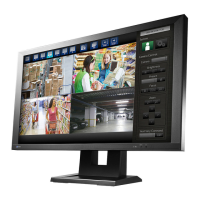
Eizo DuraVision FDF2711W-IP - User Manual

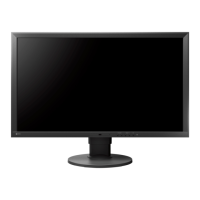
Eizo DuraVision FDF2711W-IP
20 pages
Print Icon
To Next Page IconTo Next Page
Loading...
Important
Please read this “Instruction Manual”, “Installation Manual”, and
“Setup Manual” carefully to familiarize yourself with safe and
e󰀨ective usage.
• For the latest product information including the “Instruction
Manual”, refer to our web site :
www.eizoglobal.com
Color LCD Monitor
Instruction Manual
Software Version 5.2

Other manuals for Eizo DuraVision FDF2711W-IP

Questions and Answers

  • L
    leahallenSep 15, 2025
    Why can't I change the network camera display position on my Eizo DuraVision FDF2711W-IP Monitor?
    • S
      stephanie77Sep 15, 2025
      The user level authorized to operate the camera must be 'CAMERA CONTROL' or 'ADMIN'. Also, the display position of the network camera cannot be changed during sequential display.
  • J
    Jonathan MilesAug 25, 2025
    What to do if the mouse or keyboard doesn't work with my Eizo DuraVision FDF2711W-IP?
    • M
      Matthew GriffithAug 25, 2025
      Check that the USB cable is properly connected to your Eizo monitor. If it is, try pulling out the USB cable and connecting it again.
  • P
    psmithAug 26, 2025
    What to do if my Eizo DuraVision FDF2711W-IP Monitor restarts all of a sudden?
    • A
      andrew55Aug 26, 2025
      If your monitor restarts unexpectedly, it might be due to a high internal temperature. Check the temperature around the product to ensure it's adequately ventilated.
  • H
    haileyrobertsonAug 27, 2025
    Why are the display images not smooth on my Eizo DuraVision FDF2711W-IP Monitor / camera images are not displayed (when camera images are being displayed)?
    • D
      Destiny LopezAug 27, 2025
      If the display images aren't smooth, try reducing the resolution and/or bit rate set for the network camera. Also, verify that the hubs and network cables you're using are appropriate for the amount of information being transmitted. Alternatively, move to the setting screen and return to the live image screen.
  • E
    Ethan PhillipsSep 16, 2025
    How to fix the Eizo DuraVision FDF2711W-IP when camera images are not displayed properly?
    • J
      Joshua GatesSep 16, 2025
      If camera images are not displayed correctly for a few minutes after the Eizo Monitor is powered back on, this may be normal. After several minutes, the screen should return to a normal display.
  • I
    ichristensenNov 24, 2025
    Why does my Eizo Monitor display an error message “E**-**” in the camera image display area?
    • E
      Elizabeth MathewsNov 24, 2025
      An error message may appear because too many devices are connected to the network camera, exceeding the allowable number for simultaneous connections. Disconnect other network devices or reduce the camera's resolution. Also, ensure a network cable is properly connected, the network camera is turned on, and the username/password are correctly set in the system. Check for IP address conflicts, ensure the certificate expiration date is correct if 'Certificate Validation' is enabled. Network bandwidth may be overwhelmed or the display capability of this product may have been exceeded, so reduce the resolution and/or bit rate set for the network camera. A resolution incompatible with this product may be set, so try changing the resolution of the network camera. The streaming format from the net...
  • A
    Amy CaldwellSep 7, 2025
    What to do if the screen is not displayed and the power indicator is not turned on on my Eizo Monitor?
    • D
      Debra Wolfe DDSSep 7, 2025
      Connect the power cord.
  • R
    Ryan PaceSep 9, 2025
    What to do if I cannot log in to my Eizo DuraVision FDF2711W-IP Monitor?
    • A
      Alicia SmithSep 9, 2025
      If you cannot log in to your Eizo Monitor, try entering your username and password again. Alternatively, reset the account information using the Reset button and log in with the default account settings.
  • G
    Gerald JonesSep 2, 2025
    What to do if the set date and time are not displayed correctly on my Eizo DuraVision FDF2711W-IP?
    • D
      Dale SmithSep 2, 2025
      If the date and time are not displayed correctly, especially after the system hasn't been connected to power for a week or more, set the date and time again.
  • T
    Taylor SmithSep 1, 2025
    How to fix the time mismatch between the network camera and the Eizo DuraVision FDF2711W-IP Monitor system?
    • V
      vmosleySep 1, 2025
      To resolve the time difference between the network camera and the system, go to the setting screen and adjust the time of the network camera to match the time of the product.

Eizo DuraVision FDF2711W-IP Specifications

General IconGeneral
Panel TypeIPS
Contrast Ratio1000:1
Viewing Angle (H/V)178°/178°
Connectivity/Video InputsHDMI, DisplayPort, DVI-D, VGA
IP DecodingYes
PoE++Yes
Screen Size27 inches
Resolution1920 x 1080
Brightness300 cd/m²
Color Depth8-bit (16.77 million colors)

Related product manuals