- 19 -
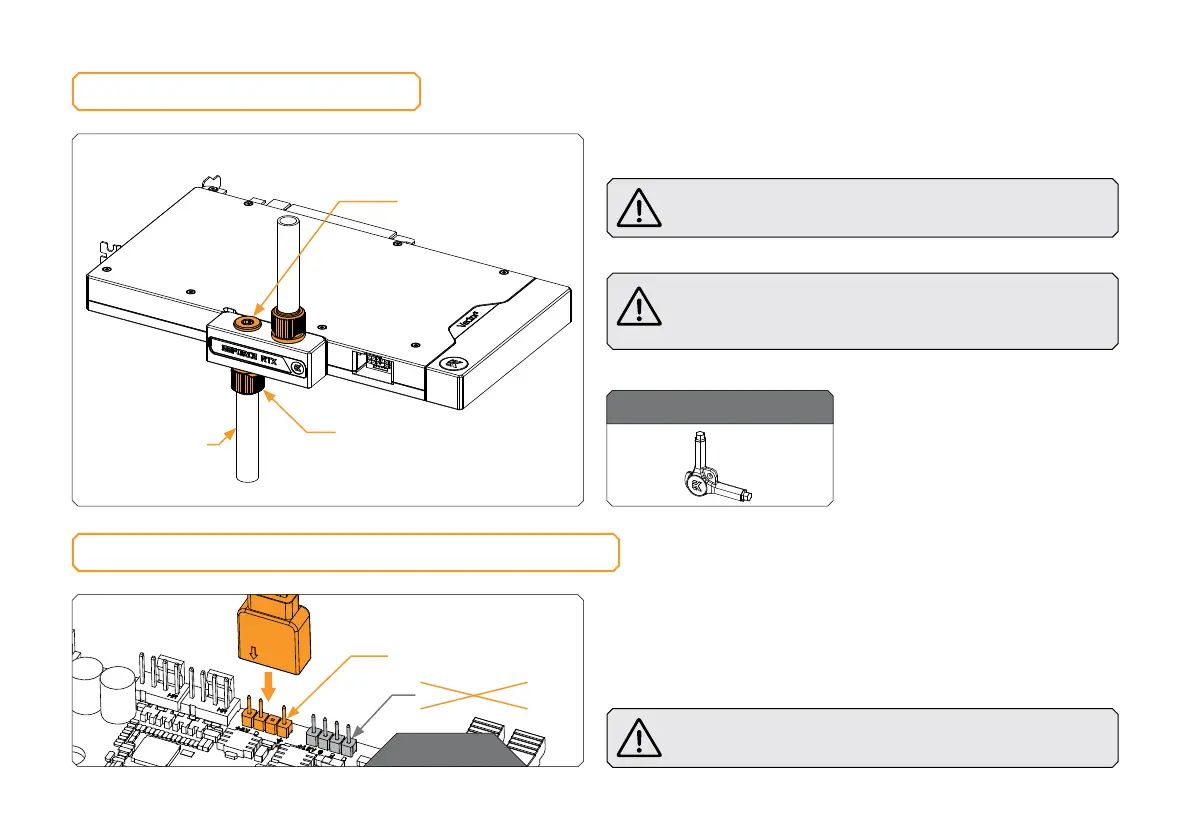
CONNECTING THE D-RGB LED STRIP
STEP 1
Plug the 3-pin connector of the distribution plate D-RGB LED
light to the D-RGB HEADER on the motherboard. The LED will
work if the pin layout on the header is as follows: +5V, Digital,
Empty, Ground.
Incorrect installation or installation to a wrong header can
damage the LED strip or the header itself!
STEP 1
D-RGB HEADER
RGB HEADER
FITTINGS AND TUBING
Screw in two (2) G1/4 threaded male fittings. Attach the liquid
cooling tubes and connect the water block to the cooling loop.
Do not forget to plug the remaining two openings using
the enclosed EK-Plug G1/4 or its equivalent.
EK recommends using EK fittings with all EK water blocks.
CAUTION: When using connectors other than EK fittings,
pay special attention to the length of the fittings’ male G1/4”
thread – 5mm is the maximum G1/4” thread length allowed!
TUBING
EK- PLUG G1/4
EK-FITTING
For this step, you will need:
EK-Loop Multi Allen Key







 To Next Page