- 16 -
CUTTING AND PLACING THERMAL PADS - BACKPLATE
STEP 2
Place Thermal Pad - BP Chip - 30x30x1mm on the marked position.
STEP 2
STEP 1
STEP 1
After attaching the water block, a few more thermal pads need to be
placed on backplate to cover all the necessary components.
Pay attention not to use too much force when pressing
the block down to the PCB since chip dies are prone
to cracking.
Before attaching the PCB to the Water Block, make sure
all the Thermal Pads are placed correctly!
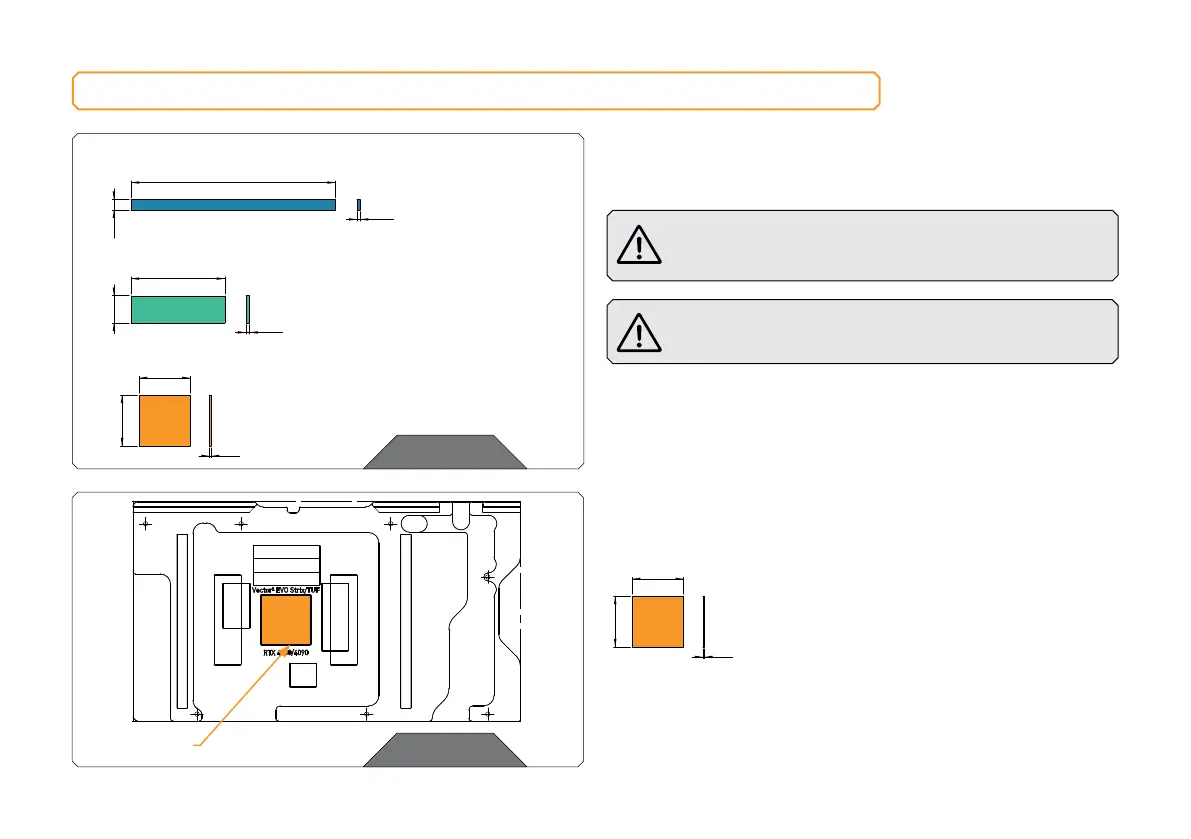
Replacement thermal pads:
Thermal Pad - BP Chip - 30x30x1mm EAN: 3831109914519 – 1 pc
Thermal Pad- VRAM - (55x16x2 mm) EAN: 3831109914540 – 3 pcs
Thermal Pad- VRM - (120x6x2 mm) EAN: 3831109914533 – 2 pcs
Thermal Pad - VRM – (120x6x2 mm)
6 mm
2 mm
Thermal Pad- VRAM – (55x16x2 mm)
16 mm
2 mm
Thermal Pad - BP Chip – 30x30x1mm
30 mm
30 mm
1 mm
Thermal Pad - BP Chip – 30x30x1mm
30 mm
1 mm
30x60x1 mm







 To Next Page