E L A N H O M E S Y S T E M S
© ELAN Home Systems 2009 • All rights reserved. Page 23
A12 INSTALLATION MANUAL
Chapter 5: Troubleshooting
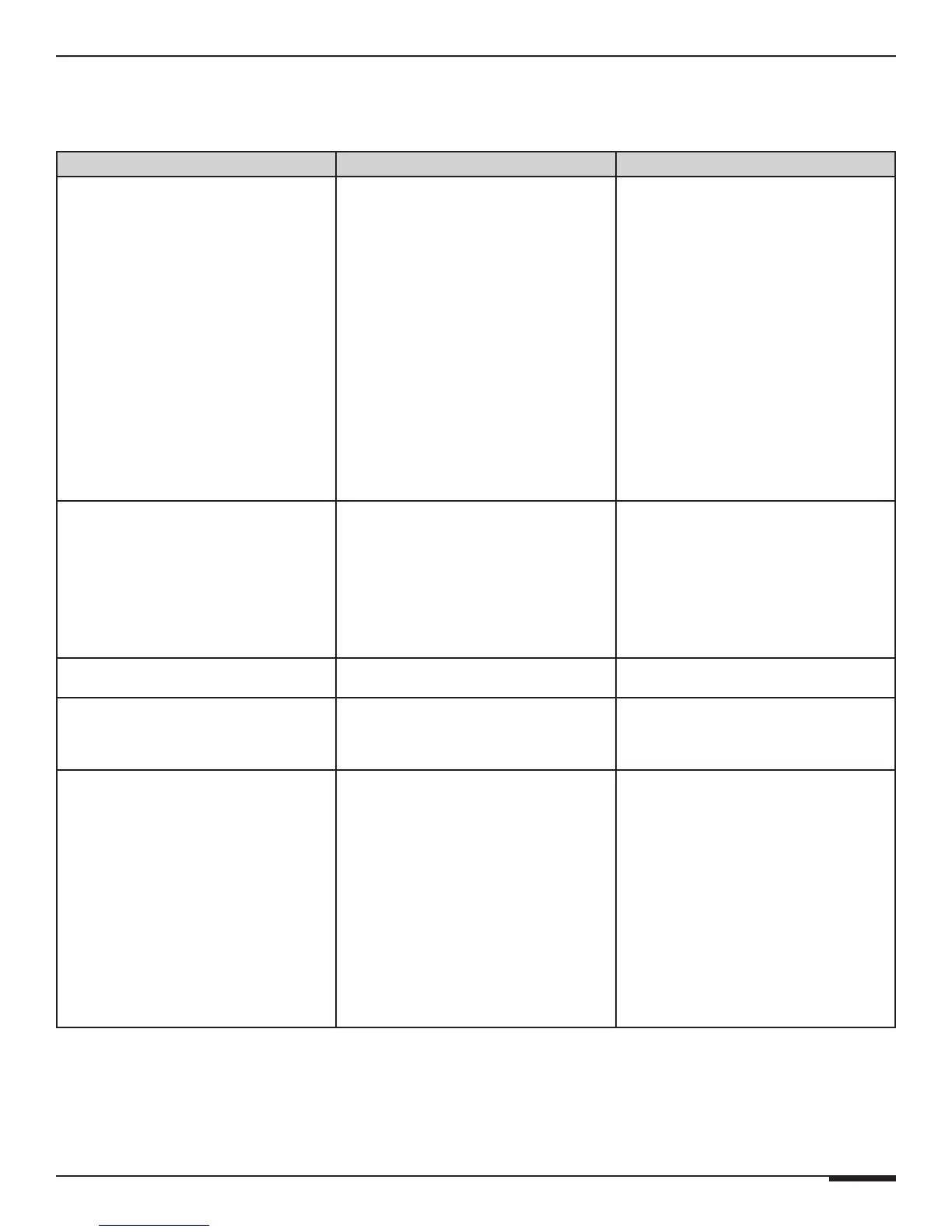
Symptom Possible Cause Solution
No Audio From One or
More Channels
1. Loose/bad speaker cable connection
2. Break/short in speaker cable
3. Speaker is defective
4. RCA patch cable defective
5. Source not sending audio
6. DIP switches set incorrectly. Verify
BUS DIP switch settings
1. Check cable ends at binding posts
and speaker terminals.
2. Check continuity of each speaker
cable using multimeter. If short or open
is indicated, check wiring for proper
connections.
3. Swap with known good speaker.
4. Swap with known good patch cable.
5. Verify source is powered up and play-
ing. Check any tape monitor settings on
A/V Receiver.
6. Verify/correct dip switch settings.
No Audio From One Channel Amplifier is overheating due to
inadequate ventalation or prolonged
operation at clipping levels.
1. (a) Turn the amplifier off and allow the
internal circuits to cool.
(b) Ensure that the amplifier has
proper ventilation. Add cooling fan if
necessary.
(c) Lower the gain level controls for
that channel pair.
No Audio From One Channel Unit may require service. Contact ELAN Technical Support.
Very Low or No Sound on Some or All
Channels
Audio input cable is bad. Check source equipment cables for
damage and faulty connections and cor-
rect.
Audio “Hum” 1. Ground potential difference between
source components (ground loop)
2. Faulty/damaged cables
3. Faulty wiring
1. (a) Test AC outlet using ground tester.
(b) Reverse the AC plug of compo-
nents with non-polarized ends plugged
into the same outlet strip as amp.
2. Check source equipment cables for
damage and faulty connections.
3. (a) Make sure volume controls are not
hooked up backwards.
(b) Check for shorts in wiring (see
item 2 in “No audio…”).



 To Next Page