ELAN HOME SYSTEMS
Page 16 © ELAN Home Systems 2005 • All rights reserved.
A1240 INSTALLATION MANUAL
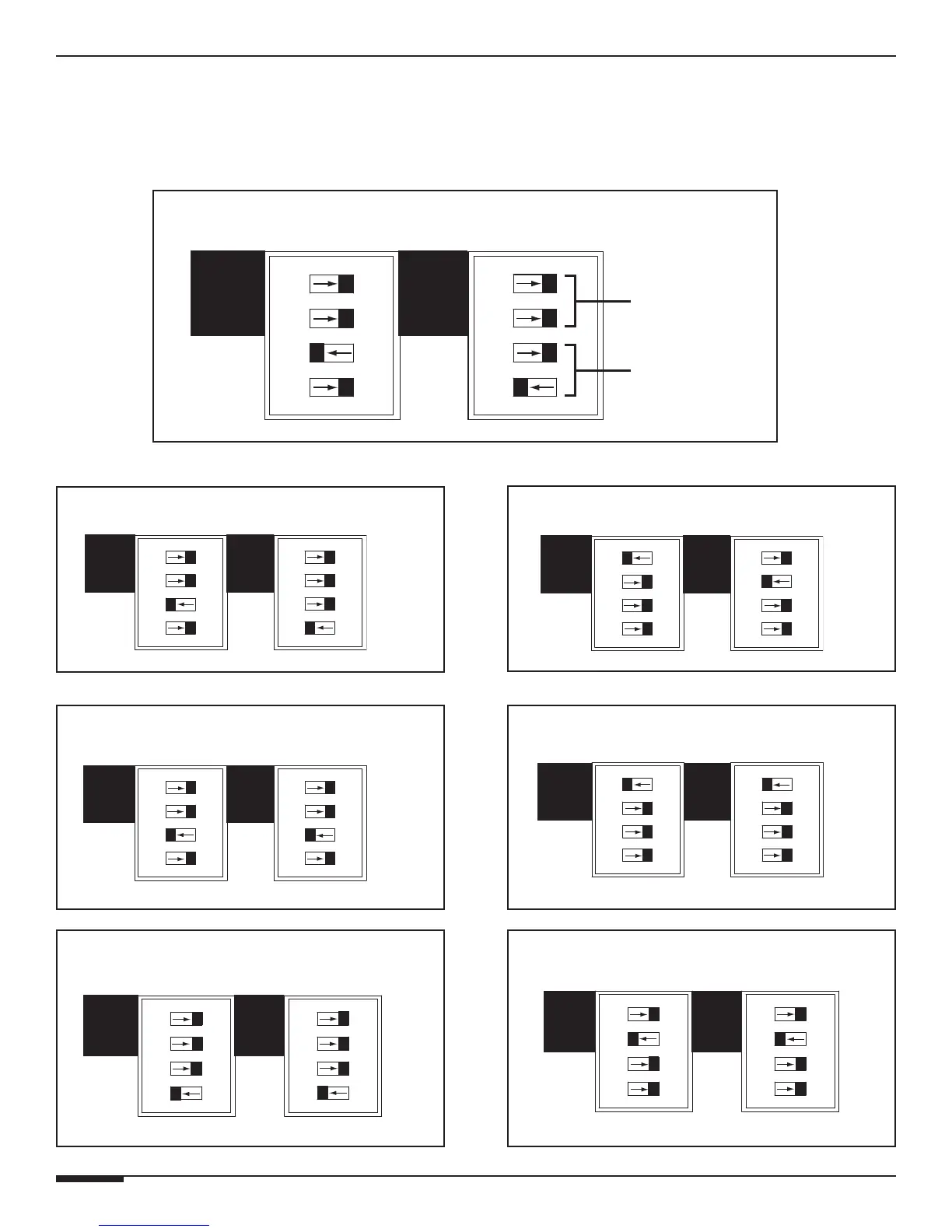
DIP Switch Settings
The four DIP switches correspond (from top to bottom) to Bus Left, Bus Right, Direct
Input Left, and Direct Input Right. Flip the switch to the left to enable the setting, to
the right to disable it. Only one setting should be enabled (set to the left position) at
a time. Carefully review the diagrams below before setting DIP switches.
BUS
Direct Input-Stereo (Factory Default)
BUS
Direct Input-Mono
(Sending CH. 1, 3, 5, 7, 9, or 11 to CH. 2, 4, 6, 8, 10, or 12)
BUS
Bus Mode-Stereo
BUS
Bus Mode-Mono
(Sending Left Bus Input to Left & Right Channels)
BUS
Direct Input-Mono
(Sending CH. 2, 4, 6, 8, 10, or 12 to CH. 1, 3, 5, 7, 9, or 11)
BUS
Bus Mode-Mono
(Sending Right Bus Input to Left & Right Channels)
BUS
Factory Default DIP Switch Settings
BUS INPUT
Dipswitches
DIRECT INPUT
Dipswitches



 To Next Page