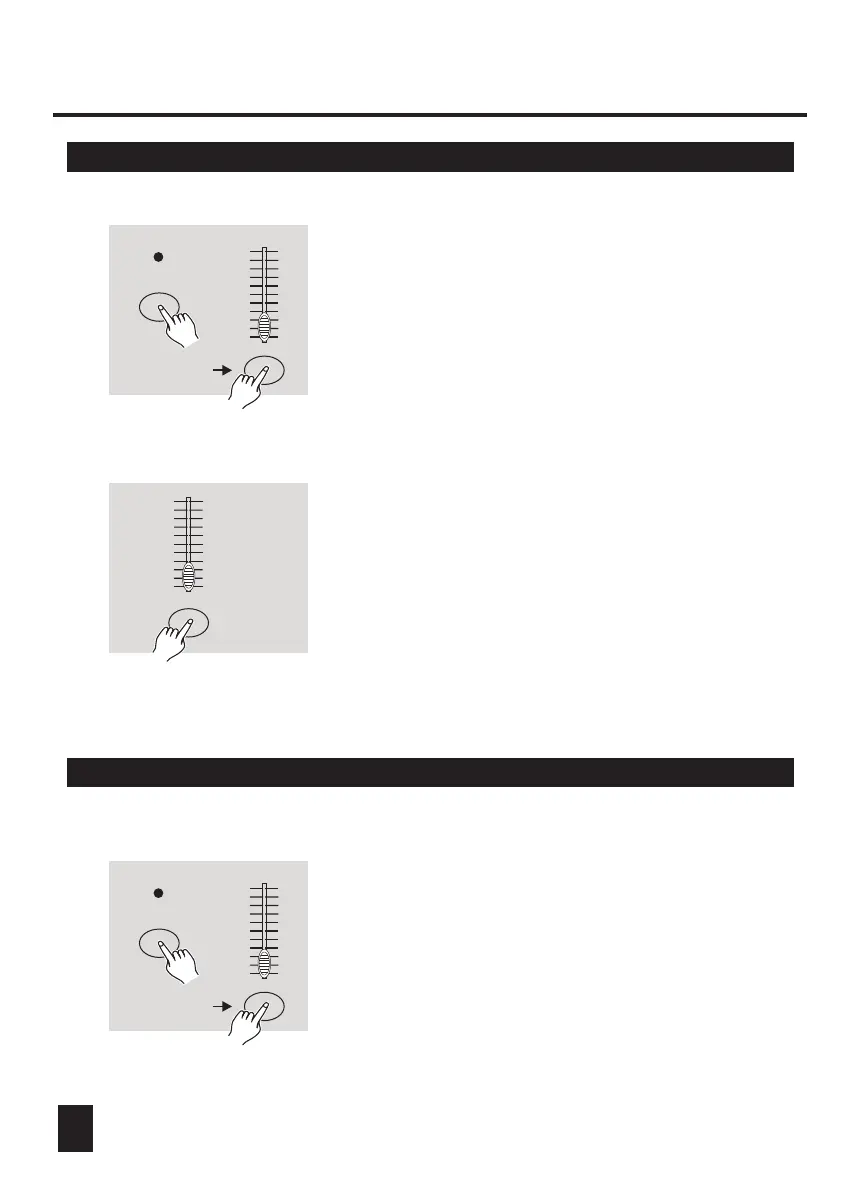
3.1 Setting MIDI IN
3.2 Setting MIDI OUT
RECORD
RECORD
Flash button 1
Flash button 2
Flash buttons
1-16
1. Tap the Flash button 1 three times while holding
down the Record button, the Segment Display
reads "CHI" indicating MIDI IN channel setup is
available.
1. Tap the Flash button 2 three times while holding
down the Record button, the Segment Display
reads "CHO" indicating MIDI OUT channel setup
is available.
2. Tap the Flash button numbered from 1-16 to
assign MIDI IN channel 1-16, the relevant
channel LED lights indicating MIDI IN channel
is set.
Tap this button
three times
Tap this button
three times
23
10
8
6
4
2
0
10
8
6
4
2
0
10
8
6
4
2
0
10
8
6
4
2
0
10
8
6
4
2
0
10
8
6
4
2
0
3. MIDI Operation & DMX Channel Setup



 To Next Page