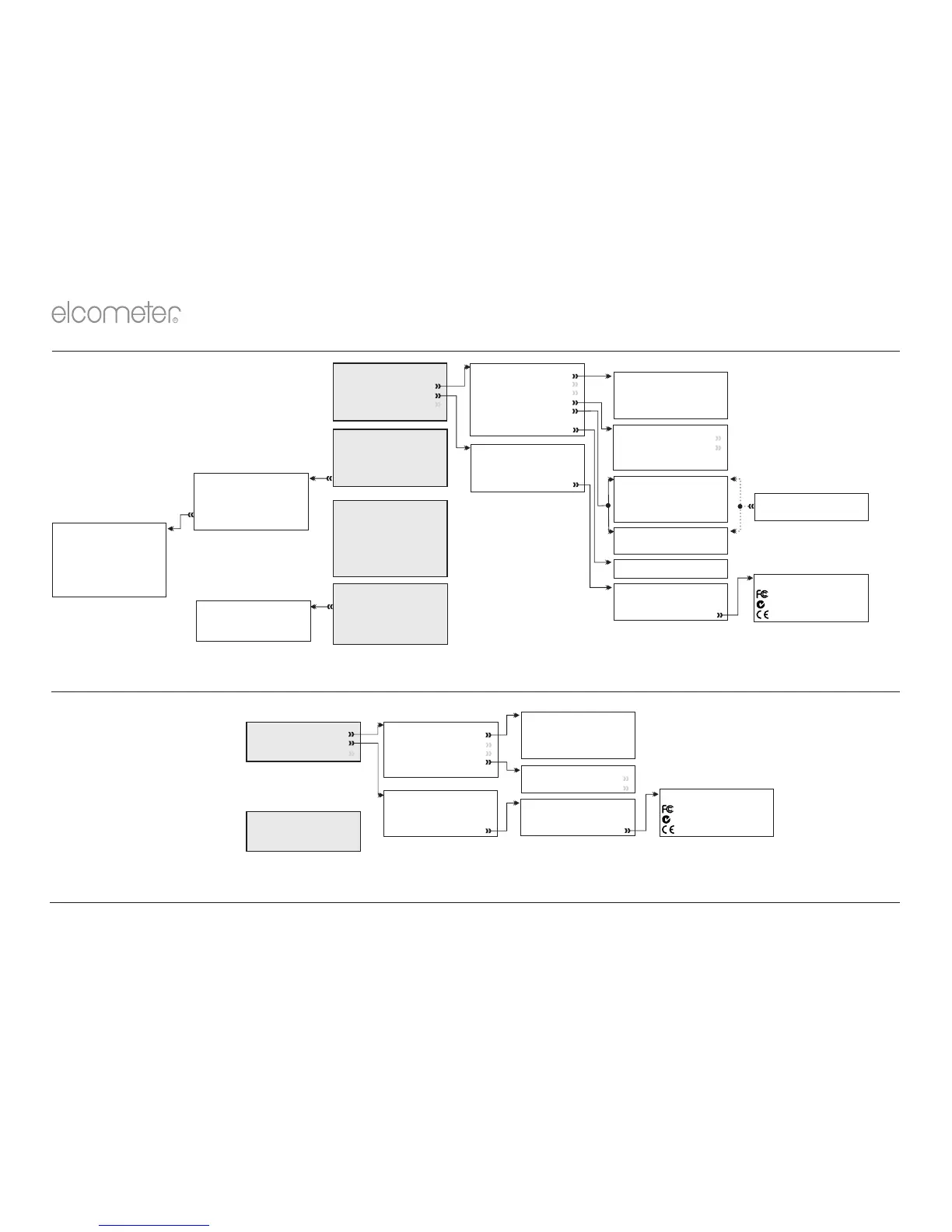
15 MENU STRUCTURE - ELCOMETER 456 MODEL E
4 To reset the Elcometer 456 Model E to the factory calibration, select Menu/Reset
14 MENU STRUCTURE - ELCOMETER 456 MODEL B
en
R
www.elcometer.com13
Display
Clear Statistics
Readings Only
Readings & Selected Stats
Readings & Bar Graph
Statistics
Setup
Units
Language
Beep Volume
Screen Settings
Probe
Gauge Auto Off
Calibration Lock
Select Statistics
Number of Readings
Mean
Lowest Reading
Highest Reading
Standard Deviation
Coefficient of Variation
Elcometer Index Value
Probe
Auto FNF
Ferrous F
Non Ferrous N
Probe Switch On
Probe
Ferrous F1
Ferrous F2
○
○
○
○
○
○
Screen Settings
Screen Brightness
Screen Timeout
Auto Display Rotation
Opening Screen
About
Gauge Information
Probe Information
Contact
Legal
Cal Method
Zero
Smooth
Rough / 2 Point
○
○
○
○
○
○
○
○
○
○
Menu
Delete Last Reading
Setup
About
Reset
Emergency Light
Calibration
Calibrate
Cal Method
Factory Calibration
Calibration Lock
Test Calibration
○
Data
Last Five Readings
50.5 µm
52.3 µm
51.0 µm
51.8 µm
51.5 µm
Escape Delete Ok
○
○
○
Calibration Lock
Enable PIN
Units
µm
mm
mils
inch
○
○
○
○
○
○
○
Statistics
Clear Statistics
View Selected
View All
Select Statistics
Counted Average
Probe
Menu displayed is dependent
on the probe connected
Legal
Patents
Legal Notices
Regulatory
Regulatory
xxxxx
Setup
Units
Language
Beep Volume
Screen Settings
Probe Switch On
Screen Settings
Screen Brightness
Screen Timeout
About
Gauge Information
Probe Information
Contact
Legal
Menu
Setup
About
Reset
Calibration
Pressing the Cal Softkey
starts the calibration process
Units
µm
mm
mils
inch
○
○
○
○
○
Legal
Patents
Legal Notices
Regulatory
Regulatory
xxxxx



 To Next Page