8
8 EN
ELDES GATE CONTROLLER ESIM120/320 User Manual v.1.1
3. INSTALLATION
• The system should be installed indoors, in stationary environment ONLY.
• For the connection of input/output terminals, use 0.50 mm
2
(0.02in
2
) thread unshielded cable of up to 100m (328.08ft) length.
1. Wire up the system in accordance with the wiring diagrams (see 2.3 Wiring Diagrams for more details).
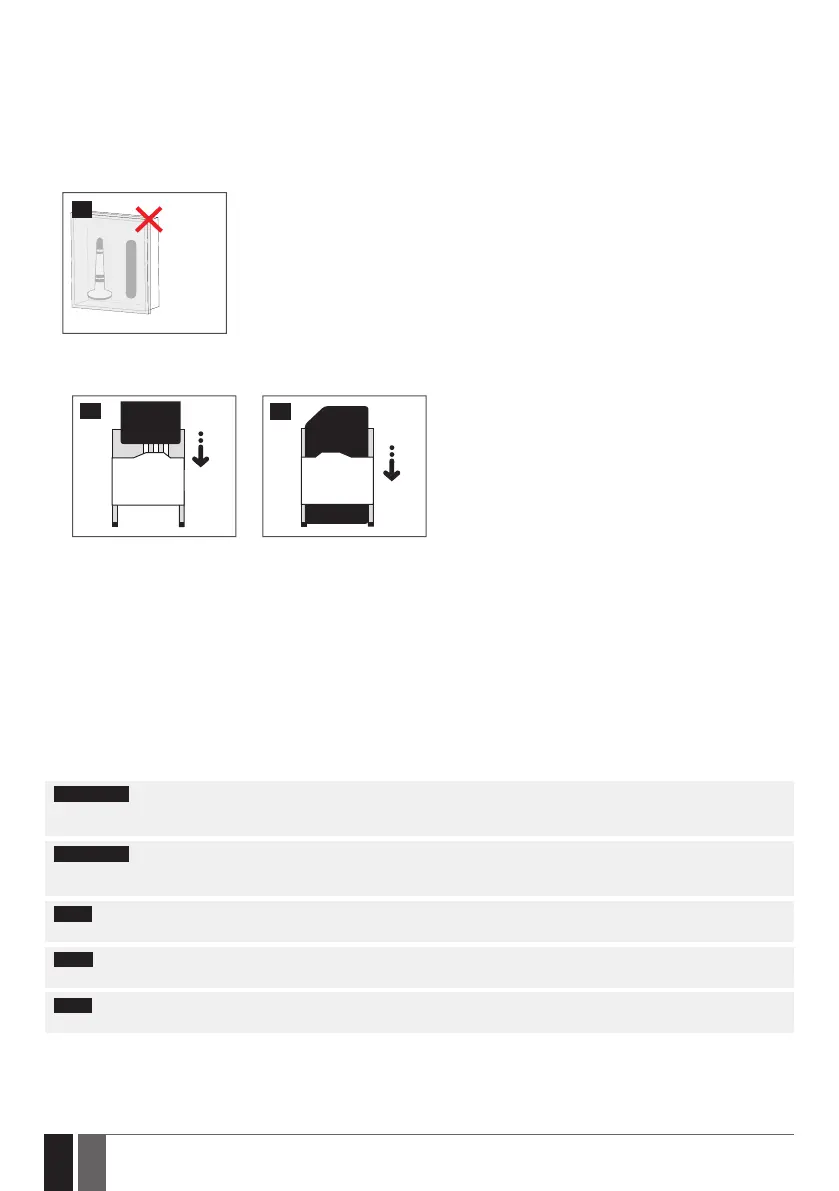
2. Connect the antenna. Based on the type of antenna supplied with ESIM120/ESIM320 unit, follow the recommendations for the anten-
na installation:
Antenna
4
Never install in the following
locations:
• inside the metal cabinet
• closer than 20cm (7.87in) from
the power lines
3. Disable the PIN code request of the SIM card by inserting it into a mobile phone and following the proper menu steps.
4. Once the PIN code is disabled, insert the SIM card into the SIM card slot / holder of ESIM120/ESIM320 system.
5
6
5. Power up the system and wait until indicator SIM STAT lights up indicating SIM card status.
6. Once the indicator SIM STAT lights OFF, the illuminated indicator NETW lights up indicating that the system has successfully connected
to GSM/3G network. To nd the strongest signal, position the antenna and follow the indications provided by NETW indicator (see 2.2.
Main Unit, LED Indicator and Connector Functionality for more details).
7. Change the system language if necessary (see 6. SYSTEM LANGUAGE for more details).
8. Change the default SMS password (see 7. SMS PASSWORD for more details).
9. Set the phone number for Admin 1 (see 8. ADMINISTRATOR PHONE NUMBERS for more details).
10. Set system date and time (see 9. DATE AND TIME for more details).
11. Once the system is fully congured, it is ready for use. However, if you fail to receive a reply by SMS text message from the system,
please check the SMSC (Short Message Service Center) phone number. For more details regarding the SMS center phone number,
please refer to 16.2. SMSC (Short Message Service Center) Phone Number.
ATTENTION: ESIM120 is NOT compatible with pure 3G SIM cards. Only 2G SIM cards and 3G SIM cards with 2G/GSM prole enabled are
supported. Meanwhile, ESIM320 is compatible with any SIM card and supports both 2G and 3G connections. For more details, please
contact your operator.
ATTENTION: We also recommend you to disable call forwarding, voice mail/text message reports on missed/busy calls and
similar services that might cause incorrect system operation. Please contact your operator for more details on these services and how
to disable them.
NOTE: For maximum system reliability we recommend you do NOT use a Pay As You Go SIM card. Otherwise, in the event of insucient
credit balance on the SIM card, the system would fail to make a phone call or send SMS text messages.
NOTE: We advise you to choose the same SIM provider for your system as for your mobile phone. This will ensure the fastest, most
reliable SMS text message delivery service and phone call connection.
NOTE: Even though the installation process of ESIM120/ESIM320 is not too complicated, we still recommend to perform it by a person
with basic knowledge in electrical engineering and electronics to avoid any system damage.


 To Next Page