6
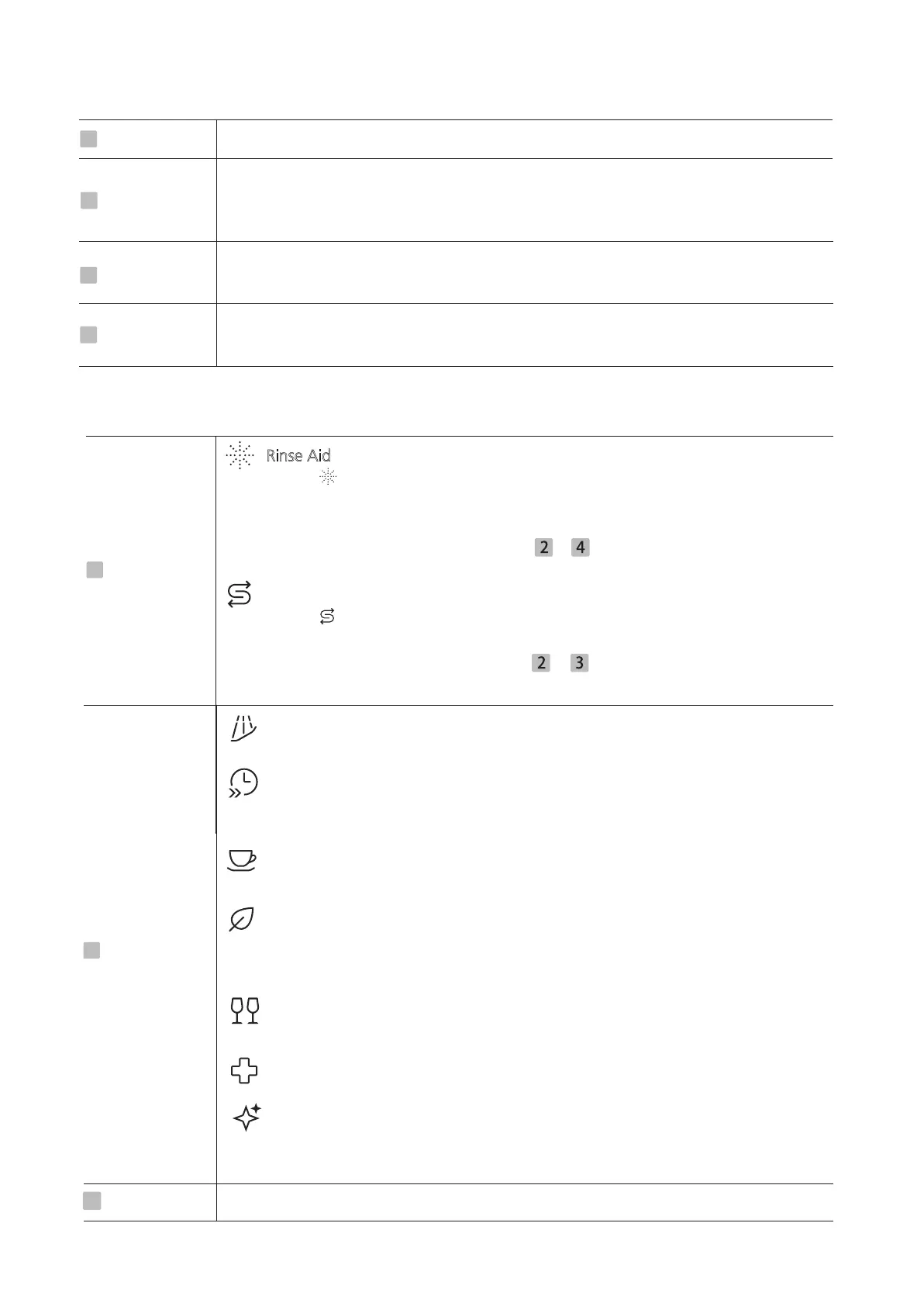
Operation (Button)
1
Power
Press this button to turn on your dishwasher
Press the Delay button to increase the delay start time.Delay a cycle for up to 24
hours in one-hour increments. After setting the delay time, press the Start/Pause
button to start.
2
Delay
Press this button to select the appropriate washing program, the program
indicator will be lit.
3
Program
Press the button to start the selected washing program or pause the working
program.
4
Start/Pause
Display
Rinse Aid
If the “ ” indicator is lit, it means the dishwasher is low
on dishwasher rinse aid
and requires a refill.The indicator will be off in a certain time after refill the rinse
aid.
If users don’t need the indicator, hold + for 3s to OFF/ON the indicator.
After the operation the indicator will be deactivated forever, until reactivated.
Salt
If the “ ” indicator is lit, it means the dishwasher is low on dishwasher salt and
needs to be refilled.The indicator will be off in a certain time after refill the salt.
If users don’t need the indicator, hold + for 3s to OFF/ON the indicator.
After the operation the indicator will be deactivated forever, until reactivated.
5
Warning
indicator
Pre-rinse
To rinse dishes that you plan to wash later that day.
Quick
A shorter wash for lightly soiled loads that do not
need drying.
Normal
For normally soiled loads, such as pots, plates, glasses and lightly soiled pans.
ECO
This is standard program, it is suitable to clean normally soiled tableware and it
is the most efficient program in terms of its combined energy and water
consumption for that type of tableware.
Delicate
For lightly soiled crockery and glass.
Hygiene
Use to sanitize your dishes and glassware. The highest water temperature is 72℃
Machine
Care
This program provides an effective cleaning of the dishwasher itself.Please find
more details in Maintenance & Cleaning
6
Program
indicator
7
Screen
To show the reminding time, delay time, error code etc.


 To Next Page