28
12. Front Panel Accessibility
Step: 1
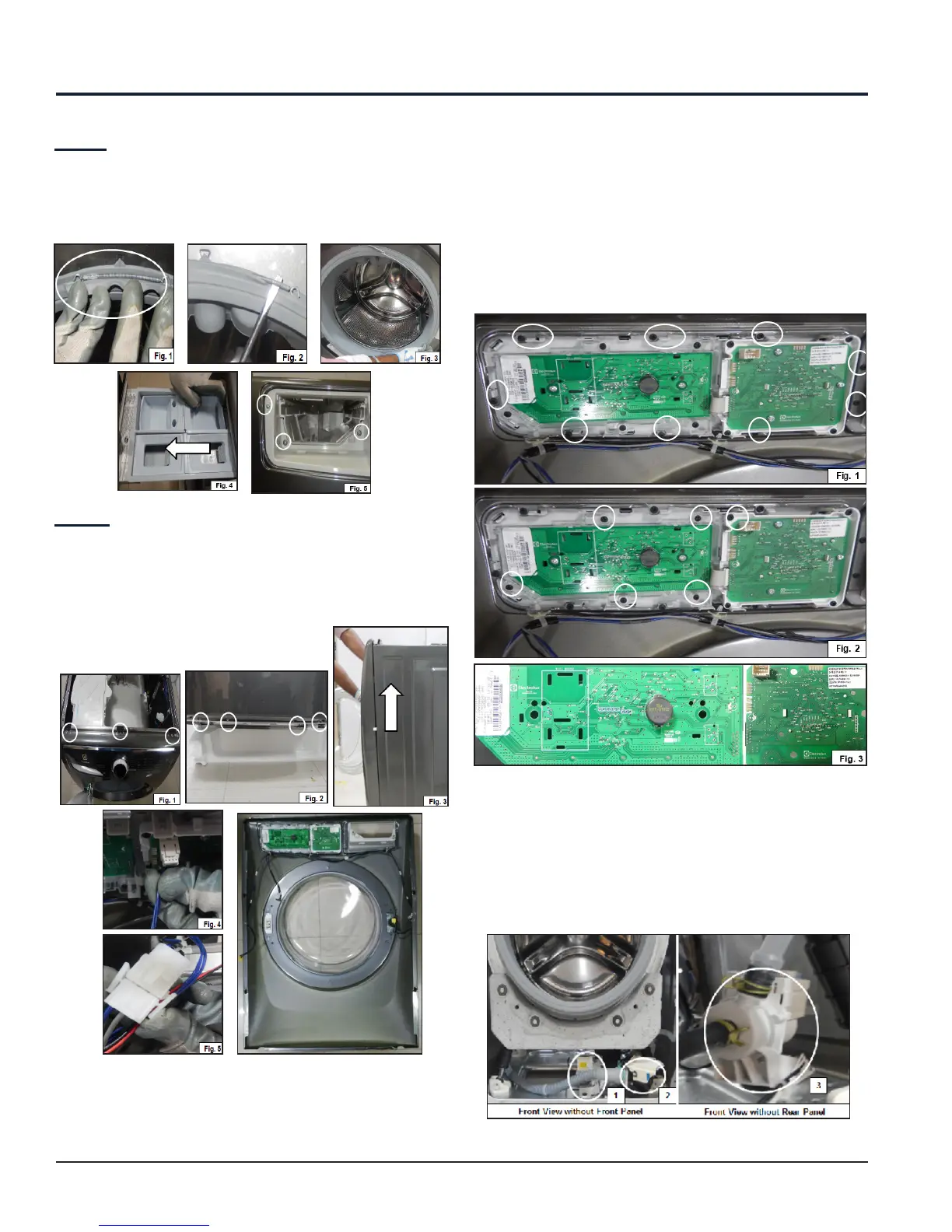
Release the bellow clamp and loosen the Bellow as
shown (See Fig. 1, 2, and 3). Pull out the Dispenser as
shown (See Fig. 4) and loosen the screws as shown
(See Fig. 5).
Step: 2
Loosen the 3 screws at the top (See Fig. 1) and 4
screws at the bottom (See Fig. 2) of Front Panel. Lift
the Front panel until it is unlocked from the Side Panel
(See Fig. 3) and detach the connector (See Fig. 4 and
5). Front Panel with User Interface
Board Assembly is shown in figure.
From the Front Panel we can access:
1. Control Panel
12.1 Control Panel Accessibility
Loosen the screws, release the snaps (See Fig. 1), and
loosen the remaining screws (See Fig. 2) to remove
the User Interface (UI) Board Assembly (See Fig. 3).
After Front Panel removal, the following components
can be accessed from the Washer:
1. Concentrated Wash Pump
2. Drain Pump
3. Recirculation Pump



 To Next Page