12 electrolux
How to programme the Oven
to switch off
1. Switch the oven on, place food in the
oven, select the desired cooking
function and adjust the cooking tempe-
rature, if necessary.
2. Touch the time function control
and
select the Cooking Duration function.
The Cooking Duration symbol will
flash and “0.00” will appear in the
display (Fig. 9).
3. While the symbol is flashing, set the
desired time using the “ ” control.
Maximum time is 23 hours 59 minutes.
The programmer will wait a few
seconds and then start running.
4. When the programmed time has
elapsed, the oven will be switched off
automatically. An acoustic alarm will
be heard and “0.00” will appear on the
control panel.
5. To switch off the acoustic alarm, touch
the
control.
If you touch any other control, the alarm
will stop and the control panel will
display the symbols indicated in Fig.
10. Then, you need to reset the
programmer display by touching the
control.
The acoustic alarm will switch
off automatically after
approximately two minutes.
Then touch the
control to
reset the programme.
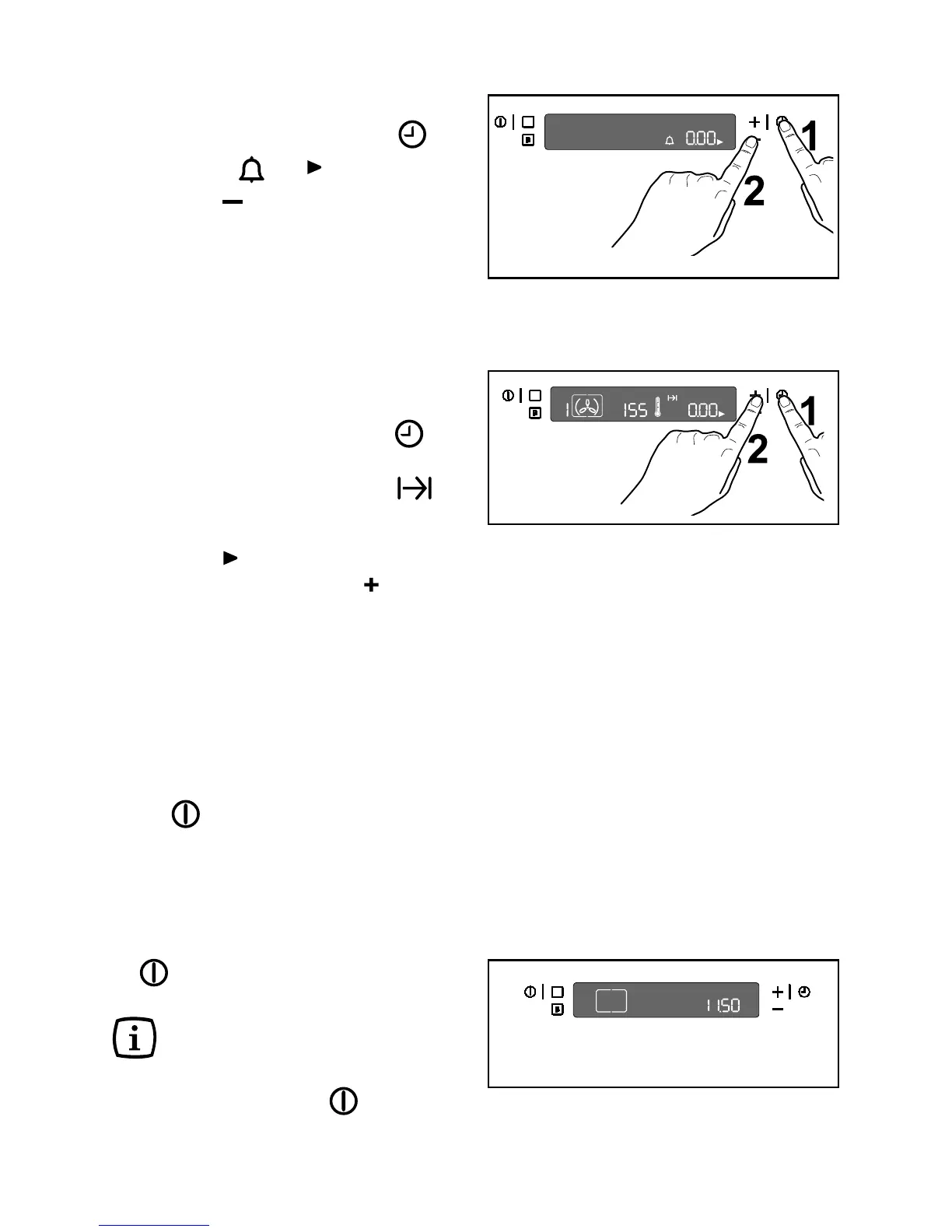
Fig. 9
Fig. 10
How to cancel the Minute Minder:
Touch the time function control until
the symbols and flash.
Touch the “ ” control until “0.00” appears
in the display to re-set the time (Fig. 8).
Fig. 8



 To Next Page