electrolux 13
If you want to cancel the
programme, simply cancel the
Cooking Duration that has
been set (see the relevant
section).
The acoustic alarm will switch
off automatically after
approximately two minutes.
Touch the
control to reset
the programme.
How to programme the Oven to
switch on and off
1. Set the Cooking Duration as described in
the relevant section.
2. Touch the time function control
until
the function for the end of the cooking time
is selected and the corresponding symbol
is flashing. The control panel will
display the end of cooking time (that is,
the actual time + cooking duration time)
(Fig. 12).
3. Touch the “ ” control to select the desired
end of the cooking time.
Remember that the cooking
duration time as such will not
change.
4. After the setting is carried out, the
programmer will wait a few seconds and
then start running.
5. The oven will switch on and off
automatically. When it switches itself off,
an acoustic alarm will sound.
6. To switch off the acoustic alarm, touch
the control.
If you touch any other control, the alarm
will stop and the control panel will
display the symbols indicated in Fig. 10.
Then, you need to reset the programmer
display by pressing the
control.
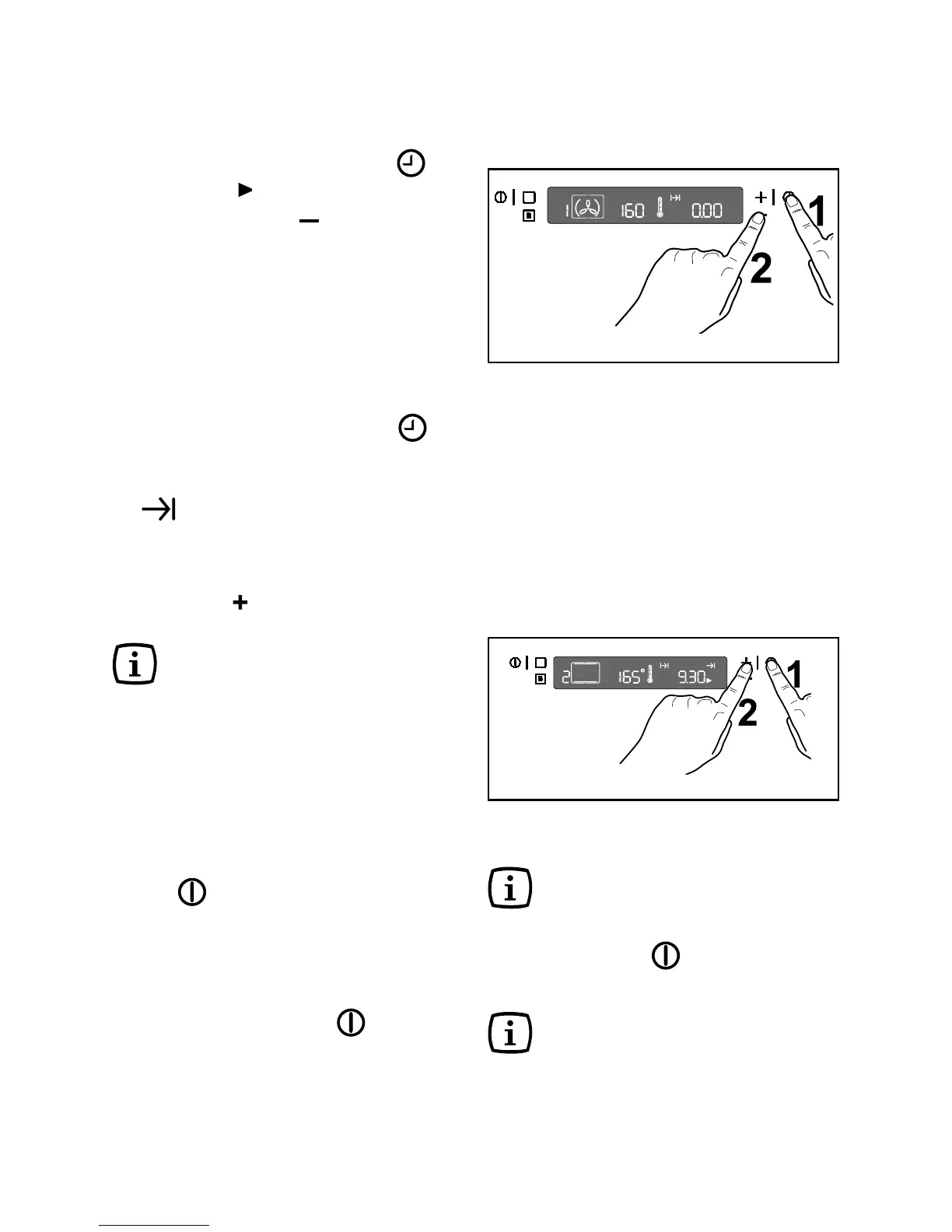
Fig. 12
How to cancel a programmed
Cooking Duration Time:
— Touch the time function control until
the symbol flashes.
— Touch the control “
” to decrease the
time until the display shows “0.00” (Fig.
11).
Fig. 11



 To Next Page