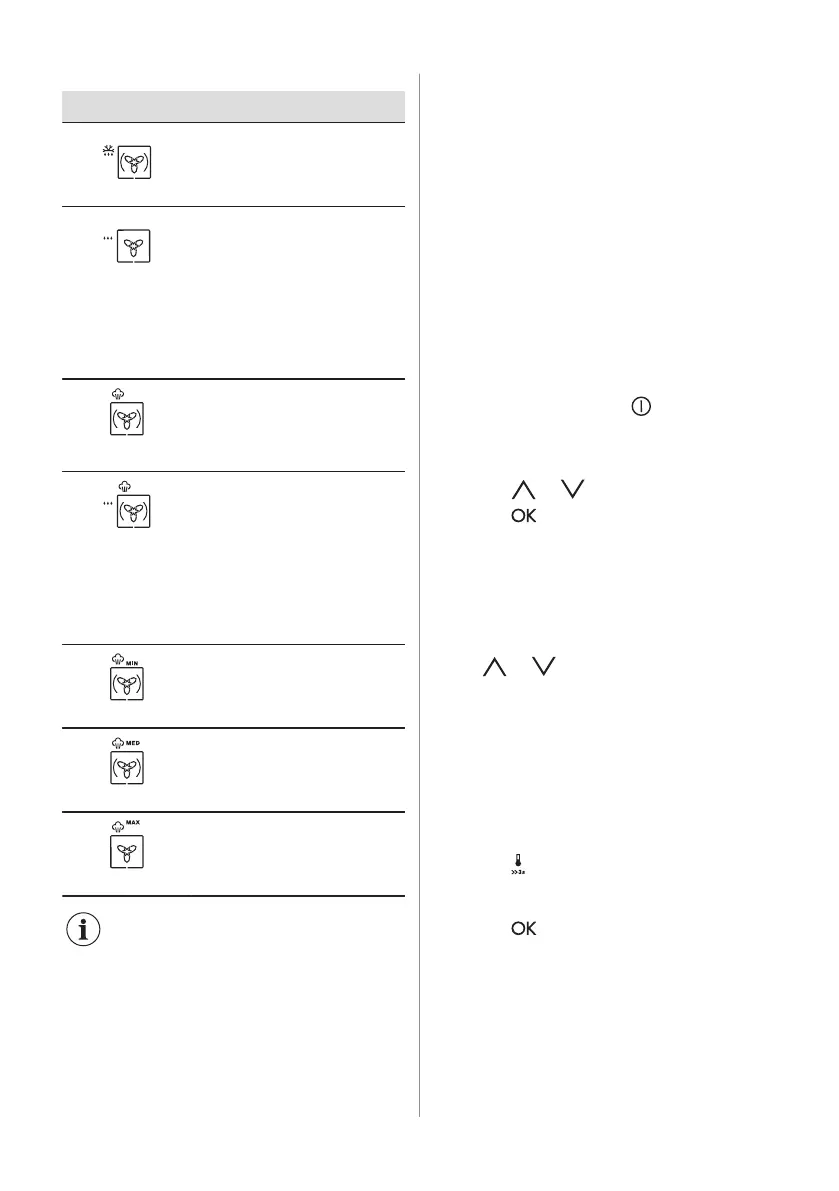
Oven function Application
Defrost
To defrost food (vegetables and
fruit). The defrosting time de‐
pends on the amount and size
of the frozen food.
Moist Fan Baking
This function is designed to
save energy during cooking.
When you use this function, the
temperature in the cavity may
differ from the set temperature.
The residual heat is used. The
heating power may be reduced.
For more information refer to
"Daily Use" chapter, Notes on:
Moist Fan Baking.
Bread Baking
Use this function to prepare
bread and bread rolls with pro‐
fessional-like result in terms of
crispiness, colour and crust
gloss.
Steam Regenerat‐
ing
Food reheating with steam pre‐
vents surface drying. Heat is
distributed in a gentle and even
way, which allows to recover
taste and aroma of food as just
prepared. This function can be
used to reheat food directly on a
plate. You can reheat more than
one plate at the same time, us‐
ing different shelf positions.
Humidity Low
To bake bread, roast large
pieces of meat or to warm up
chilled and frozen meals.
Humidity High
For dishes with a high moisture
content, custard royale and terri‐
nes, and for poaching fish.
Full Steam
For vegetables, fish, potatoes,
rice, pasta or special side-
dishes.
The lamp may turn off
automatically at a temperature
below 60 °C during some oven
functions.
6.2 Notes on: Moist Fan Baking
This function was used to comply with the
energy efficiency class and ecodesign
requirements according to EU 65/2014 and
EU 66/2014. Tests according to EN 60350-1.
The oven door should be closed during
cooking so that the function is not interrupted
and the oven operates with the highest
energy efficiency possible.
When you use this function the lamp
automatically turns off after 30 sec.
For the cooking instructions refer to "Hints
and tips" chapter, Moist Fan Baking. For
general energy saving recommendations
refer to "Energy Efficiency" chapter, Energy
Saving.
6.3 How to set: Heating Functions
1. Turn on the oven with .
The display shows the set temperature, the
symbol and the number of the heating
function.
2. Press or to set a heating function.
3. Press or the oven starts
automatically after 5 seconds.
If you turn on the oven and do not set any
heating function or programme, the oven
turns off automatically after 20 seconds.
6.4 How to set: Temperature
Press or to change the temperature
in steps: 5 °C.
When the oven is at the set temperature a
signal sounds and the Heat up indicator
disappears.
6.5 How to check: Temperature
You can check the current temperature in the
oven when the function or programme works.
1. Press .
The display shows the temperature in the
oven.
2. Press or the display shows again the
set temperature automatically after 5
seconds.
6.6 How to set: Fast Heat Up
Do not put food in the oven when the Fast
heat up works.
12 ENGLISH



 To Next Page