When the water hardness exceeds the
values in the table, fill the water drawer with
bottled water.
1. Take the 4 colour change strip supplied
with the steam set in the oven.
2. Put all the reaction zones of the strip into
the water for approximately 1 second.
Do not put the strip into the running
water.
3. Shake the strip to remove the excess of
the water.
4. Wait 1 minute and check the water
hardness with the table below.
The colours of the reaction zones
continue to change. Do not check the
water hardness later than 1 minute after
test.
5. Set the water hardness: settings menu.
Refer to the "Additional functions" chapter,
Using the settings menu.
Test strip Water Hardness
1
2
3
4
You can change the water hardness in the
settings menu.
6. DAILY USE
WARNING!
Refer to Safety chapters.
6.1 Heating Functions
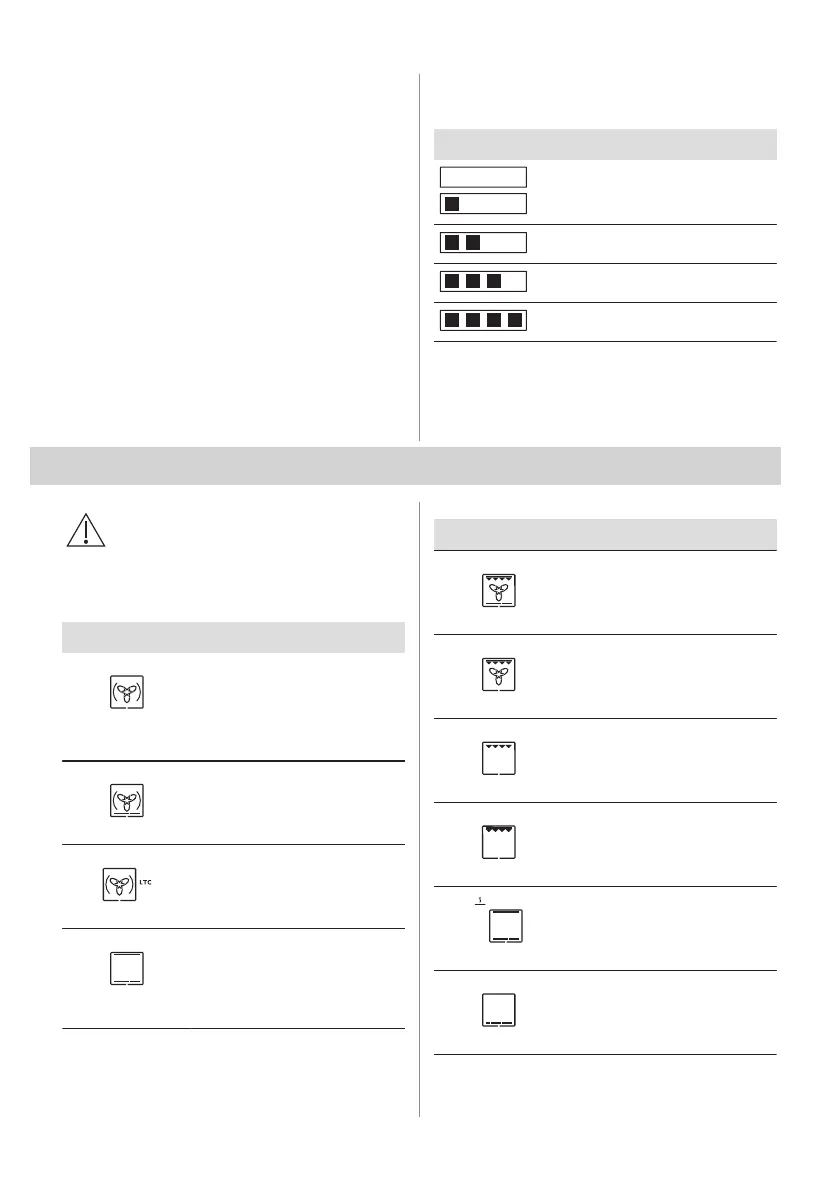
Oven function Application
True Fan Cooking
To bake on up to three shelf po‐
sitions at the same time and to
dry food.
Set the temperature 20 - 40 °C
lower than for Conventional
Cooking.
Pizza Function
To bake pizza. To make inten‐
sive browning and a crispy bot‐
tom.
Slow Cooking
To prepare tender, succulent
roasts.
Conventional
Cooking
To bake and roast food on one
shelf position.
Oven function Application
Frozen Foods
To make convenience food
(e.g., french fries, potato wedg‐
es or spring rolls) crispy.
Turbo Grilling
To roast large meat joints or
poultry with bones on one shelf
position. To make gratins and to
brown.
Grill
To grill thin pieces of food and
to toast bread.
Fast Grilling
To grill thin pieces of food in
large quantities and to toast
bread.
Keep Warm
To keep food warm.
Bottom Heat
To bake cakes with crispy bot‐
tom and to preserve food.
ENGLISH 11



 To Next Page