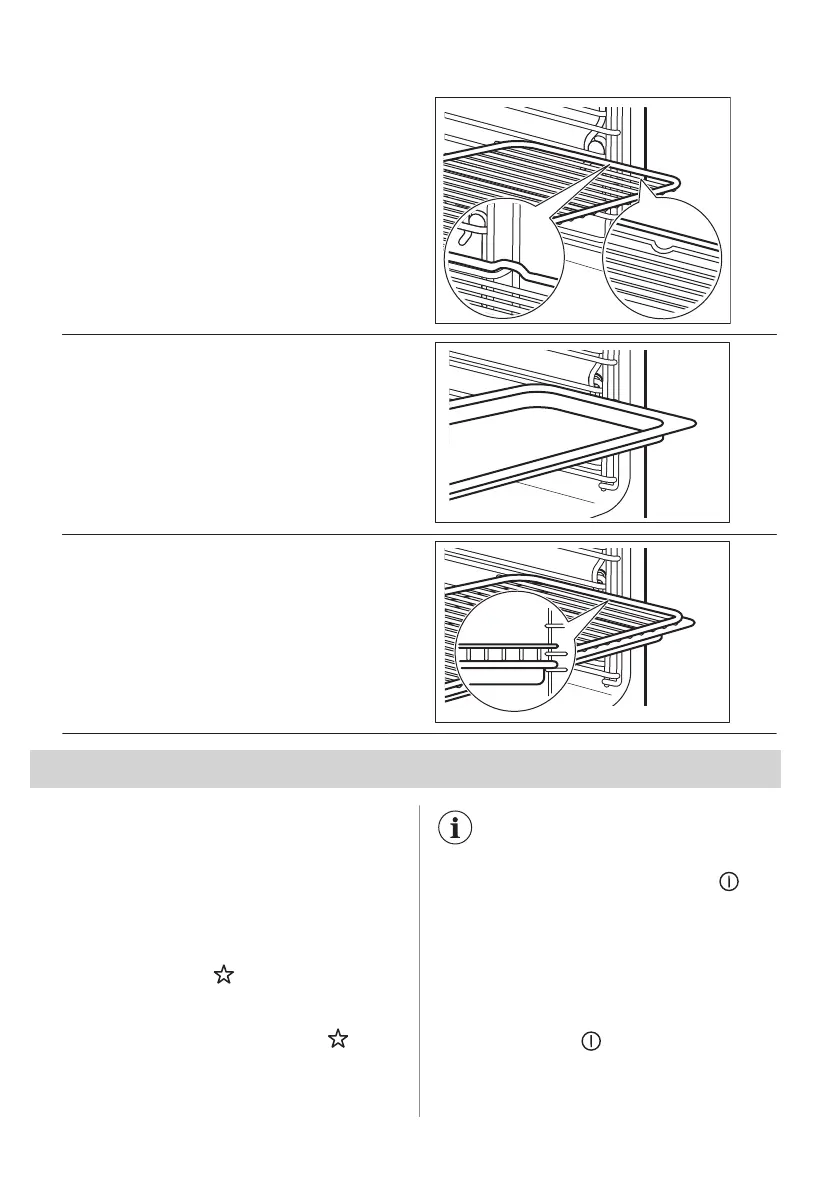
Wire shelf:
Push the shelf between the guide bars of the shelf
support.
Baking tray / Deep pan:
Push the tray between the guide bars of the shelf
support.
Wire shelf, Baking tray / Deep pan:
Push the tray between the guide bars of the shelf
support and the wire shelf on the guide bars
above.
10. ADDITIONAL FUNCTIONS
10.1 Using My Favourite
Programme function
Use this function to save your favourite
temperature and time settings for an oven
function or programme.
1. Set the temperature and time for an oven
function or programme.
2. Touch and hold for more than three
seconds. An acoustic signal sounds.
3. Deactivate the appliance.
• To activate the function touch . The
appliance activates your favourite
programme.
When the function operates,
you can change the time and
temperature.
• To deactivate the function touch .
The appliance deactivates your favourite
programme.
10.2 Using Child Lock
The Child Lock prevents an accidental
operation of the oven.
1. Press and hold
for 3 sec to turn off the
oven.
ENGLISH 19



 To Next Page