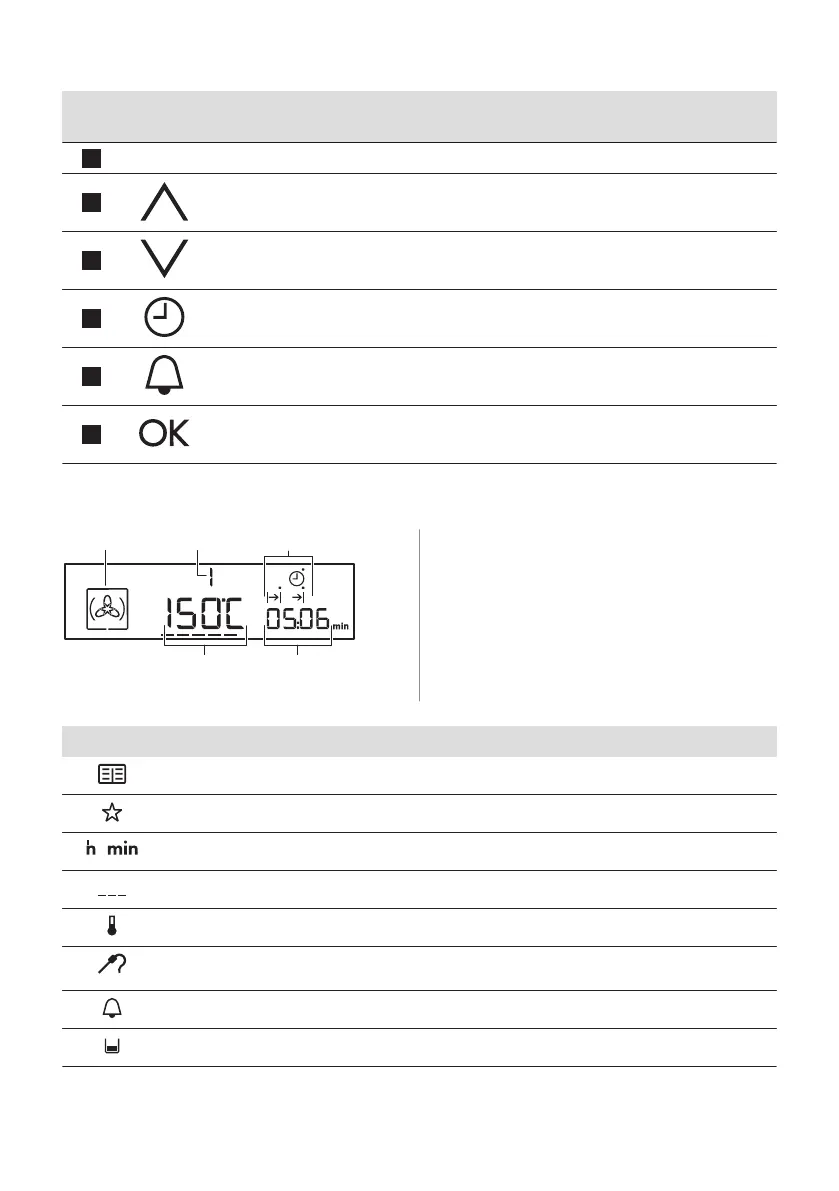
Sensor
Field
Function Description
6
-
Display Shows the current settings of the oven.
7
Up To move up in the menu.
8
Down To move down in the menu.
9
Clock To set the clock functions.
10
Minute Minder To set the Minute Minder.
11
OK To confirm the selection or setting.
4.2 Display
A. Heating function symbol
B. Number of the heating function /
programme
C. Indicators for the clock functions (refer to
"Clock functions" table)
D. Clock / residual heat display
E. Temperature / time of day display
Other indicators of the display:
Symbol Name Description
Automatic programme You can choose an automatic programme.
My favourite programme The favourite programme works.
/
h / min A clock function works.
Heat-up / residual heat indicator Shows the temperature level of the oven.
Temperature You can examine or change the temperature.
Core temperature sensor The core temperature sensor is in the core tempera‐
ture sensor socket.
Minute minder The minute minder function works.
Water drawer indicator Shows the water level.
ENGLISH 9



 To Next Page