EasyManua.ls Logo

Electrolux EWW1122DW - The Function of Control Panel; Control Panel Overview

Electrolux EWW1122DW
44 pages
Print Icon
To Next Page IconTo Next Page
To Previous Page IconTo Previous Page
Loading...
Power Start/
Pause
Temp. Dirt
level
Wash Rinse
Delicates
Wash
Wash & Dry
Cottons
Regular
Favourites
Clean Me
Whites
Eco-Whites
Woollens
Heavy Duty
Unlock/
Add Clothes
Start/
Pause
Power
7
14
www.electrolux.com
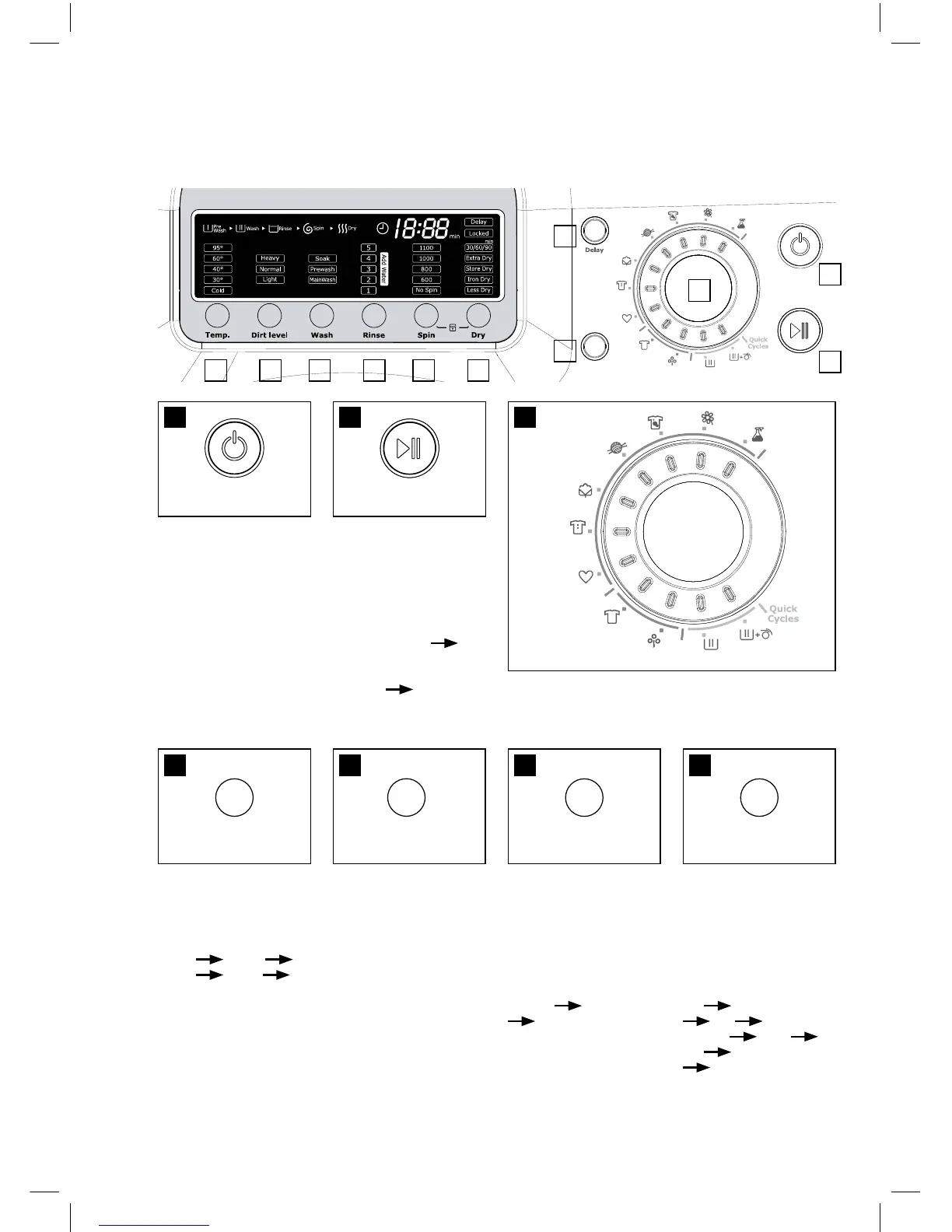
5. tHe FUnCtIon oF ContRoL PAneL
1. Press this switch
to turn the power “ON”
or “OFF”.
2. Operation and
temporary stop is
repeated as it is
pressed. When you
want to change
program in operating;
Press the “Start /
Pause” button
Select the program
that you want to
change Press the
“Start / Pause” button
again.
4. It can be used
to adjust water
temperature according
to types of the load to
be washed.
40°C 60°C
95°C Cold
30°C
5. You can select the
soil level you want and
each lamp is turned
on when that course is
selected.
3. You can select the course you want and each
lamp is turned on when that course is selected.
6. You can select
the wash course you
want and each lamp
is turned on when that
course is selected. As
this button is pressed,
the wash course is
selected by “Main
Wash” “Pre Wash”
“Soak”.
7. You can select the
rinse time(s) you want
and each lamp is
turned on when that
course is selected.
As this button is
pressed, the rinse
time(s) is selected by
‘1’ ‘Add Water’
‘2’ ‘Add
Water’ ... ...
‘5’ ‘Add Water’
‘0’.
4 5 6
1 2 3
7
Delicates
Wash
Wash & Dry
Cottons
Regular
Favourites
Clean Me
Whites
Eco-Whites
Woollens
Heavy Duty
1
2
4 5 6 7 8
3
9
11
12

Related product manuals