www.smartvest.com
SmartVest
SQL
Airway Clearance System
18
SQL Air Pulse Generator
Setting Ramp Mode
Steps:
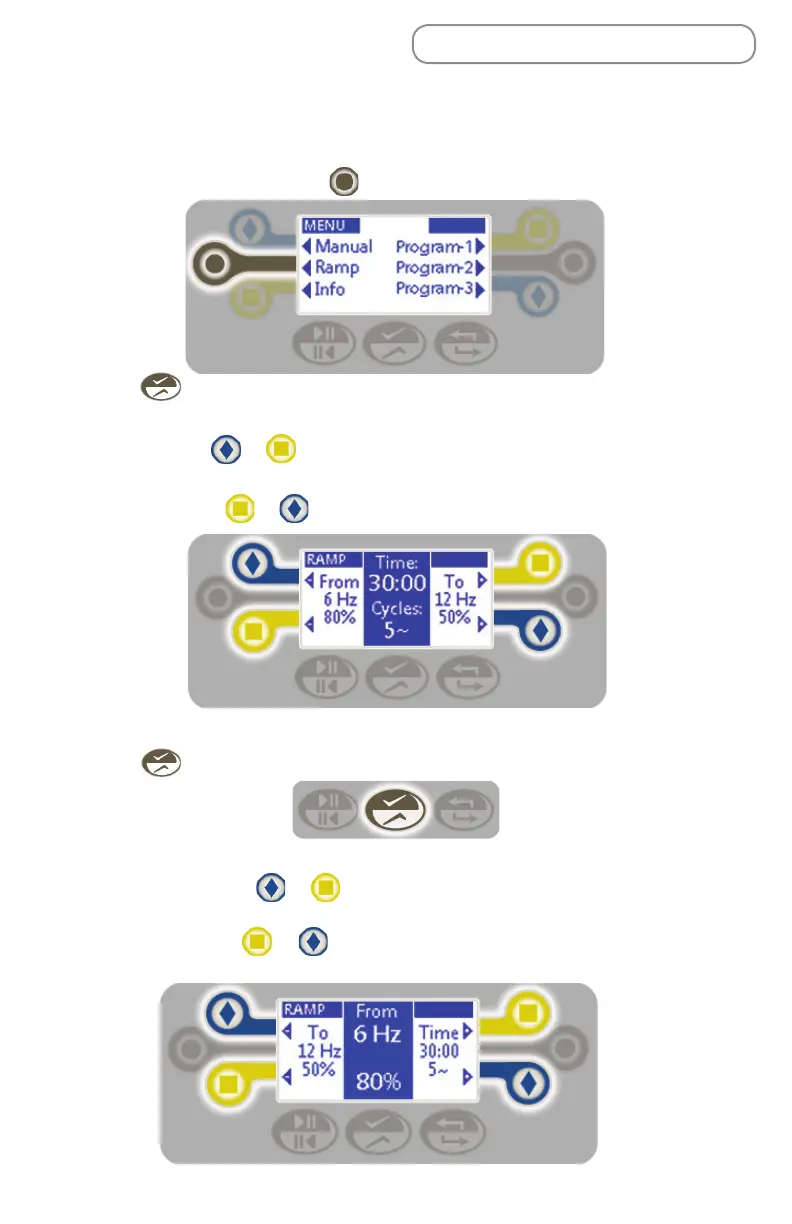
1. From the Home screen, press to select the Ramp mode.
2. Press to select the treatment sequence column.
3. To adjust the following settings:
• Time - Press or to the left or right of the time display. Adjust in 30
second increments from :30 - 60:00 minutes.
• Cycles - Press or to the left or right of the cycles display.
NOTE: Frequency, pressure, and time cannot be changed during treatment.
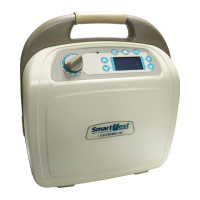
4. Press to save the settings and move to the From: column.
5. To adjust the From settings:
• Frequency - Press or to the left or right of the frequency display.
Adjust in 1 Hz increments from 5 to 20 Hz.
• Pressure - Press or to the left or right of the pressure display.
Adjust in increments of 5% from 10%-100%.


 To Next Page