SmartVest
SQL
Airway Clearance System
www.smartvest.com
19
SQL Air Pulse Generator
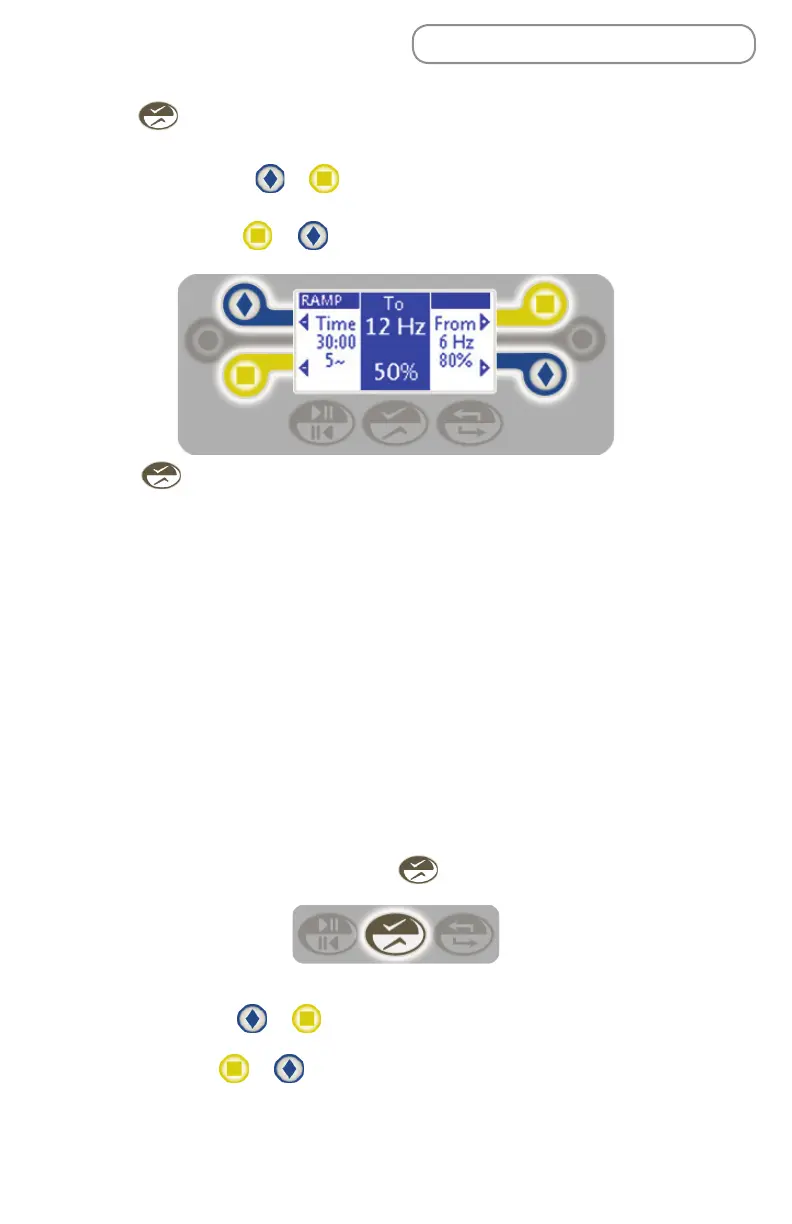
6. Press to save the settings and move to the To: column.
7. To adjust the To settings:
• Frequency - Press or to the left or right of the frequency display.
Adjust in 1 Hz increments from 5 to 20 Hz.
• Pressure - Press or to the left or right of the pressure display. Adjust
in increments of 5% from 10%-100%.
8. Press save the displayed values as the new default values (see Starting
the Treatment Protocol).
Setting a Pause
Your treatment protocol will pause or hold at the end of an interval. This is the
time designated to clear secretions. The default number and duration of a pause
is different by operating mode, but can be adjusted.
• Program (1-3) and Ramp - Pauses automatically for 5:00 minutes between
each of the defined intervals or cycles.
• Manual - Runs once and then holds.
To change these settings, continue on with the following steps, otherwise - skip
this section.
1. From within an operating mode, press for 2 seconds to access the pause
settings.
2. Set the following items:
• Pauses - Press or to the left or right of the Pauses display to
increase or decrease the number of pauses. Adjust from 0-5 pauses or Auto.
• Time - Press or to the left or right of the time display. Adjust from
00:15 - 5:00 minutes or Hold.


 To Next Page