(Picture 3)
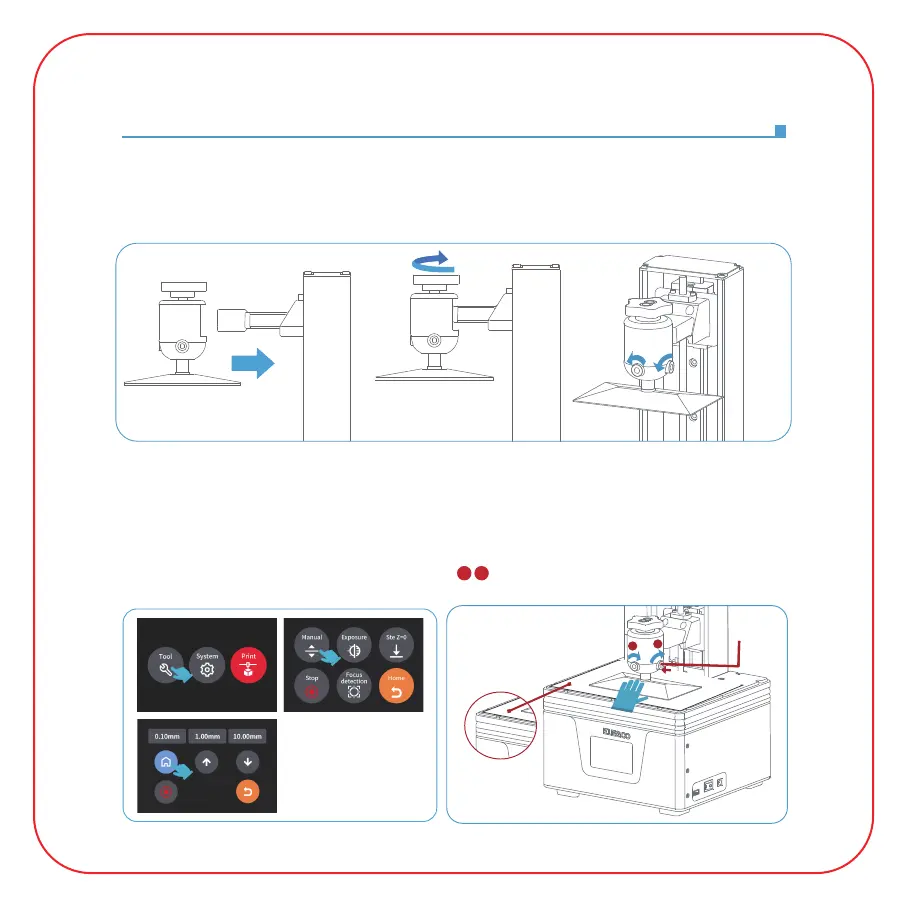
Leveling
1. Take out the printer carefully and tear off the plastic film.
2. Power on the printer.
3. Please insert the build platform, fasten the screw knob and loosen the fixing screws.
(See Picture 1)
4. Remove the resin tank, place a leveling paper between the build platform and the
tempered glass, and click "Move Z axis to zero" (See Picture 2). When the build platform
stops, please press the top of the build platform with one hand, and ensure that the four
corners of the build platform are evenly attached to the tempered glass, and then use the
Allen wrench to tighten the fixing screws ( ) on both sides of the build platform.
(See Picture 3)
(Picture 1)
(Picture 2)
1 2
1
2



 To Next Page